RabbitMQ Node.js Reconnect: Fix "Channel Closed" Errors
Stop guessing why your RabbitMQ connection drops. Fix IllegalOperationError, ECONNRESET, and build a reconnect handler that survives production.

On this page
Run a RabbitMQ consumer in Node.js for long enough and one of three errors will eventually show up in your logs. Not in development, where the broker is on localhost and nothing ever moves. In staging, at the worst possible moment, usually right after a deploy.
IllegalOperationError: Channel closed
    at Channel.<anonymous> (/node_modules/amqplib/lib/channel.js:159:11)
    at Channel.C._rpc (/node_modules/amqplib/lib/channel.js:141:8)
Or this one, which looks like a networking problem because it is one:
Error: read ECONNRESET
    at TCP.onStreamRead (node:internal/stream_base_commons:217:20)
Or this one, which is RabbitMQ telling you directly:
Error: Connection closed: 320 (CONNECTION-FORCED) with message
"CONNECTION_FORCED - Closed via management plugin"
All three mean roughly the same thing: your code tried to talk to RabbitMQ through a connection or a channel that is no longer there. The fix is not complicated once you understand why it happens, but the why is exactly where most RabbitMQ tutorials stop. They show you how to publish a message and consume it, then leave connection handling as an exercise for production, which is precisely when it breaks.
This guide explains what each error actually means, then builds a connection module that survives all three. Every snippet below runs against a real broker, and the final module is the one you can copy into a service.
Connections and Channels: What Actually Breaks
Almost every confusing amqplib error traces back to one distinction that the happy-path tutorials gloss over.
A connection is a single TCP connection to the broker. Opening one costs a TCP handshake plus an AMQP handshake plus authentication, so you open one per process and keep it.
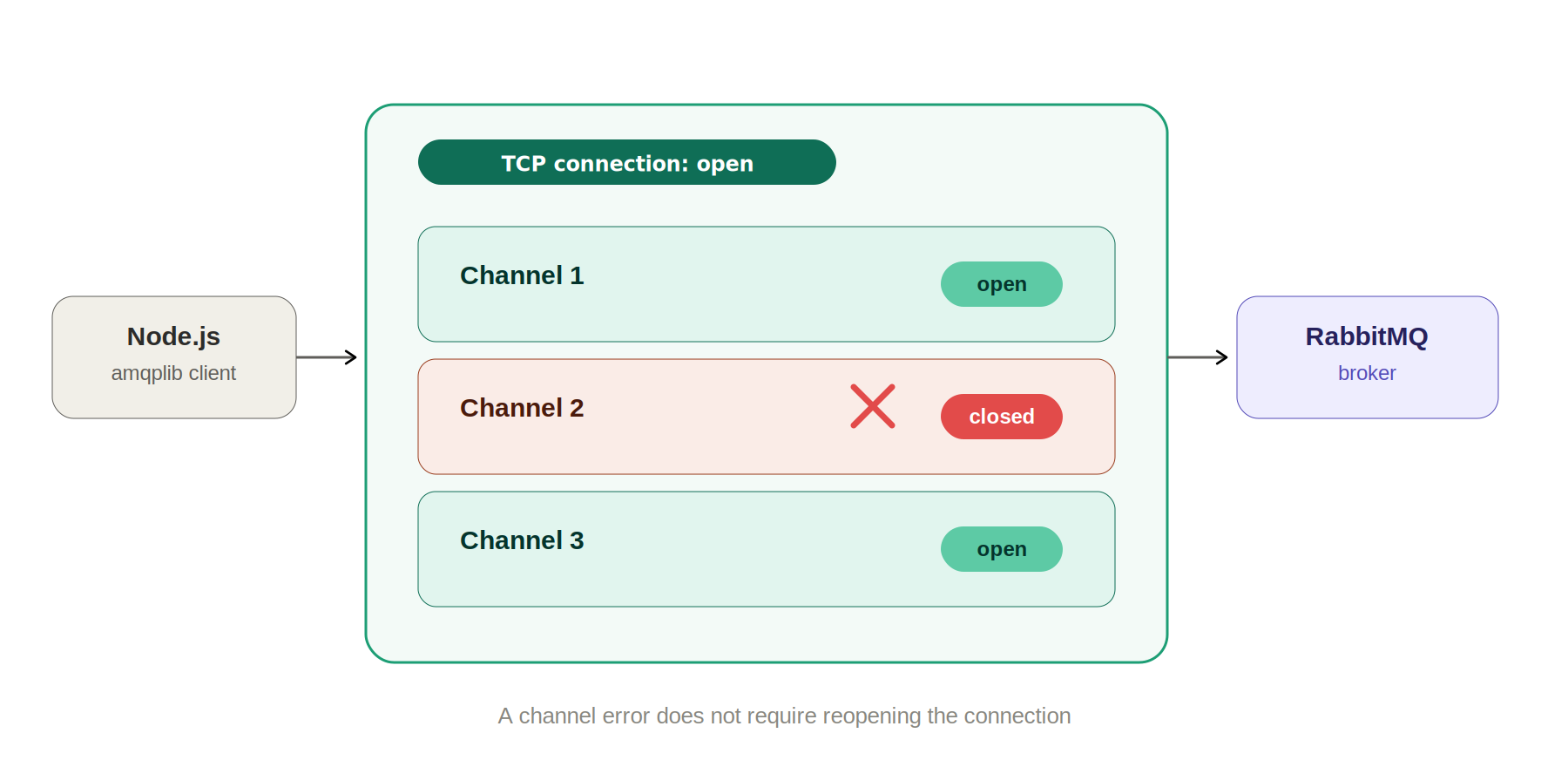
A channel is a lightweight virtual connection that lives inside that TCP connection. It is what you actually use to declare queues, publish messages, consume, and acknowledge. Channels are cheap, which is the point: AMQP multiplexes many of them over one socket so you do not pay for a new TCP connection every time a different part of your app needs to talk to the broker.
Here is the part that causes the errors. The two fail independently, and they fail in different ways.
| Connection (the TCP socket) | Channel (multiplexed inside it) | |
|---|---|---|
| How many you want | One per process, long lived | One per concurrent concern: publisher, each consumer |
| Cost to create | Expensive: TCP plus AMQP handshake plus auth | Cheap: one protocol frame |
| What kills it | Network drops, broker restart, admin action, heartbeat timeout | A protocol error on your side, or the connection dying |
| Blast radius when it dies | Every channel on it dies with it | Only that channel, the connection survives |
| Can you reuse it after close | No, call connect again | No, call createChannel again |
| Typical error you see | ECONNRESET, CONNECTION-FORCED | IllegalOperationError: Channel closed |
Quick RabbitMQ and amqplib Setup
You need a broker to reproduce any of this. One Docker command gives you RabbitMQ plus the management UI on port 15672, which matters here because the UI is how you will deliberately break your own connection later.
docker run -d --name rabbitmq \
  -p 5672:5672 -p 15672:15672 \
  rabbitmq:4-management
Open http://localhost:15672 and log in with guest / guest. Then install the client:
npm install amqplib
npm install --save-dev @types/amqplib
A bare connection is four lines, and this is the version that appears in every getting-started guide:
import amqp from "amqplib";

const connection = await amqp.connect("amqp://localhost");
const channel = await connection.createChannel();

await channel.assertQueue("orders", { durable: true });

channel.sendToQueue("orders", Buffer.from(JSON.stringify({ id: 1 })));
This works. It keeps working right up until the broker restarts, the network blips, or an idle connection gets reaped by something in between. Then it fails, and notice how: it does not throw at the moment the connection dies. It throws on the next operation, which could be minutes later, in a completely unrelated part of your code. That delay is why these errors feel random.
Fixing "IllegalOperationError: Channel closed"
This error means you called a method on a channel object that RabbitMQ has already closed server side. The channel object still exists in your process, which is why there is no type error and no crash at the call site you would expect. amqplib checks its internal state, sees the channel is gone, and throws IllegalOperationError.
Three things cause it, and in my experience they account for nearly every occurrence.
Cause 1: using a channel after its error event fired
When a channel hits a protocol violation, RabbitMQ closes it and amqplib emits error on the channel. Acknowledging the same message twice does it. So does asserting a queue with arguments that differ from how it already exists, which is the classic version: someone declared orders as durable: true last month, your new code asserts it as durable: false, and the broker kills the channel with a PRECONDITION_FAILED.
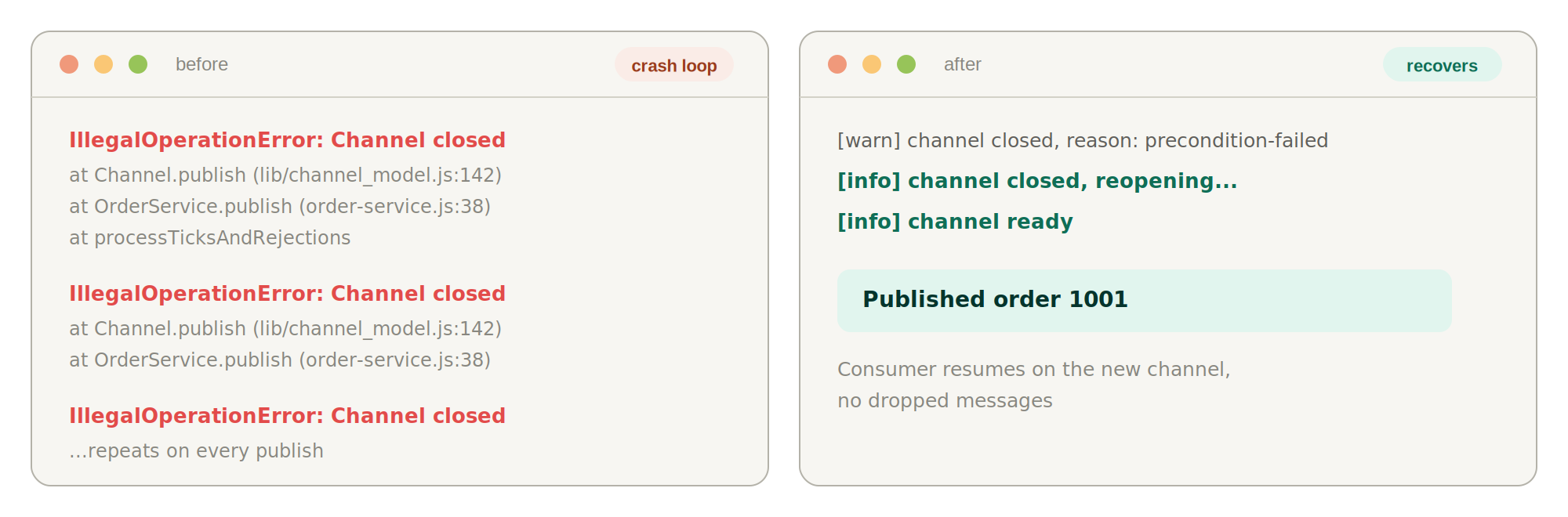
If your handler logs that error and carries on, every subsequent operation on that channel throws IllegalOperationError. The original error is the real bug. The IllegalOperationError flood afterwards is just noise hiding it, which is why reading the first error in your logs rather than the loudest one matters so much here.
Cause 2: one shared channel for the whole app
You create a channel at startup, export it, and import it everywhere. It is the obvious design and it is a single point of failure. One bad assertQueue in one rarely used code path closes the channel, and now every publisher and every consumer in the process is broken until someone restarts it.
Use separate channels for separate concerns: one for publishing, one per consumer. They cost almost nothing, and a protocol error in your dead-letter consumer stops taking down order publishing with it.
Cause 3: acking a message from a channel that has since closed
This one shows up specifically during reconnects and it is the subtlest of the three. A message arrives, your handler starts some async work that takes two seconds, and the connection drops during those two seconds. Your handler finishes and calls channel.ack(msg) on the old, dead channel.
Worse, the ack was never going to land anyway. Delivery tags are scoped to a channel, so the tag on that message is meaningless to the new channel. RabbitMQ already requeued the message when the channel died, and another consumer has probably processed it. This is the mechanism behind most mysterious duplicate processing during deploys.
| Trigger | What you see first | Fix |
|---|---|---|
| Queue asserted with mismatched options | PRECONDITION_FAILED, then IllegalOperationError on every later call | Match existing queue arguments, or delete and redeclare the queue deliberately |
| Double ack or ack of an unknown delivery tag | PRECONDITION_FAILED - unknown delivery tag | Ack exactly once per message, and never in a retry wrapper |
| One channel shared across the whole process | Unrelated features break together after one error | One channel per publisher and per consumer |
| Ack fired after a reconnect | IllegalOperationError inside an async handler | Capture the channel in a local variable and check it is still the live one before acking |
| Publishing to a non-existent exchange | NOT_FOUND - no exchange ... | Assert the exchange at startup, before the first publish |
The fix pattern
Treat the channel object as dead the instant close or error fires, and never let a stale reference escape into an async handler. In TypeScript that means the channel is nullable, which is the whole point: the type system now forces you to handle the case where it is gone.
let channel: amqp.Channel | null = null;

async function openChannel(connection: amqp.Connection) {
  const ch = await connection.createChannel();

  // A channel error is always terminal: RabbitMQ has already closed it
  // server side, so the only safe move is to drop the reference.
  ch.on("error", (err) => {
    console.error("[amqp] channel error:", err.message);
    if (channel === ch) channel = null;
  });

  ch.on("close", () => {
    if (channel === ch) channel = null;
  });

  channel = ch;
  return ch;
}

// Never import a channel directly. Ask for the live one.
function requireChannel(): amqp.Channel {
  if (!channel) throw new Error("AMQP channel unavailable, retry shortly");
  return channel;
}
The if (channel === ch) guard is not decoration. During a reconnect storm you can have an old channel's close event arriving after a new channel has already been assigned. Without that identity check, the late event nulls out your healthy new channel and you reconnect in a loop for no reason.
For the ack problem, capture the channel in a local variable inside the consumer and compare it before acknowledging:
const ch = requireChannel();

await ch.consume("orders", async (msg) => {
  if (!msg) return; // null means the consumer was cancelled

  try {
    await handleOrder(JSON.parse(msg.content.toString()));
  } catch (err) {
    // Requeue once; a poison message should go to a dead letter queue,
    // not loop forever between the broker and this handler.
    if (channel === ch) ch.nack(msg, false, false);
    return;
  }

  // If the channel rotated while handleOrder was awaiting, this delivery
  // tag is already void and RabbitMQ has requeued the message.
  if (channel === ch) ch.ack(msg);
});
Fixing "ECONNRESET" and "CONNECTION-FORCED" (320)
These two are connection level, not channel level, so they take every channel down with them. They look similar in a log file and they have completely different causes, so telling them apart is the first diagnostic step.
ECONNRESET is a raw TCP error. Something between your process and the broker closed the socket without an orderly shutdown, and Node surfaces it from the socket layer with no AMQP information attached at all. A broker process that was killed, a load balancer or NAT gateway reaping an idle connection, a container that lost its network: all of them look like this.
CONNECTION_FORCED with code 320 is the opposite. RabbitMQ decided to close your connection and was polite enough to send a proper AMQP close frame first, with a reason string. Somebody clicked close in the management UI, a policy or a plugin kicked you off, or the broker is shedding connections under memory or disk alarm pressure. Shared and free tier hosted brokers do this far more often than a dedicated cluster.
The distinction matters because it points at different owners. ECONNRESET is an infrastructure conversation. A recurring CONNECTION_FORCED under load usually means you are hitting a broker resource alarm, and the real fix is consuming faster or raising a limit, not reconnecting harder.
| ECONNRESET | CONNECTION-FORCED (320) | |
|---|---|---|
| Who closed it | The network, or a killed process | RabbitMQ, deliberately |
| AMQP close code | None, it is a socket error | 320, with a reason string |
| Where the stack trace points | node:internal/stream_base_commons | amqplib connection frame handling |
| Usual cause | Idle connection reaped, broker restart, network partition | Admin action, policy, memory or disk alarm |
| Prevention that actually helps | Heartbeats, so an idle socket is never idle | Consume faster, raise limits, stop leaking connections |
| Client side response | Reconnect with backoff | Reconnect with backoff |
Building a Reconnect Handler That Actually Works
Neither connection level error is preventable from the client, so the response to both is identical: notice the connection is gone, then rebuild it. Five steps, and the order matters.
- 1
Make connection setup a function you can call again
Top level connect calls cannot be retried. Move everything, the connect, the channel, the queue assertions, and the consumers, into one idempotent function so that recovery is just calling it again.
typescriptasync function connect(): Promise<void> { connection = await amqp.connect(process.env.AMQP_URL!, { heartbeat: 30 }); attachConnectionListeners(connection); await openChannel(connection); await assertTopology(requireChannel()); await startConsumers(requireChannel()); attempts = 0; // only reset after the whole path succeeded } - 2
Handle connection error and close as two different events
amqplib emits
errorthenclosefor an abnormal drop, but onlyclosefor a clean one. Reconnect fromclose, because it is the event that always fires. Useerrorpurely for logging, otherwise you schedule two reconnects for a single failure.typescriptfunction attachConnectionListeners(conn: amqp.Connection) { conn.on("error", (err) => { // "Connection closing" is the echo of our own graceful close, not a fault. if (err.message !== "Connection closing") { console.error("[amqp] connection error:", err.message); } }); // close always fires, error does not. Reconnect from here only. conn.on("close", () => { connection = null; channel = null; if (!isShuttingDown) scheduleReconnect(); }); } - 3
Back off exponentially, and add jitter
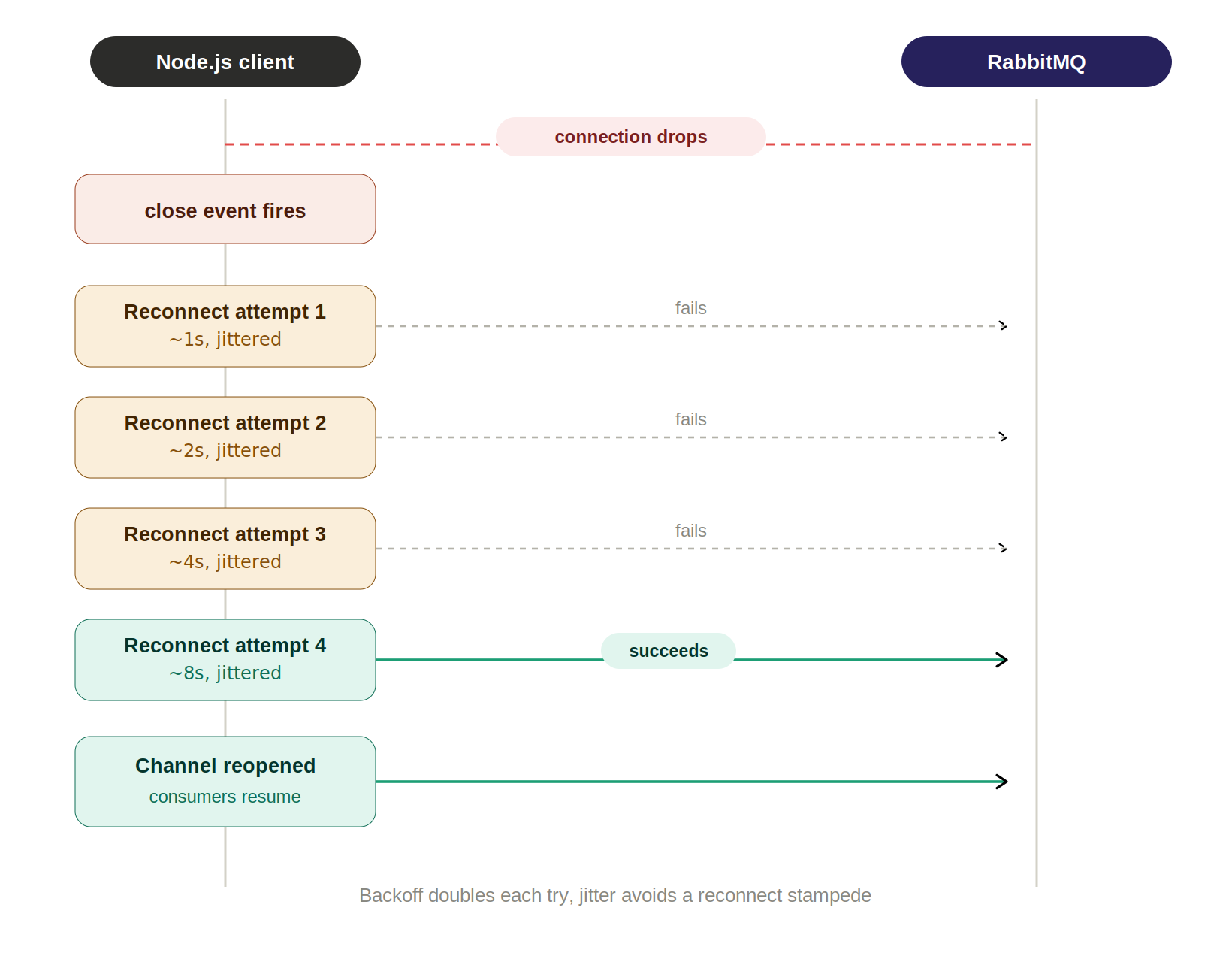
Exponential backoff stops a downed broker from being hammered. Jitter is the part people leave out, and it is what prevents the reconnect storm: twenty pods whose connections all dropped in the same instant will otherwise retry in perfect lockstep and knock the broker over again the moment it recovers.
typescriptlet attempts = 0; function scheduleReconnect() { const base = Math.min(1000 * 2 ** attempts, 30_000); // Full jitter: spreads a fleet of consumers across the window instead of // letting them all retry on the same tick. const delay = Math.random() * base; attempts++; console.warn("[amqp] reconnecting in", Math.round(delay), "ms"); setTimeout(() => { connect().catch((err) => { console.error("[amqp] reconnect failed:", err.message); scheduleReconnect(); }); }, delay); } - 4
Decide what publishing does while disconnected
This is the decision that silently loses messages, and it has no universal right answer. Either publishes fail fast and the caller handles it, or you buffer in memory and flush after reconnect. Buffering trades a bounded amount of memory for a window where a process crash loses whatever was queued.
typescriptexport async function publish(queue: string, payload: unknown) { if (!channel) { // Fail fast. The caller knows whether this is retryable, we do not. throw new Error("AMQP unavailable"); } const ok = channel.sendToQueue(queue, Buffer.from(JSON.stringify(payload)), { persistent: true, // survives a broker restart, but only on a durable queue }); // false means the internal write buffer is full: wait for drain before // publishing again or you will grow the heap without limit. if (!ok) await once(channel, "drain"); } - 5
Expose the connection state to your health check
A consumer that is disconnected but still answering 200 on
/healthis worse than one that is down, because nothing escalates. Report AMQP state from readiness so Kubernetes stops routing to a pod that cannot do its job.typescriptexport function amqpHealthy() { return connection !== null && channel !== null; } // Readiness, not liveness: a restart will not fix a broker outage, so do not // let a liveness probe crash-loop every consumer while RabbitMQ recovers. app.get("/ready", (_req, res) => amqpHealthy() ? res.sendStatus(200) : res.sendStatus(503), );
Graceful Shutdown on SIGTERM in Node.js
When Docker or Kubernetes replaces your pod, it sends SIGTERM and then waits, by default 30 seconds, before SIGKILL. Node's default SIGTERM behaviour is to exit immediately. Every message your consumer was halfway through is abandoned mid-flight, unacknowledged, and RabbitMQ requeues it for delivery somewhere else.
If your handler has side effects, and most do, that is a duplicate charge, a duplicate email, or a duplicate row. The redelivery is RabbitMQ behaving correctly. The duplicate is your shutdown path failing to drain.
The sequence that avoids it is: stop accepting new deliveries, wait for in-flight work, then close the channel, then the connection.
let isShuttingDown = false;
let inFlight = 0;

async function shutdown(signal: string) {
  if (isShuttingDown) return; // SIGTERM can arrive more than once
  isShuttingDown = true;
  console.log("[amqp] received", signal, "draining...");

  try {
    // 1. Cancel the consumer. Deliveries stop, the channel stays open so
    //    in-flight messages can still be acknowledged.
    if (channel && consumerTag) {
      await channel.cancel(consumerTag);
    }

    // 2. Wait for handlers to finish, but never forever: leave headroom
    //    inside terminationGracePeriodSeconds or SIGKILL ends this anyway.
    const deadline = Date.now() + 15_000;
    while (inFlight > 0 && Date.now() < deadline) {
      await new Promise((r) => setTimeout(r, 100));
    }
    if (inFlight > 0) {
      console.warn("[amqp] abandoning", inFlight, "in-flight messages");
    }

    // 3. Channel before connection. Closing the connection first voids
    //    pending acks on every channel riding on it.
    await channel?.close();
    await connection?.close();
  } catch (err) {
    console.error("[amqp] shutdown error:", (err as Error).message);
  }

  process.exit(0);
}

process.on("SIGTERM", () => void shutdown("SIGTERM"));
process.on("SIGINT", () => void shutdown("SIGINT"));
Two details carry most of the weight here. The isShuttingDown flag is what stops your own channel.close() from firing the close listener and triggering a reconnect while you are trying to exit, which is an easy way to build a process that refuses to die.
And the order is not stylistic. Closing the connection first tears down the socket underneath every channel, so any ack still in flight is discarded and those messages get redelivered: exactly the outcome you added the drain logic to prevent.
Pair the drain with a prefetch limit. channel.prefetch(10) caps unacknowledged messages per channel at ten, which bounds both how much work a shutdown has to wait for and how much gets requeued in the worst case. The default is unlimited, meaning RabbitMQ will push the entire queue at your process and a restart requeues all of it.
The Complete Production Connection Module
Everything above, assembled into one file. This is roughly 90 lines and it is the whole pattern: lifecycle listeners on both objects, jittered backoff, identity-checked channel references, a health signal, and a drain on shutdown.
import amqp, { type Channel, type Connection } from "amqplib";

const URL = process.env.AMQP_URL ?? "amqp://localhost";

let connection: Connection | null = null;
let channel: Channel | null = null;
let consumerTag: string | null = null;
let attempts = 0;
let isShuttingDown = false;
let inFlight = 0;

type Handler = (payload: unknown) => Promise<void>;
const handlers = new Map<string, Handler>();

export async function connect(): Promise<void> {
  if (isShuttingDown) return;

  connection = await amqp.connect(URL, { heartbeat: 30 });

  connection.on("error", (err) => {
    if (err.message !== "Connection closing") {
      console.error("[amqp] connection error:", err.message);
    }
  });

  // close always fires, error does not. Reconnect from here only.
  connection.on("close", () => {
    connection = null;
    channel = null;
    consumerTag = null;
    if (!isShuttingDown) scheduleReconnect();
  });

  const ch = await connection.createChannel();
  // Identity guard: a late close event from an old channel must not null
  // out the channel that replaced it.
  ch.on("error", (err) => {
    console.error("[amqp] channel error:", err.message);
    if (channel === ch) channel = null;
  });
  ch.on("close", () => {
    if (channel === ch) channel = null;
  });

  await ch.prefetch(10);
  channel = ch;

  for (const queue of handlers.keys()) {
    await ch.assertQueue(queue, { durable: true });
  }
  await resumeConsumers(ch);

  attempts = 0; // only after the full path succeeded
  console.log("[amqp] connected");
}

function scheduleReconnect() {
  const base = Math.min(1000 * 2 ** attempts, 30_000);
  const delay = Math.random() * base; // full jitter, avoids reconnect storms
  attempts++;
  setTimeout(() => {
    connect().catch((err) => {
      console.error("[amqp] reconnect failed:", err.message);
      scheduleReconnect();
    });
  }, delay);
}

async function resumeConsumers(ch: Channel) {
  for (const [queue, handler] of handlers) {
    const { consumerTag: tag } = await ch.consume(queue, async (msg) => {
      if (!msg) return;
      inFlight++;
      try {
        await handler(JSON.parse(msg.content.toString()));
        if (channel === ch) ch.ack(msg);
      } catch {
        if (channel === ch) ch.nack(msg, false, false); // to the DLQ
      } finally {
        inFlight--;
      }
    });
    consumerTag = tag;
  }
}

export function onQueue(queue: string, handler: Handler) {
  handlers.set(queue, handler);
}

export async function publish(queue: string, payload: unknown) {
  if (!channel) throw new Error("AMQP unavailable");
  const ok = channel.sendToQueue(
    queue,
    Buffer.from(JSON.stringify(payload)),
    { persistent: true },
  );
  if (!ok) await new Promise((r) => channel?.once("drain", r));
}

export function amqpHealthy() {
  return connection !== null && channel !== null;
}

export async function shutdown() {
  if (isShuttingDown) return;
  isShuttingDown = true;

  if (channel && consumerTag) await channel.cancel(consumerTag).catch(() => {});

  const deadline = Date.now() + 15_000;
  while (inFlight > 0 && Date.now() < deadline) {
    await new Promise((r) => setTimeout(r, 100));
  }

  await channel?.close().catch(() => {});
  await connection?.close().catch(() => {});
}
Registering handlers before connecting is what makes reconnection work without extra bookkeeping. Because handlers is the source of truth, every reconnect reasserts the queues and re-registers the consumers from the same map, so recovery is genuinely the same code path as the first connect:
import { onQueue, connect, publish, shutdown, amqpHealthy } from "./lib/rabbitmq";

onQueue("orders", async (payload) => {
  await handleOrder(payload);
});

await connect();

process.on("SIGTERM", async () => {
  await shutdown();
  process.exit(0);
});
Test it properly before you trust it. Open the management UI at http://localhost:15672, go to the Connections tab, pick your connection and click Close. That produces a genuine CONNECTION_FORCED 320, which is the exact error you cannot easily trigger any other way. Then run docker stop rabbitmq, watch the backoff climb in your logs, and docker start rabbitmq to confirm the consumers come back without a restart.
When To Reach for amqp-connection-manager
amqp-connection-manager has roughly 2.1 million weekly downloads, which tells you how many teams hit this problem and reached for a package. It wraps the pattern above and adds cluster failover and in-memory buffering while disconnected. It is a thin, well tested layer over amqplib rather than a heavy abstraction, and reaching for it is a perfectly reasonable call.
The reason to read the rest of this article anyway is that the library does not remove the failure modes, it only handles the plumbing. A channel still dies permanently on a protocol error. A stale delivery tag is still void after a reconnect. Your queue arguments still have to match what the broker already has. When something does go wrong behind the wrapper, you are debugging the same AMQP semantics with one more layer in the stack trace.
| Hand-rolled (the module above) | amqp-connection-manager | |
|---|---|---|
| Setup effort | About 90 lines you own and must test | One dependency, a few lines of config |
| Reconnect and backoff | Yours, tune it however you like | Built in, configurable interval |
| Multi-broker failover | Not included, you would add it | Built in, pass an array of URLs |
| Publishing while offline | Fails fast unless you add a buffer | Buffered in memory and flushed on reconnect |
| Graceful shutdown drain | Yours, and explicit about in-flight work | Closes cleanly, draining is still on you |
| Debuggability | Every line is yours to read | One more layer between you and amqplib |
| Best fit | One or two queues, or unusual retry needs | Several queues, clustered brokers, many consumers |
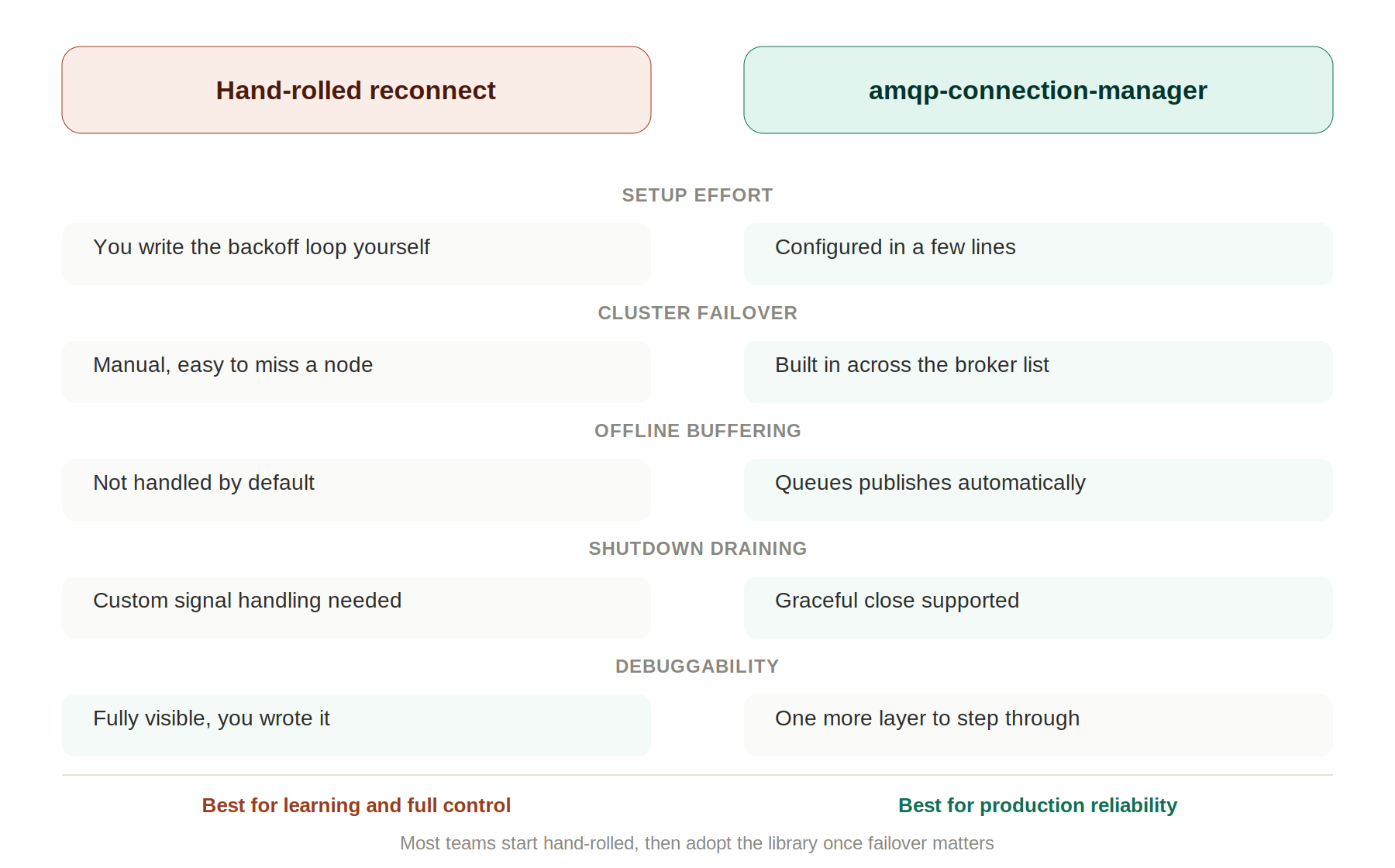
My own rule: roll your own while you have one or two queues in one process, because the code is small and the understanding is worth more than the saved hour. Switch to the library once you are managing several queues, running a clustered broker, or need offline buffering, since those are the parts that are genuinely tedious to get right by hand.
If you are weighing RabbitMQ against other options entirely, the distinction worth knowing is that RabbitMQ routes discrete jobs to workers with per-message acknowledgement, while a log based broker keeps events for many independent readers. Our guide to Apache Kafka with Node.js covers that model, and Redis explained for developers covers the lighter-weight queueing that often removes the need for a broker at all.
Production Checklist
Run through this before a RabbitMQ consumer goes anywhere near production traffic.
heartbeatis set (30 seconds is a sane default) so a dead socket is detected in about a minute- Both
errorandcloseare handled on the connection, with reconnect triggered only fromclose - Both
errorandcloseare handled on every channel, and the reference is nulled with an identity guard - Reconnect uses exponential backoff with jitter and a cap, and the attempt counter resets only on full success
- Separate channels for publishing and for each consumer, never one shared channel
prefetchis set, so unacknowledged messages are bounded- Queues are
durableand messages arepersistent, or you have decided you do not need either - A dead letter exchange exists, so a poison message cannot loop forever
SIGTERMcancels the consumer, drains in-flight work, then closes channel before connection- The drain timeout is shorter than
terminationGracePeriodSeconds - Readiness (not liveness) reports AMQP connection state
- Handlers are idempotent, because at-least-once delivery means duplicates are normal
- Tested by closing the connection from the management UI and by stopping the broker container
Frequently Asked Questions
What causes IllegalOperationError: Channel closed in amqplib?
It means you called a method on a channel that RabbitMQ has already closed server side. amqplib checks its internal channel state, finds it closed, and throws rather than writing to a dead channel.
The trigger is almost always one of three things: using a channel after its error event fired (usually after a PRECONDITION_FAILED from mismatched queue arguments or a double ack), sharing a single channel across the whole app so one error breaks everything, or acking a message whose channel closed while your async handler was still running.
Can I reopen a closed RabbitMQ channel?
No. A closed channel is gone permanently and there is no reopen method. You call connection.createChannel() and get a new channel object, then reassert your queues and restart your consumers on it.
This is why channel references should never be module-level constants you import directly. Expose a getter that returns the current live channel, or null, so callers are forced to handle the gap instead of holding a stale reference forever.
What is the difference between ECONNRESET and CONNECTION_FORCED (320)?
ECONNRESET is a TCP-level failure with no AMQP information attached: the socket was closed without an orderly shutdown. Think killed broker process, network partition, or an idle connection reaped by a load balancer or NAT gateway.
CONNECTION_FORCED with code 320 is RabbitMQ closing you on purpose and sending a proper AMQP close frame with a reason string first. Common reasons are an admin closing the connection from the management UI, a policy, or the broker shedding connections under a memory or disk alarm.
You can tell them apart from the stack trace: ECONNRESET points into node:internal/stream_base_commons, while a 320 comes through amqplib's connection frame handling with a readable reason.
How many connections and channels should a Node.js service open?
One connection per process, and one channel per concurrent concern. A connection costs a TCP handshake plus an AMQP handshake plus authentication, so opening one per operation is a real performance problem and will exhaust broker connection limits under load.
- One channel for publishing: a publish-side protocol error then cannot break your consumers.
- One channel per consumer:
prefetchis per channel, so separate channels give you separate concurrency limits. - Never one shared channel for everything: it makes every unrelated feature in the process share a single point of failure.
- Never a channel per message: channels are cheap, not free, and the churn shows up as broker CPU.
How do I shut down a RabbitMQ consumer gracefully in Node.js?
Cancel the consumer first so deliveries stop, wait for in-flight handlers to finish, then close the channel, then the connection. Closing the connection first voids pending acks on every channel riding on it, which causes exactly the redelivery you are trying to prevent.
process.on("SIGTERM", async () => {
  isShuttingDown = true;                 // stops the reconnect loop
  await channel.cancel(consumerTag);     // no new deliveries
  while (inFlight > 0) await wait(100);  // add a deadline in real code
  await channel.close();                 // channel first
  await connection.close();              // connection second
  process.exit(0);
});
Set the isShuttingDown flag before closing anything, or your own close() call fires the close listener and schedules a reconnect while the process is trying to exit.
Does amqplib reconnect automatically?
No. amqplib is a deliberately low-level protocol client: it reports that the connection closed by emitting an event and leaves recovery entirely to you. This surprises people coming from the Java or .NET clients, which ship optional automatic recovery.
You either implement the reconnect loop yourself (the module earlier in this article) or use amqp-connection-manager, which wraps amqplib and adds reconnection, cluster failover, and offline publish buffering.
Why do messages get processed twice after a reconnect?
Because RabbitMQ is at-least-once by design. Any message delivered but not acknowledged when a channel closes gets requeued and redelivered, and if your handler had already finished its side effects before the ack failed, that work happens twice.
You cannot configure this away, so make handlers idempotent instead. Derive a deterministic key from the message, then record it in the same database transaction as the work itself so a replay is a no-op.
await db.transaction(async (tx) => {
  // The unique constraint on processed_messages.id is what makes a
  // redelivery a no-op instead of a duplicate charge.
  const inserted = await tx
    .insert(processedMessages)
    .values({ id: payload.eventId })
    .onConflictDoNothing()
    .returning();

  if (inserted.length === 0) return; // already handled, skip
  await chargeCustomer(tx, payload);
});
Setting prefetch low bounds how many messages can be in this state at once, which limits the damage a single reconnect can do. This is the same at-least-once problem every broker has; our guide to Node.js microservices covers where that idempotency key belongs in a service boundary.
Does this apply to NestJS microservices using RabbitMQ?
Partly. The NestJS RabbitMQ transport wraps amqplib and handles basic reconnection for you, so you will not write the backoff loop yourself. The AMQP semantics underneath are identical: channels still die permanently on protocol errors, delivery tags are still void after a reconnect, and queue arguments must still match what the broker already has.
The one thing NestJS does not do for you is drain in-flight messages on shutdown. Enable shutdown hooks with app.enableShutdownHooks() and implement OnApplicationShutdown on your consumer, or a redeploy will abandon messages mid-handler. Our NestJS RabbitMQ microservices guide covers how the transport layer fits together.
The whole topic collapses into one rule once the connection and channel distinction is clear: a closed AMQP object is never reusable, so your code has to hold references it is willing to throw away. Every IllegalOperationError is a reference that outlived the thing it pointed at.
Spend twenty minutes on this before you need it. Run the broker in Docker, wire up the module above, then close your own connection from the management UI and stop the container. Watching the backoff climb and the consumers come back on their own is worth more than any amount of reading, and it is a far better place to learn it than a production incident at 2am.
Related Articles
Apache Kafka with Node.js: Complete Setup Guide (2026)
Learn Kafka with Node.js step by step: core concepts, local Docker setup, real KafkaJS code, and when to use it in a monolith vs microservices.
Node.js Microservices Without Express: A Zero-Dependency Guide
Build two real Node.js microservices with zero npm installs, using node:http, fetch, and node:test. No Express, no Docker required.
Redis Explained: What It Is & How to Use It With Node.js
Confused about what Redis actually is? This guide explains Redis in plain English, then shows how to set it up with Docker and use it with Node.js caching.