Redis Explained: What It Is & How to Use It With Node.js
Confused about what Redis actually is? This guide explains Redis in plain English, then shows how to set it up with Docker and use it with Node.js caching.

On this page
Redis comes up in almost every backend conversation eventually. Someone says "just cache it in Redis" and everyone nods, but if you have never actually touched it, that sentence does not mean much. Is Redis a database? A cache? Both? Neither?
Most guides dodge that question and jump straight into installing things. This one answers it first, because the confusion about what Redis is is exactly what stops people from knowing when to use it.
By the end you will know what Redis is doing under the hood, why it is so much faster than a normal database, how to run it on your machine in one command, and how to wire it into a Node.js app with a caching pattern you will reuse for years.
What Redis Actually Is
Redis stands for Remote Dictionary Server. That name is more useful than "Redis" alone, because it describes exactly what is going on: it is a server you talk to over the network, and it behaves like a dictionary. You give it a key, it gives you back a value. No tables, no rows, no joins.
If you have used a JavaScript Map or a Python dict, you already understand the mental model. The difference is that this dictionary lives in its own process, on its own port, and every service in your system can read and write to it at the same time.
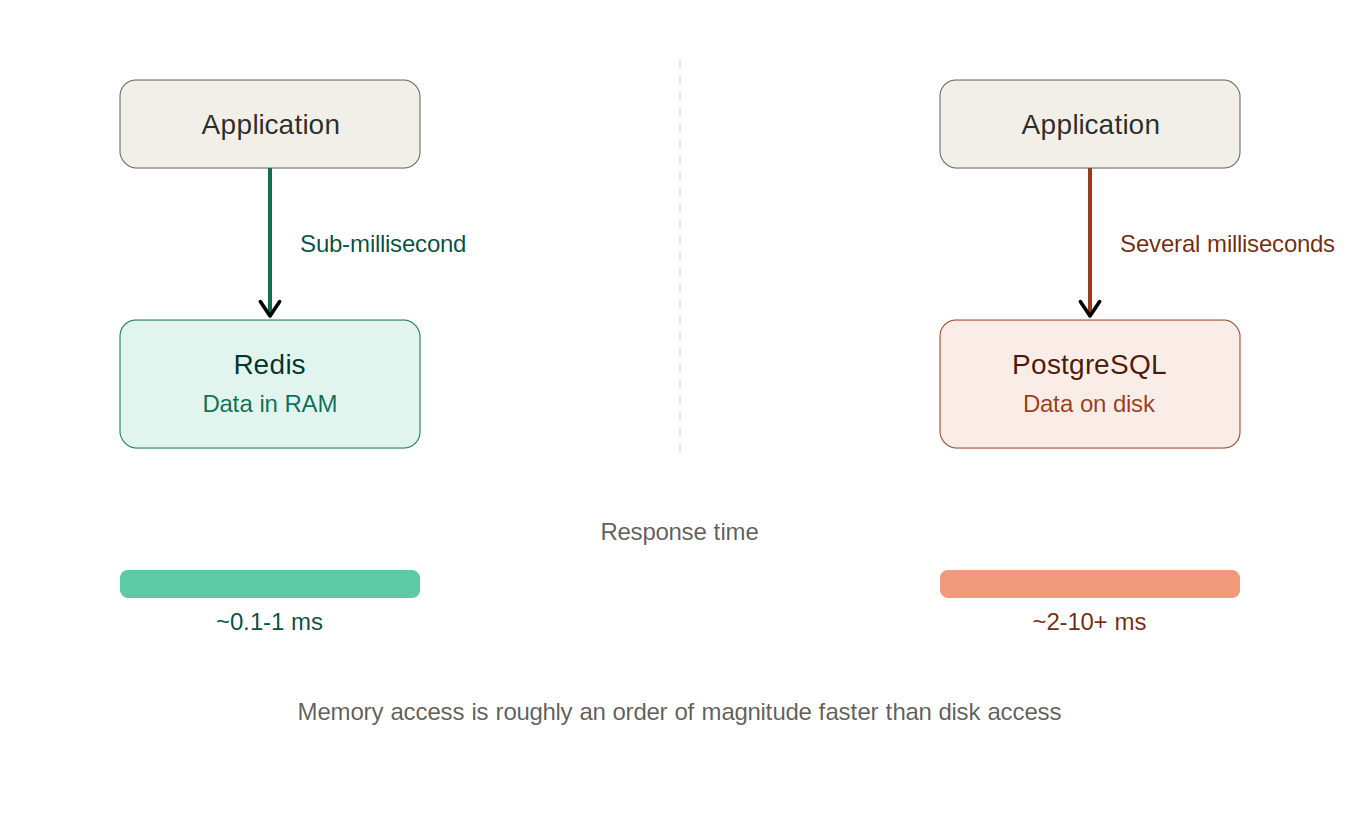
The "in memory" part is the whole story behind the speed. A traditional database like PostgreSQL writes to disk, because disk is where data survives a restart. Disk reads and writes are slow compared to RAM even on fast NVMe SSDs, and that gap is measured in orders of magnitude, not percentages.
Redis keeps the working set in RAM and only touches disk on its own schedule, which is why a Redis GET typically returns in well under a millisecond while an equivalent indexed database query is comfortably 10 to 50 times slower once you count connection overhead, query planning, and disk access.
One more thing worth knowing early: the core of Redis processes commands on a single thread. That sounds like a limitation, and in some workloads it is, but it is also the reason Redis operations are atomic without you doing anything. There is no partial update and no race between two clients incrementing the same counter, because commands run one after another.
Is Redis a Database?
Technically, yes. Redis is a database. It stores data, it can persist that data to disk, and it can be run as the primary datastore for an application. Some companies do exactly that.
In practice, almost nobody uses Redis as their only database, and the reasons are worth understanding because they tell you where the boundary sits.
Redis has no query language. You cannot ask it "give me every user who signed up last month and has more than three orders." You can fetch by key, or use the commands that belong to a specific data structure. That is plenty for a cache and completely unworkable for reporting or ad hoc analysis.
Redis is memory-first. Your dataset has to fit in RAM. A 200 GB PostgreSQL database runs happily on a machine with 16 GB of memory. A 200 GB Redis dataset needs roughly 200 GB of RAM, which changes the cost conversation entirely. If you are sizing an instance, our Redis memory calculator estimates how much RAM a given key count and value size will actually need.
Durability is opt-in. A relational database gives you durability by default: once a transaction commits, it survived. Redis makes you choose a persistence strategy on purpose, and the default configuration favours speed over guarantees.
| Redis | Traditional SQL database | |
|---|---|---|
| Where data lives | In RAM, optionally snapshotted to disk | On disk, with RAM used as a cache |
| Typical read latency | Under 1 ms | Single-digit to tens of milliseconds |
| Querying | By key, plus data-structure commands | Full SQL: joins, aggregates, ad hoc filters |
| Schema | None, enforced by your application | Defined columns, types, and constraints |
| Durability | Configurable, opt-in | Durable by default via transactions and WAL |
| Dataset size limit | Bounded by available RAM | Bounded by available disk |
| Best used as | A fast layer in front of something else | The source of truth |
So the honest answer: Redis is a database in the technical sense, but it is built to be exceptionally good at a narrower set of jobs. Most teams run it alongside PostgreSQL or MySQL, not instead of them. Treating those two rows of the table as competitors is the mistake; they solve different halves of the same problem.
Why Developers Actually Reach for Redis
Set the marketing language aside. Here is what Redis is genuinely good for, roughly in the order you will meet each one in a real job.
Caching. This is the big one, and it is the reason most teams install Redis in the first place. If your app runs the same expensive query or third-party API call over and over, store the result in Redis with an expiry and skip the expensive work next time. A dashboard query that takes 400 ms against Postgres becomes a sub-millisecond lookup, and the database stops carrying traffic it never needed to see. Which caching pattern you pick matters as much as the tool; our full breakdown of caching strategies covers cache-aside, write-through, and the invalidation traps in each.
Session storage. The moment you run more than one server instance behind a load balancer, storing sessions in process memory breaks. Request one hits server A and logs the user in; request two hits server B, which has never heard of them. Redis gives every instance one shared place to read and write session data, which is why it is the default session store for Express, Django, and Rails deployments at scale.
Rate limiting. Redis has atomic increment commands, so "allow this API key 100 requests per minute" is a counter with a TTL rather than a distributed locking problem. Because commands are atomic, two simultaneous requests cannot both read the same count and both decide they are under the limit.
Leaderboards and rankings. Sorted sets keep members ordered by score automatically. Building a live leaderboard on a relational database means an ORDER BY over a growing table on every page load, plus indexes to maintain. Redis gives you "top 10 players" and "what rank is this user" as single commands that stay fast as the set grows.
Pub/sub and real-time fan-out. Redis can broadcast a message to every subscribed client instantly, which is handy for live notifications, presence indicators, and pushing updates to WebSocket servers. It is fire-and-forget, so it suits UI updates rather than anything where a dropped message is a business problem.
Queues and background jobs. Lists and streams are commonly used as job queues, and popular libraries like BullMQ are built directly on Redis. This works well up to a point, covered in the "when not to use Redis" section below.
Setting Redis Up Locally
The fastest way to get Redis running on your machine, assuming Docker is installed, is a single command:
docker run -d --name redis -p 6379:6379 redis:7That pulls the official image, runs it detached, and maps the container's Redis port to port 6379 on your machine, which is the default every client library expects. Confirm it is actually alive:
docker exec -it redis redis-cli PINGIf you get PONG back, Redis is running and accepting commands. That two-command loop is the whole local setup.
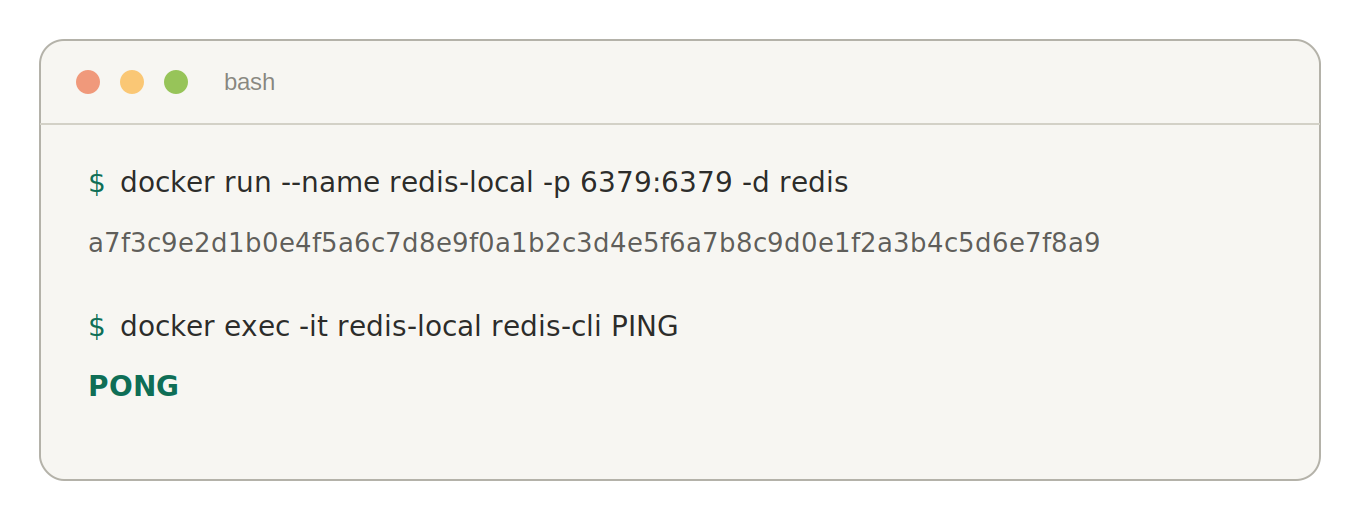
While you are in redis-cli, it is worth spending two minutes poking at it directly before you write any application code. Run redis-cli with no arguments to get an interactive prompt and try these:
SET greeting "hello from redis"
GET greeting
EXPIRE greeting 60      # key deletes itself in 60 seconds
TTL greeting            # seconds remaining
INCR page:views         # atomic counter, starts at 1
KEYS * # every key (fine locally, avoid in production)If you would rather install Redis natively, it is available through the usual package managers: brew install redis on macOS, apt install redis-server on Debian and Ubuntu, and via WSL on Windows. Docker is still the easier path for local development, because you can delete the container and start from a clean state without touching anything installed on your system.
Redis Data Types, the Short Version
Redis is not limited to string keys holding string values. It ships with several built-in data structures, and choosing the right one often removes a chunk of application logic you would otherwise write yourself.
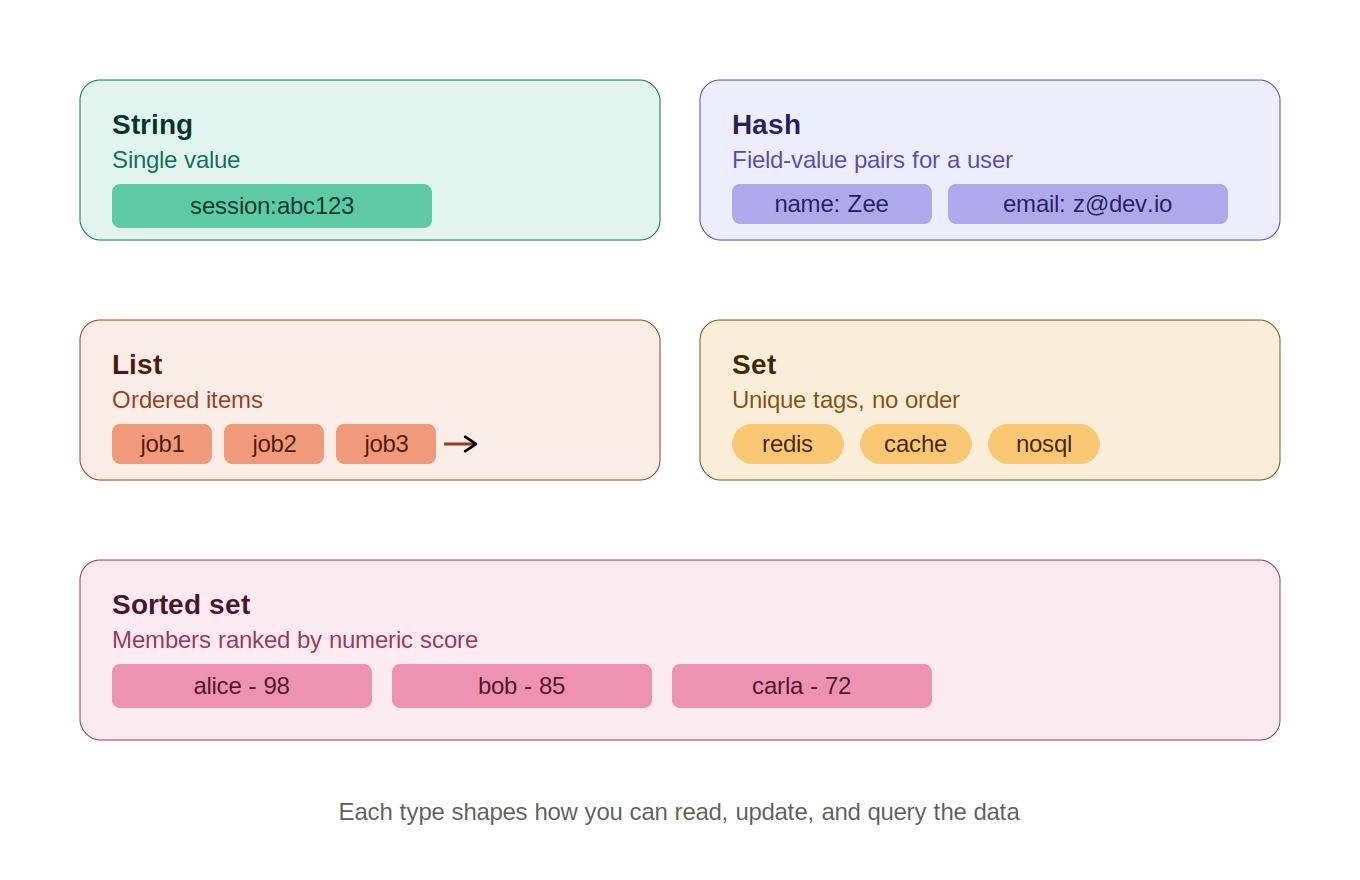
| Type | What it holds | Reach for it when |
|---|---|---|
| String | A single value, text or number | Caching a JSON blob, counters, feature flags |
| Hash | Field-value pairs under one key | Representing an object without re-serialising the whole thing |
| List | An ordered sequence, push and pop from either end | Simple queues, recent-activity feeds |
| Set | Unordered unique members | Tags, membership checks, deduplication |
| Sorted set | Unique members, each with a numeric score | Leaderboards, priority queues, time-ordered data |
You do not need to memorise the command set for each of these today. Knowing that they exist, and roughly what each is for, is enough to recognise the moment you need one. The typical progression is to use strings for everything at first, then discover hashes when you get tired of parsing and re-stringifying whole objects to change one field.
There are more types beyond these five (streams, bitmaps, HyperLogLog, geospatial indexes), but they solve specific problems you will know you have when you have them.
Connecting Node.js to Redis
You need a client library. ioredis and node-redis are the two mainstream options and either is fine for most projects. The examples below use ioredis because its API is slightly more direct.
npm install ioredisimport Redis from "ioredis";
// Defaults to localhost:6379, which matches the Docker setup above.
const redis = new Redis(process.env.REDIS_URL);
await redis.set("greeting", "hello from redis");
const value = await redis.get("greeting");
console.log(value); // "hello from redis"That is the entire loop: connect, set, get. Create the client once and share it across your app rather than opening a new connection per request, because connection setup is the slowest part of the whole interaction.
Now the pattern you will actually use in production. This is cache-aside, and it covers a large share of real-world Redis usage:
const TTL_SECONDS = 3600;

async function getUser(userId) {
  const cacheKey = `user:${userId}`;
  const cached = await redis.get(cacheKey);

  if (cached) {
    return JSON.parse(cached); // cache hit
  }

  const user = await db.users.findById(userId); // cache miss: real query
  if (user) {
    await redis.set(cacheKey, JSON.stringify(user), "EX", TTL_SECONDS);
  }

  return user;
}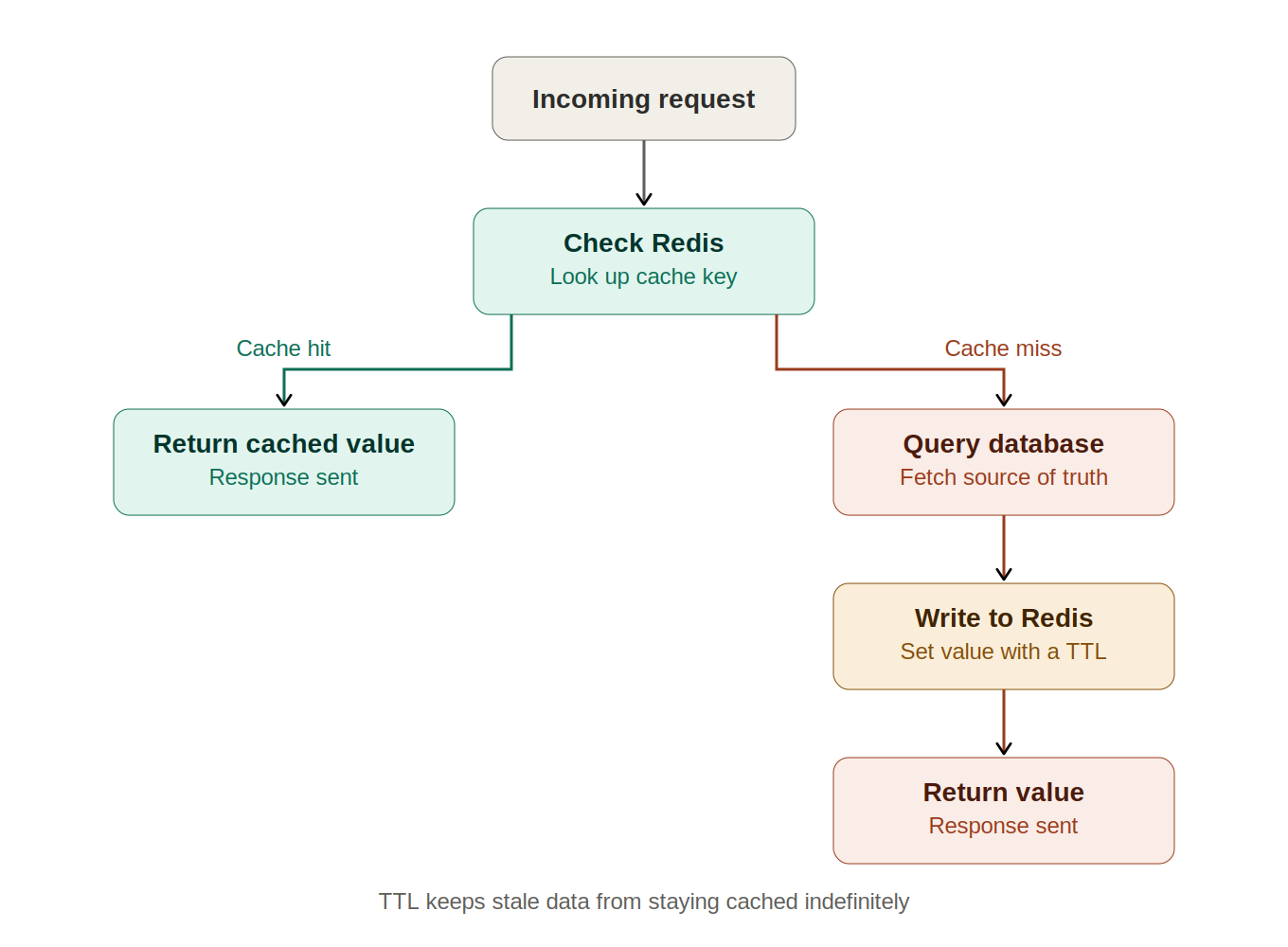
Three details in that function are doing real work. The "EX", TTL_SECONDS argument sets an expiry so stale data cannot live forever, which is your safety net when cache invalidation goes wrong. The if (user) guard stops you caching null and turning a temporary miss into an hour of wrong answers. And the key namespace (user:123 rather than just 123) keeps different kinds of data from colliding in a shared keyspace.
The one thing this simple version does not handle is invalidation on write. If something updates the user, delete the key in the same operation:
async function updateUser(userId, changes) {
  const user = await db.users.update(userId, changes);
  await redis.del(`user:${userId}`); // next read repopulates the cache
  return user;
}
Deleting the key rather than overwriting it is deliberate. The next read rebuilds the cache from whatever the database actually contains, so a bug in your update path cannot write bad data into the cache and keep serving it.
If you are on Bun rather than Node, you may not need a client library at all: Bun ships a built-in Redis client, which we covered in our write-up on Bun's native SQL and Redis clients.
How Redis Keeps (or Loses) Your Data
This is the part most introductions skip, and it is the part that decides whether Redis is safe for a given job. Redis offers two persistence mechanisms, and you can run either, both, or neither.
RDB snapshots write a point-in-time dump of the whole dataset to disk at intervals you configure. They are compact and fast to restore, but a crash loses everything written since the last snapshot, which could be several minutes of data.
AOF (append-only file) logs every write command as it happens and replays the log on startup. It loses far less on a crash, at the cost of a larger file and slightly more write overhead. How much you can lose depends on the appendfsync setting: the common default flushes to disk once per second, so worst case is about a second of writes.
Running both is the usual recommendation for anything you would be upset to lose: AOF for the fine-grained recovery, RDB for fast restores and backups.
Related to this is eviction. When Redis reaches its maxmemory limit, its maxmemory-policy decides what happens: reject new writes, or evict existing keys (allkeys-lru evicts the least recently used, volatile-ttl evicts keys closest to expiry). For a pure cache, an LRU policy is what you want. For anything holding data you need, rejecting writes and alerting is safer than silently dropping keys.
When Not to Use Redis
Redis gets recommended reflexively, so it is worth being clear about where it is the wrong answer.
- As a replacement for your relational database. If your data has relationships, needs joins, or gets queried in ways you cannot predict in advance, that belongs in PostgreSQL or MySQL. Redis sits in front of it, not instead of it.
- As your only source of truth, without a deliberate persistence setup. The default configuration trades durability for speed. That is a fine trade for a cache and a bad one for orders or payments.
- For datasets that do not fit in memory. RAM is expensive compared to disk. A dataset measured in hundreds of gigabytes is usually a sign you want a disk-based store with a Redis cache in front of the hot subset, not all of it in Redis.
- As a guaranteed message queue. Redis pub/sub is fire-and-forget: a subscriber that is offline when a message is published never receives it. Fine for live UI updates, risky for anything where a dropped message matters. Redis Streams and BullMQ close most of that gap, but if delivery guarantees are a hard requirement, a purpose-built broker like RabbitMQ or SQS is the safer choice.
- As a premature optimisation. Adding Redis adds an extra service to run, monitor, and keep consistent. If your database query takes 8 ms and you serve 30 requests a minute, caching it buys you nothing and costs you a cache invalidation bug waiting to happen. Measure first.
None of that is an argument against Redis. It is an argument for adding it when you can name the problem it is solving, which is the difference between a stack you understand and a stack you inherited.
Frequently Asked Questions
Is Redis a database?
Yes, technically. Redis stores data, supports persistence to disk through RDB snapshots and AOF logging, and can run as an application's primary datastore.
In practice, most teams use it as a cache or supporting layer alongside a traditional database such as PostgreSQL, because Redis has no SQL-style query language and its dataset has to fit in RAM. Calling it "a database you use for specific jobs" is closer to how it actually gets deployed.
Is Redis free to use?
The core server is free to download and self-host. Redis changed its licensing in recent years and the source-available licences (RSALv2 and SSPL) place restrictions on offering Redis itself as a managed service, which matters to cloud providers rather than to teams running it for their own applications.
That licence change is also why the Valkey fork exists, a fully open-source drop-in alternative maintained under the Linux Foundation. Managed Redis from cloud providers is a paid service in every case.
Does Redis need a schema?
No. Redis is schema-less. Structure lives in your application code, not in the server, and nothing stops you storing a JSON string under one key and a counter under another.
The trade-off is that Redis will never catch an inconsistency for you the way a relational table with typed columns and constraints would. Two conventions carry most of the weight in practice:
- Namespace your keys with a consistent pattern like
user:123:profileso you can reason about, and selectively clear, related data - Validate on read, because a cached value written by an older version of your code may not match the shape your current code expects
What is the difference between Redis and Memcached?
Both are in-memory key-value stores used for caching. Redis does considerably more; Memcached does one thing with a simpler operational footprint.
| Feature | Redis | Memcached |
|---|---|---|
| Data types | Strings, hashes, lists, sets, sorted sets, streams | Strings only |
| Persistence | Optional (RDB and AOF) | None |
| Pub/Sub | Yes | No |
| Replication | Built in | Not built in |
| Threading | Single-threaded command core | Multithreaded |
Can I use Redis without Docker?
Yes. Docker is the fastest path for local development, but Redis installs natively through standard package managers on every platform.
# macOS
brew install redis && brew services start redis

# Debian / Ubuntu
sudo apt install redis-server

# Windows: install via WSL, then use the Ubuntu command above
A native install runs as a background service and survives reboots, which some people prefer. The reason to favour Docker locally is disposability: deleting a container and starting fresh takes one command and leaves nothing behind on your system.
How long should I cache something in Redis?
There is no universal number. The right TTL is the longest window where serving slightly stale data would not cause a real problem.
- Seconds to a minute for data that changes constantly and is read heavily, like a live count or feed, where the cache exists purely to absorb traffic spikes
- Minutes to an hour for user profiles, product details, and settings, combined with deleting the key on write so updates appear immediately
- Hours to a day for genuinely slow-moving data such as configuration, currency rates, or category trees
Always set some expiry, even a long one. A key with no TTL that your invalidation logic forgets about will serve wrong data indefinitely, and those bugs are miserable to track down because everything looks correct in the database.
Does Redis lose my data if the server restarts?
It depends entirely on your persistence configuration. With persistence disabled, a restart wipes everything. With RDB snapshots, you lose whatever was written since the last snapshot. With AOF at the common once-per-second flush setting, you lose at most about a second of writes.
The safe way to design around this is to assume any individual key can vanish at any time. If your code handles a cache miss correctly, an entire Redis restart is a slow few seconds rather than an outage. If a missing key means broken behaviour or lost data, that data should not live only in Redis.
Redis is simpler than its reputation suggests: a dictionary that lives in RAM, in its own process, that every part of your system can reach. Everything else, the data types, the persistence modes, the eviction policies, is detail hanging off that one idea.
Start with the Docker command and the cache-aside function above. Once that pattern is running against something real, the rest of Redis stops being a list of features and starts being a set of tools you reach for when you recognise the problem each one solves.
Related Articles
Caching Strategies Explained: CDN, Redis & DB Cache
A practical guide to caching strategies: browser cache, CDN, in-process memory, and Redis. Learn which layer to use, cache-aside patterns, and invalidation.
Bun 1.3's Built-in SQL and Redis Clients: Do You Still Need pg, mysql2, and ioredis?
Bun 1.3 ships built-in Postgres, MySQL, SQLite, and Redis clients. Side-by-side code vs pg, mysql2, and ioredis, plus when migrating actually makes sense.
30 Node.js Interview Questions and Answers (2026)
30 Node.js interview questions with full answers: event loop, streams, clustering, worker threads, memory leaks, and security. Updated for 2026.