Apache Kafka with Node.js: Complete Setup Guide (2026)
Learn Kafka with Node.js step by step: core concepts, local Docker setup, real KafkaJS code, and when to use it in a monolith vs microservices.

On this page
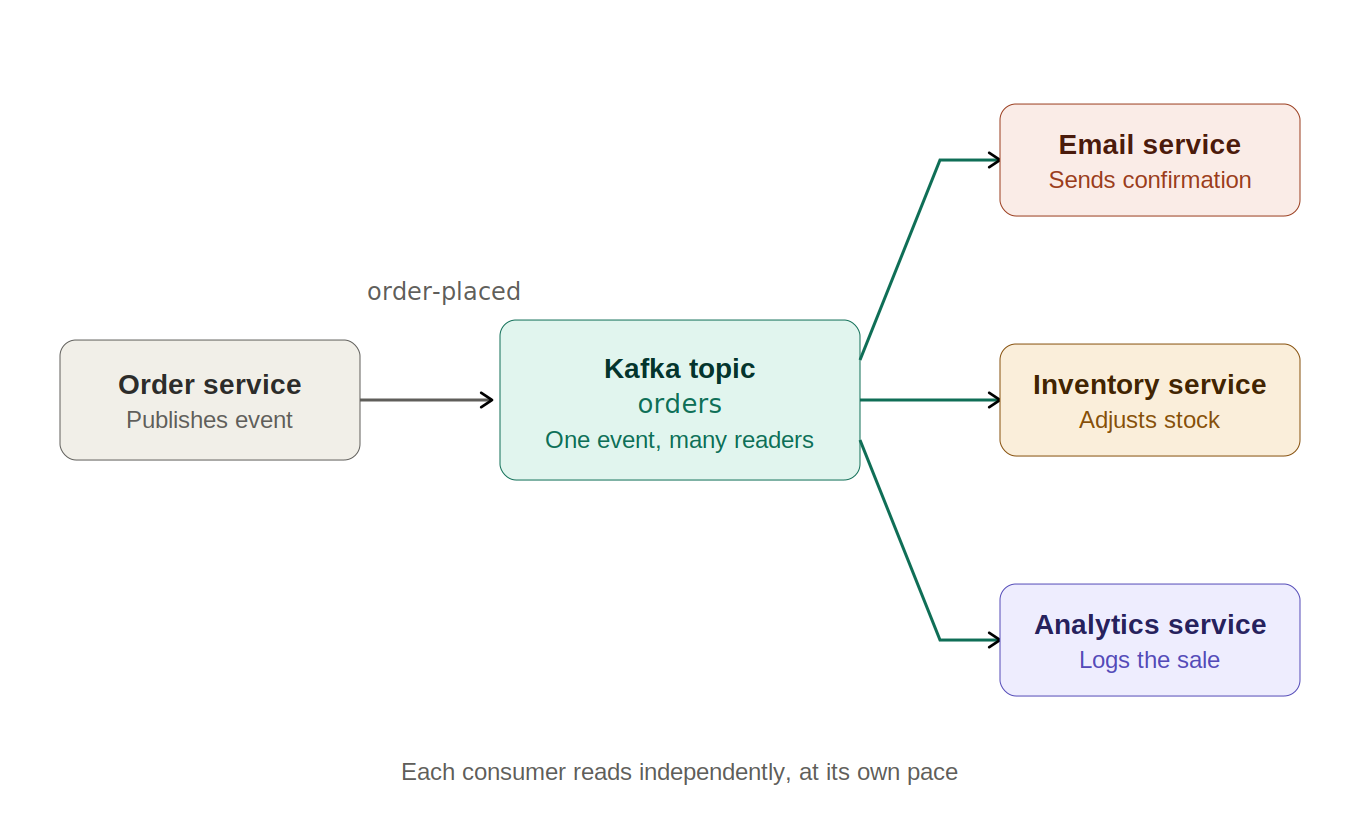
If two parts of your app both need to know when something happens, you already understand the problem Kafka solves. A customer places an order. Your email service needs to send a confirmation. Your inventory service needs to decrement stock. Your analytics pipeline wants the event too.
The obvious solution is to call all three from your order handler. That works until you add a fourth listener, then a fifth. Now your order handler imports half the codebase, and one slow downstream call holds up the HTTP response the customer is waiting on.
Kafka flips the direction. Your order handler publishes one event and stops caring. Anyone who needs it subscribes and reads it on their own schedule. This guide takes you from that idea to working Kafka with Node.js code, running locally on Docker, then answers the question most Kafka tutorials skip entirely: do you actually need microservices to use it?
What Kafka Actually Solves
The textbook definition is that Kafka is a distributed commit log. That is accurate and completely useless if you have never used one, so park it for a moment.
Here is the practical version. Kafka is an append-only log that lives on a server. Producers append records to the end of it. Consumers read through it at their own pace, keeping track of how far they have got. Records do not disappear when someone reads them, which is the single most important difference between Kafka and a traditional message queue.
That one property is what makes everything else possible. Because the log persists, a new consumer can join next month and replay every event from the beginning. A consumer that crashes can restart and pick up exactly where it stopped. Three different teams can read the same stream without coordinating with each other or with the producer.
| Direct HTTP calls between services | Publishing events to Kafka | |
|---|---|---|
| Who knows about whom | The caller must know every listener's URL and contract | The producer knows only the topic name |
| Adding a new listener | Requires a code change and redeploy of the caller | New consumer subscribes; producer is untouched |
| If a listener is down | The call fails, and you own the retry logic | The event waits in the log until the consumer returns |
| Latency felt by the user | Sum of every downstream call | One local write, then the request returns |
| Replaying past events | Not possible without a custom audit table | Built in; reset the offset and read again |
| Operational cost | None beyond the services you already run | A cluster to run, monitor, and size |
That last row matters. Kafka is not free. You are trading a simple function call for a piece of infrastructure that needs to be running, monitored, and understood by whoever is on call. The rest of this guide is partly about when that trade is worth making.
The Core Concepts, One Example Throughout
Every Kafka explainer drowns you in vocabulary on page one. Instead, here is one running example (an online store) with each term introduced only where it earns its place.
- Producer is any code that sends events. When a customer checks out, your order service is the producer.
- Topic is the named log events get written to, for example
order-placed. Producers write to it, consumers read from it, and it is the only name either side needs to agree on. - Consumer is code that reads from a topic. Your email service and your inventory service are both consumers of
order-placed. - Partition is how one topic is split so it can be read in parallel. A topic with 3 partitions can be processed by 3 workers at once.
- Offset is a consumer's bookmark: the position it has read up to in a given partition. Kafka stores this per consumer group, which is how a restarted consumer resumes instead of starting over.
- Broker is one Kafka server. A cluster is several brokers sharing the work and replicating each other's data.
- Consumer group is a set of consumers that share a topic's partitions between them, so each event is handled once by the group rather than once per instance.
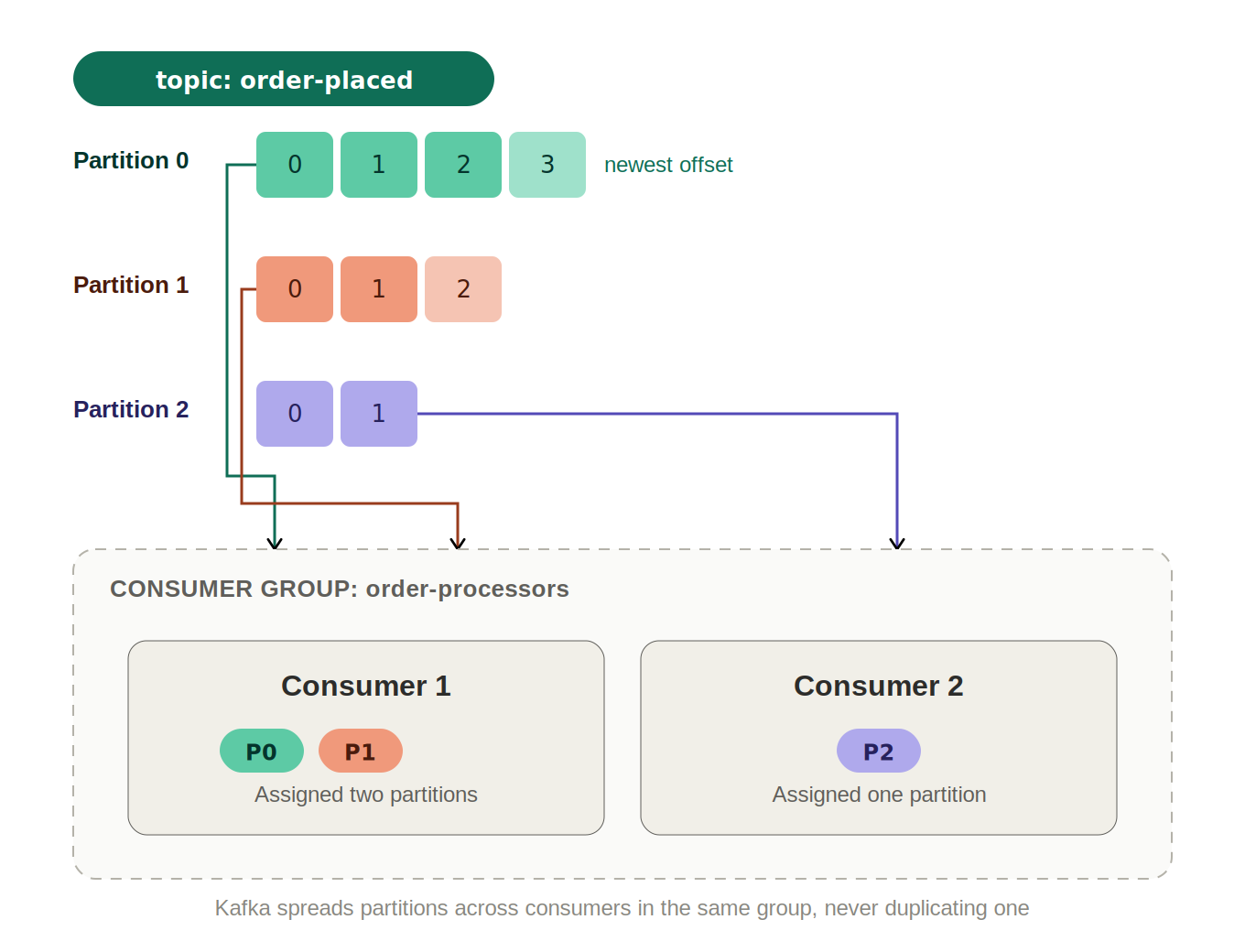
Partitions are where most beginners get burned, so it is worth slowing down. When you publish a message with a key, Kafka hashes that key to pick a partition. Same key always lands in the same partition, which means all events for order 1001 are processed in the order you sent them.
Publish without a key and Kafka spreads messages across partitions for throughput. That is fine for independent events like page views, and quietly wrong for anything where sequence matters. If you send order-created and order-cancelled with no key, a consumer can genuinely process the cancellation first.
What You Would Actually Use Kafka For
Generic lists of Kafka use cases are not much help. Here are the concrete ones a Node.js developer is likely to recognise, with what the topic and key look like in each.
| Scenario | Topic and key | Why Kafka over a plain job queue |
|---|---|---|
| Order fanout | order-placed, keyed by order ID | Several unrelated consumers need the same event, and new ones get added over time |
| Activity and analytics tracking | user-activity, no key | Very high write volume, and you want to replay history into a new dashboard later |
| Search index updates | product-updated, keyed by product ID | Ordering per product matters, and a full reindex is just a replay from offset zero |
| Audit and event sourcing | account-events, keyed by account ID | Retention is the point: the log itself is the record of what happened |
| Decoupling modules in one app | report-requested, keyed by user ID | Slow work leaves the request path without adding a separate service to deploy |
| Cross-service contracts | payment-settled, keyed by payment ID | Teams agree on an event shape instead of sharing code or calling each other directly |
Notice how many of these have nothing to do with microservices. Kafka is often introduced as a microservices tool, but half of its value is available inside a single deployable app.
It is also worth being honest about where Kafka is the wrong answer. If you need one worker to pick up one job and you care about per-job retries, delays, and priorities, a job queue backed by Redis is a simpler fit. Kafka has no per-message acknowledgement and no built-in delayed delivery.
Running Kafka Locally With Docker and Node.js
This section takes you from an empty folder to messages flowing between two Node.js processes. Everything runs on your machine, and you need only Docker and Node.js 18 or newer installed.
One thing to skip before you start: almost every older tutorial sets up Zookeeper alongside Kafka. Since Kafka 3.x, KRaft mode removes that dependency, and Zookeeper support was removed entirely in Kafka 4.0. If a guide tells you to run a zookeeper container in 2026, it is out of date.
- 1
Start a single-broker Kafka in KRaft mode
Create a
docker-compose.ymlin an empty folder. This runs one container acting as both broker and controller, which is exactly what you want locally and never what you want in production.yaml — docker-compose.ymlservices: kafka: image: apache/kafka:latest container_name: kafka ports: - "9092:9092" environment: KAFKA_NODE_ID: 1 KAFKA_PROCESS_ROLES: broker,controller KAFKA_LISTENERS: PLAINTEXT://:9092,CONTROLLER://:9093 KAFKA_ADVERTISED_LISTENERS: PLAINTEXT://localhost:9092 KAFKA_CONTROLLER_LISTENER_NAMES: CONTROLLER KAFKA_CONTROLLER_QUORUM_VOTERS: 1@kafka:9093 KAFKA_LISTENER_SECURITY_PROTOCOL_MAP: CONTROLLER:PLAINTEXT,PLAINTEXT:PLAINTEXT KAFKA_OFFSETS_TOPIC_REPLICATION_FACTOR: 1 KAFKA_TRANSACTION_STATE_LOG_REPLICATION_FACTOR: 1 KAFKA_GROUP_INITIAL_REBALANCE_DELAY_MS: 0Bring it up in the background:
bashdocker compose up -d - 2
Create the topic with more than one partition
Kafka can auto-create topics, but it gives them one partition, which caps your consumer group at one active instance forever. Create it explicitly instead:
bashdocker exec -it kafka /opt/kafka/bin/kafka-topics.sh \ --create \ --topic order-placed \ --bootstrap-server localhost:9092 \ --partitions 3 \ --replication-factor 1Confirm it exists and check what Kafka actually gave you:
bashdocker exec -it kafka /opt/kafka/bin/kafka-topics.sh \ --describe --topic order-placed \ --bootstrap-server localhost:9092You should see three lines, one per partition, each listing a leader and its replicas. If that command returns cleanly, Kafka is up and your local setup is done.
- 3
Install KafkaJS
There are three Node.js clients worth knowing about, and the choice is easier than it looks.
- `kafkajs` is pure JavaScript with no native build step, actively maintained, and has the best documentation. This is the default choice.
- `node-rdkafka` wraps the C library
librdkafka. It is faster under heavy load but needs native compilation, which turns Docker builds and CI into a chore. - `kafka-node` is the original client and has been effectively unmaintained for years. Do not start a new project with it.
bashnpm init -y npm install kafkajs - 4
Write the producer
The important detail here is the
key. Passing the order ID guarantees every event for that order lands in the same partition and is therefore processed in order.javascript — producer.jsconst { Kafka } = require("kafkajs"); const kafka = new Kafka({ clientId: "order-service", brokers: ["localhost:9092"], }); const producer = kafka.producer(); async function main() { await producer.connect(); const order = { id: "1001", item: "Mechanical Keyboard", total: 89.99 }; await producer.send({ topic: "order-placed", messages: [{ key: order.id, value: JSON.stringify(order) }], }); console.log("Published order", order.id); await producer.disconnect(); } main().catch(async (err) => { console.error("Producer failed:", err); await producer.disconnect(); process.exit(1); }); - 5
Write the consumer
The
groupIdis the most consequential line in this file. It is how Kafka tracks your offsets, so it must be stable across restarts and deploys. Generating it at runtime means every restart is treated as a brand new consumer.javascript — consumer.jsconst { Kafka } = require("kafkajs"); const kafka = new Kafka({ clientId: "email-service", brokers: ["localhost:9092"], }); const consumer = kafka.consumer({ groupId: "email-service-group" }); async function main() { await consumer.connect(); await consumer.subscribe({ topic: "order-placed", fromBeginning: true }); await consumer.run({ eachMessage: async ({ topic, partition, message }) => { try { const order = JSON.parse(message.value.toString()); console.log( `[p${partition} @${message.offset}] confirmation email for order ${order.id}` ); } catch (err) { // A malformed record must not stall the partition forever. console.error("Skipping unprocessable message:", err.message); } }, }); } main().catch(console.error); for (const signal of ["SIGINT", "SIGTERM"]) { process.on(signal, async () => { await consumer.disconnect(); process.exit(0); }); } - 6
Run both and watch the message flow
Start the consumer first so it is subscribed and assigned partitions before anything is published. In a second terminal, run the producer.
bash# terminal 1 node consumer.js # terminal 2 node producer.jsThe consumer logs the order within a few milliseconds of the producer publishing it, along with the partition and offset it came from. Those two numbers are worth logging in real systems too: when something goes wrong, the partition and offset are how you find the exact record.
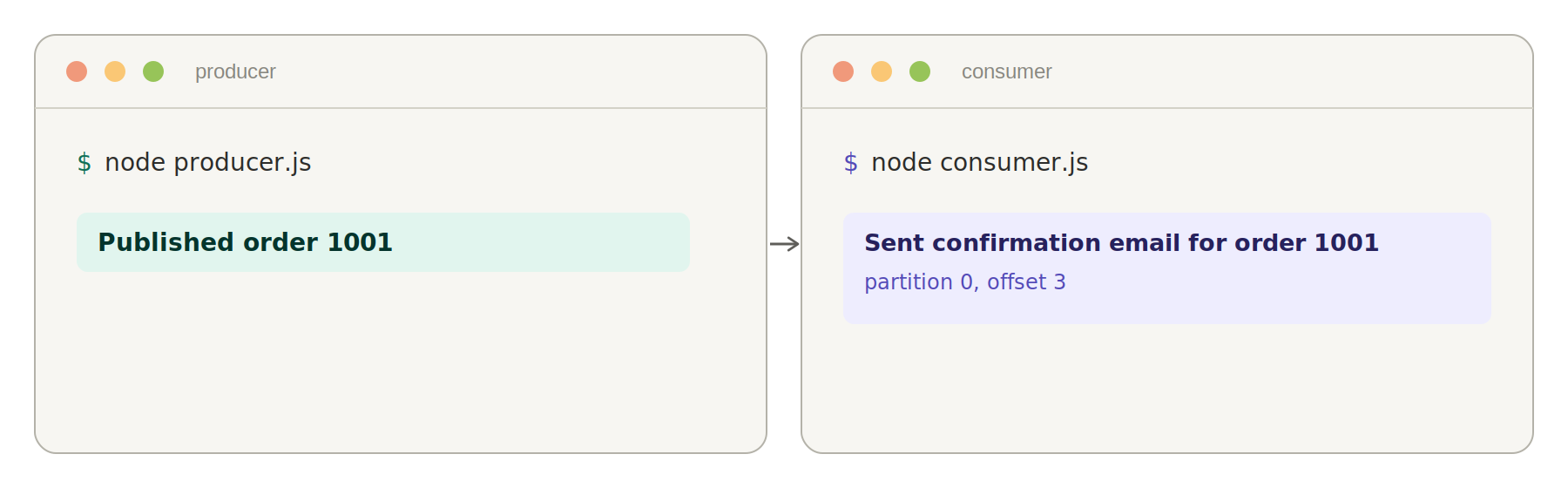
Producer on the left, consumer on the right. The partition and offset in the consumer log are your debugging handles.
Making the Producer Actually Reliable
The producer above works, and it is also where most tutorials stop. The gap between that code and something you would trust with real orders comes down to three settings.
const producer = kafka.producer({
  // Refuse to report success until every in-sync replica has the record.
  idempotent: true,
  maxInFlightRequests: 5,
  retry: { retries: 8, initialRetryTime: 300 },
});

await producer.send({
  topic: "order-placed",
  acks: -1,
  messages: [{ key: order.id, value: JSON.stringify(order) }],
});- `acks: -1` (equivalent to
acks: 'all') makes the broker wait until every in-sync replica has written the record before acknowledging. With the default ofacks: 1, only the partition leader has to confirm, so a leader crash immediately after a write loses the message silently. - `idempotent: true` attaches a producer ID and sequence number to every record so the broker can discard duplicates. Without it, a retry after a timeout that actually succeeded writes the same order twice.
- `retry` controls how long KafkaJS keeps trying through a broker restart or leader election. The default of 5 attempts is usually short for a rolling cluster upgrade.
Consumer Groups and Scaling, In Practice
Run two copies of consumer.js with the same groupId and Kafka splits the three partitions between them. One instance gets two partitions, the other gets one. Each message is still handled exactly once by the group.
Change the groupId on the second instance instead, and the behaviour flips completely: both instances now receive every message, because they are two independent groups reading the same log. That is the mechanism behind the fanout in the first diagram.
| Partitions | Consumers in the group | Result |
|---|---|---|
| 3 | 1 | One instance reads all three partitions |
| 3 | 2 | One instance gets 2 partitions, the other gets 1 |
| 3 | 3 | Perfectly balanced, one partition each |
| 3 | 4 | The fourth instance sits idle and does nothing |
| 1 | any number | Only one instance ever works; scaling is impossible |
That last row is the practical reason the setup step created three partitions instead of accepting the default. Partitions can be added to an existing topic later, but doing so changes which partition a given key hashes to, which breaks per-key ordering for records already in the log. Over-provision slightly at creation time instead.
A reasonable starting point: set the partition count to the maximum number of consumer instances you expect within the next year, with a floor of 3. Going from 3 to 6 costs almost nothing on a small cluster. Going from 1 to 3 after you are live costs you an ordering guarantee.
Monolith or Microservices? Where Kafka Fits
This is the question that actually decides whether Kafka helps you, and it is the one most tutorials never touch.
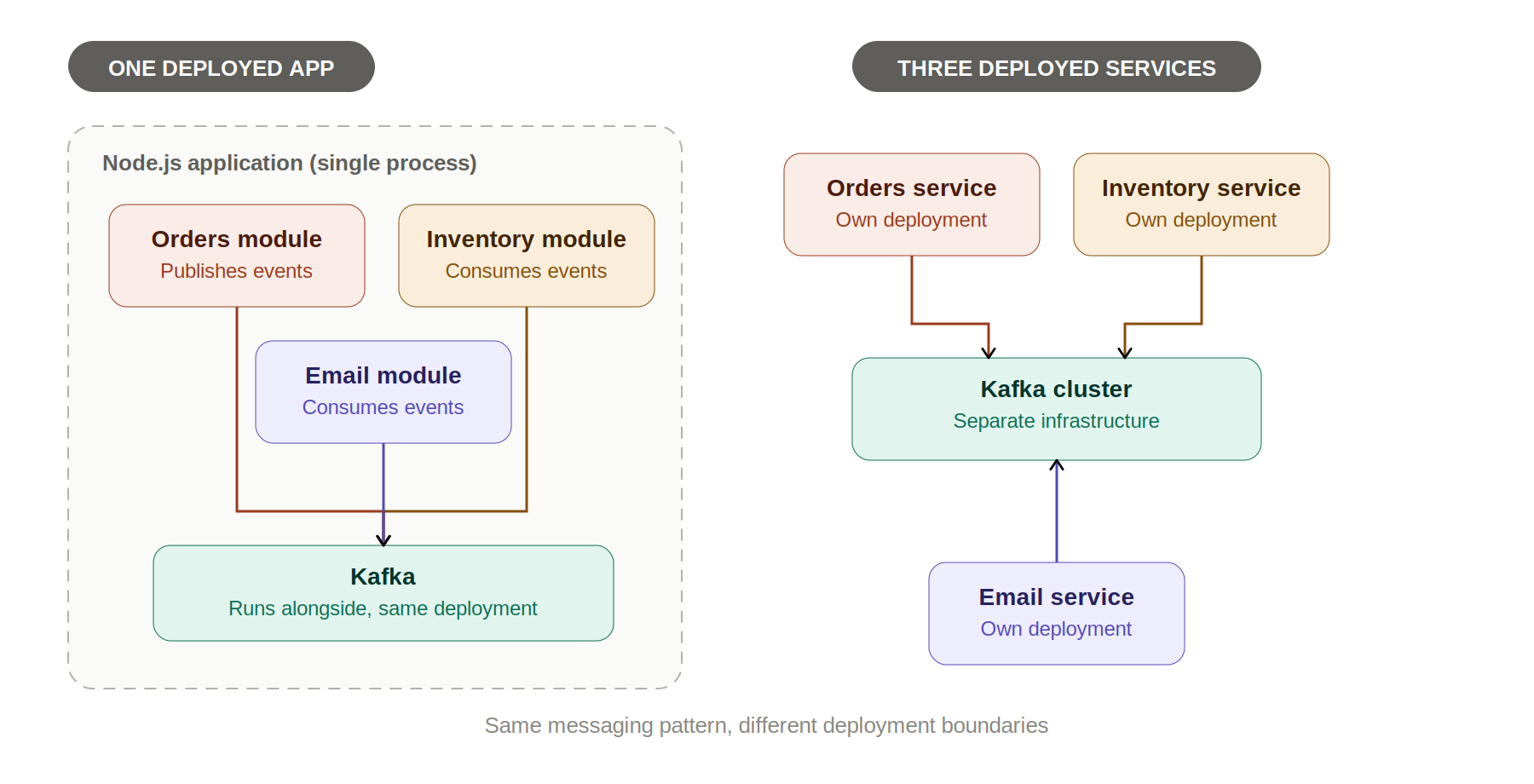
The assumption baked into most Kafka content is that you are already running microservices, or that adopting Kafka means you should be. Neither is true. Kafka inside a monolith is a legitimate architecture, and for small teams it is usually the better first move.
| Kafka inside a monolith | Kafka between microservices | |
|---|---|---|
| What you deploy | One app, plus a Kafka cluster | Several apps, plus a Kafka cluster |
| Local development | npm run dev and one container | Several processes, or a full Compose stack per developer |
| Debugging a failed order | One log stream, often one stack trace | Correlate trace IDs across separate deployed processes |
| Schema changes | Producer and consumer ship together in the same commit | Needs versioning and a compatible rollout order |
| Scaling | Scale the whole app, even if one module is the bottleneck | Scale only the consumer that is actually saturated |
| Team ownership | One codebase, coordinate through pull requests | Independent teams, coordinate through the event contract |
| Blast radius of a bad deploy | The whole application | One service; others keep consuming from the log |
Use Kafka inside a monolith when you want slow work off the request path (sending email, generating reports, updating a search index), when you want an event log you can replay or audit, or when modules are too tangled but you are not ready to run and monitor several services. You get the decoupling and the durable log without the operational tax.
Split into services when the pressure is organisational or economic rather than architectural: different teams need to ship on independent schedules, one workload genuinely needs different hardware or scaling behaviour than the rest, or a single noisy module is destabilising unrelated features on every deploy. If you are taking that route, our guide to building Node.js microservices without Express covers the service side, and if you are on NestJS its microservices module speaks Kafka natively, which comes up often in NestJS interview questions.
- Two or more teams are blocked on each other's release schedule
- One module needs to scale independently and measurably differently from the rest
- You already have centralised logging with correlation IDs across processes
- You have someone who can own Kafka in production, including partition sizing and consumer lag alerts
- Your deploy pipeline can roll out services independently without manual coordination
- Event schemas are versioned, with a plan for consumers running older versions
If you cannot tick at least four of those, adding Kafka to the app you already have will get you most of the benefit at a fraction of the cost. The event boundaries you define now become your service boundaries later, and drawing them inside one codebase is far cheaper than discovering they were wrong across five deployments.
Common Mistakes That Cost People Messages
- Leaving `acks` at the default. The producer reports success, the leader dies, the record is gone. Set
acks: -1on anything that matters. - Creating topics with one partition. Auto-creation gives you one, and it permanently caps that consumer group at a single working instance.
- Generating the `groupId` at runtime. Something like
email-service-${Date.now()}means every restart is a new group with no stored offsets, so it reprocesses the entire topic or skips everything, depending onfromBeginning. - Publishing ordered events without a key. Related events scatter across partitions and get processed out of sequence. Key by the entity ID.
- Letting `eachMessage` throw. An unhandled rejection stops the partition, and a genuinely unprocessable record blocks every message behind it forever. Catch, log, and route to a dead letter topic.
- Doing slow work synchronously inside `eachMessage`. Kafka rebalances the group if you exceed
maxPollInterval, so a long database call can trigger an endless rebalance loop. - Connecting and disconnecting the producer per request. Each cycle is a fresh connection and metadata fetch. Create it once at startup.
- Assuming Kafka is a task queue. There is no per-message ack, no delayed delivery, and no priority. Those are job queue features, not Kafka features.
Frequently Asked Questions
What is the difference between Kafka and RabbitMQ?
| Trait | Kafka | RabbitMQ |
|---|---|---|
| Core model | Durable log consumers read from | Broker that routes and deletes messages |
| After a message is read | Stays in the log until retention expires | Removed from the queue on ack |
| Replay past messages | Built in, reset the offset | Not possible without republishing |
| Per-message ack | No, offsets are committed in batches | Yes, ack or nack each message |
| Delayed or priority delivery | Not supported | Supported |
| Typical throughput | Very high, hundreds of thousands per second | High, but lower than Kafka |
Choose Kafka when several consumers need the same stream, or when replay and retention matter. Choose RabbitMQ when you are distributing discrete jobs to workers and need per-job acknowledgement, retries, and priorities.
Is Kafka overkill for a small app?
Often yes, and the honest test is whether more than one consumer needs the same event.
- One background job, one worker: a Redis-backed queue such as BullMQ is simpler and has features Kafka lacks.
- Several independent reactions to the same event: Kafka starts paying for itself, even inside one app.
- You need an audit trail or replay: Kafka is a strong fit regardless of your app's size.
- A managed cluster is not in budget: self-hosting Kafka is real operational work, so weigh that honestly.
Do I still need Zookeeper for Kafka in 2026?
No. KRaft mode replaced Zookeeper for metadata management, and Zookeeper support was removed entirely in Kafka 4.0. The docker-compose.yml in this guide runs Kafka with no Zookeeper container at all.
Can I use Kafka with TypeScript?
Yes. KafkaJS ships its own type definitions, so no @types package is needed. The one thing worth adding yourself is typing the decoded payload, because message.value is a Buffer and Kafka knows nothing about your event shape.
import { Kafka, type EachMessagePayload } from "kafkajs";

interface OrderPlaced {
  id: string;
  item: string;
  total: number;
}

const kafka = new Kafka({ clientId: "email-service", brokers: ["localhost:9092"] });
const consumer = kafka.consumer({ groupId: "email-service-group" });

await consumer.run({
  eachMessage: async ({ message }: EachMessagePayload) => {
    if (!message.value) return;
    const order = JSON.parse(message.value.toString()) as OrderPlaced;
    console.log(order.id);
  },
});Which Node.js Kafka client should I use?
- `kafkajs`: pure JavaScript, no native build, actively maintained, best docs. Correct default for almost every project.
- `node-rdkafka`: binds to
librdkafka, higher throughput, but native compilation complicates Docker images and CI. - `@confluentinc/kafka-javascript`: Confluent's official client, API-compatible with KafkaJS, worth evaluating if you are on Confluent Cloud.
- `kafka-node`: effectively unmaintained. Avoid for new work.
Start with kafkajs and move only if you have measured a throughput ceiling you can attribute to the client rather than your own handler code.
Does Kafka guarantee each message is processed exactly once?
Not by default, and not in the way most people hope. Kafka's default is at-least-once delivery: if a consumer crashes after handling a record but before committing its offset, it will see that record again on restart.
Kafka does support exactly-once semantics through transactions, but only for reads and writes that stay inside Kafka. The moment your handler sends an email or charges a card, that side effect is outside the transaction.
- Make handlers idempotent: derive a deterministic ID from the record and check it before acting.
- Store the processed ID with the write: in the same database transaction as the work itself, so a replay is a no-op.
- Treat duplicates as normal: design for them rather than trying to configure them away.
How long does Kafka keep messages?
Seven days by default, controlled per topic by retention.ms, and independent of whether anyone has read them. Kafka deletes on age or size, never on consumption.
docker exec -it kafka /opt/kafka/bin/kafka-configs.sh \
  --bootstrap-server localhost:9092 \
  --entity-type topics --entity-name order-placed \
  --alter --add-config retention.ms=2592000000
That sets 30 days. For event sourcing you may want retention.ms=-1 for unlimited retention, or log compaction, which keeps only the latest record per key instead of deleting by age.
Can I connect to Kafka from a serverless function or edge runtime?
Not with KafkaJS. The Kafka protocol runs over raw TCP with long-lived connections, and edge runtimes such as Cloudflare Workers and Vercel Edge expose only fetch. Short-lived serverless functions can technically connect, but paying the connection and metadata handshake on every invocation makes it impractical.
- Producing from the edge: use a REST proxy such as Confluent's REST Proxy, or a managed HTTP-first broker like Upstash Kafka.
- Consuming: run consumers as long-lived processes on a container platform, never in a function with an execution timeout.
- Hybrid setup: have the edge write to an HTTP endpoint on a long-running service, and let that service own the Kafka connection.
Kafka is smaller than its reputation. Strip away the vocabulary and it is an append-only log that remembers what happened, plus a rule about who reads which part of it. Producers, consumers, topics, partitions, and consumer groups are all just consequences of that one idea.
The practical path is to run the docker-compose.yml above, get the producer and consumer talking, then start a second consumer and watch the partitions rebalance. Those twenty minutes teach you more than any diagram.
After that, resist the pull toward microservices. Publish your first real events inside the app you already have, get comfortable with ordering, offsets, and lag where a single stack trace still explains everything, and let genuine scaling pressure (not architecture fashion) decide when it is time to split things apart.
Related Articles
Node.js Microservices Without Express: A Zero-Dependency Guide
Build two real Node.js microservices with zero npm installs, using node:http, fetch, and node:test. No Express, no Docker required.
30 NestJS Interview Questions and Answers (2026)
30 NestJS interview questions with full answers: modules, DI, guards, pipes, interceptors, JWT auth, microservices, and testing. Updated for 2026.
Redis Explained: What It Is & How to Use It With Node.js
Confused about what Redis actually is? This guide explains Redis in plain English, then shows how to set it up with Docker and use it with Node.js caching.