Supabase Tutorial: The Open Source Firebase Alternative
A beginner Supabase tutorial: build a full-stack app on the open source Firebase alternative with React and Node.js code, auth, RLS, storage, and pricing.

On this page
What Is Supabase?
Supabase is a hosted backend built on top of a real PostgreSQL database. You create a project, and within about two minutes you have a Postgres instance, an auto-generated REST API over every table, an authentication service, file storage, serverless functions, and a dashboard to manage all of it. The pitch is that you skip writing the boring 60% of a backend and go straight to product code.
It is usually described as "the open source Firebase alternative", and that comparison is useful as a starting point but misleading if you stop there. Firebase gives you a proprietary document store. Supabase gives you Postgres, which means SQL, joins, constraints, transactions, views, triggers, and every extension the Postgres ecosystem has built over three decades. If you already know relational databases, most of what you know transfers directly.
The parts you get out of the box are worth listing explicitly, because each one is a service you would otherwise have to build, host, and secure yourself:
- PostgreSQL database with a full SQL editor, a visual table editor, and migrations you can keep in version control.
- Auto-generated APIs: a REST API (via PostgREST) and a GraphQL endpoint derived from your schema, updated the moment you add a column.
- Auth: email/password, magic links, phone OTP, and social OAuth providers, with user records living in your own database.
- Realtime: subscribe to
INSERT,UPDATE, andDELETEevents on a table over a WebSocket, plus presence and broadcast channels. - Storage: an S3-compatible object store with access rules written the same way as your database policies.
- Edge Functions: Deno-based serverless functions deployed close to your users.
It is also genuinely open source. The core platform is on GitHub and you can self-host the whole stack with Docker, which means the "what if they shut down or raise prices" question has a real answer rather than a migration nightmare. Your data is in Postgres, so worst case you take a pg_dump and run it anywhere.
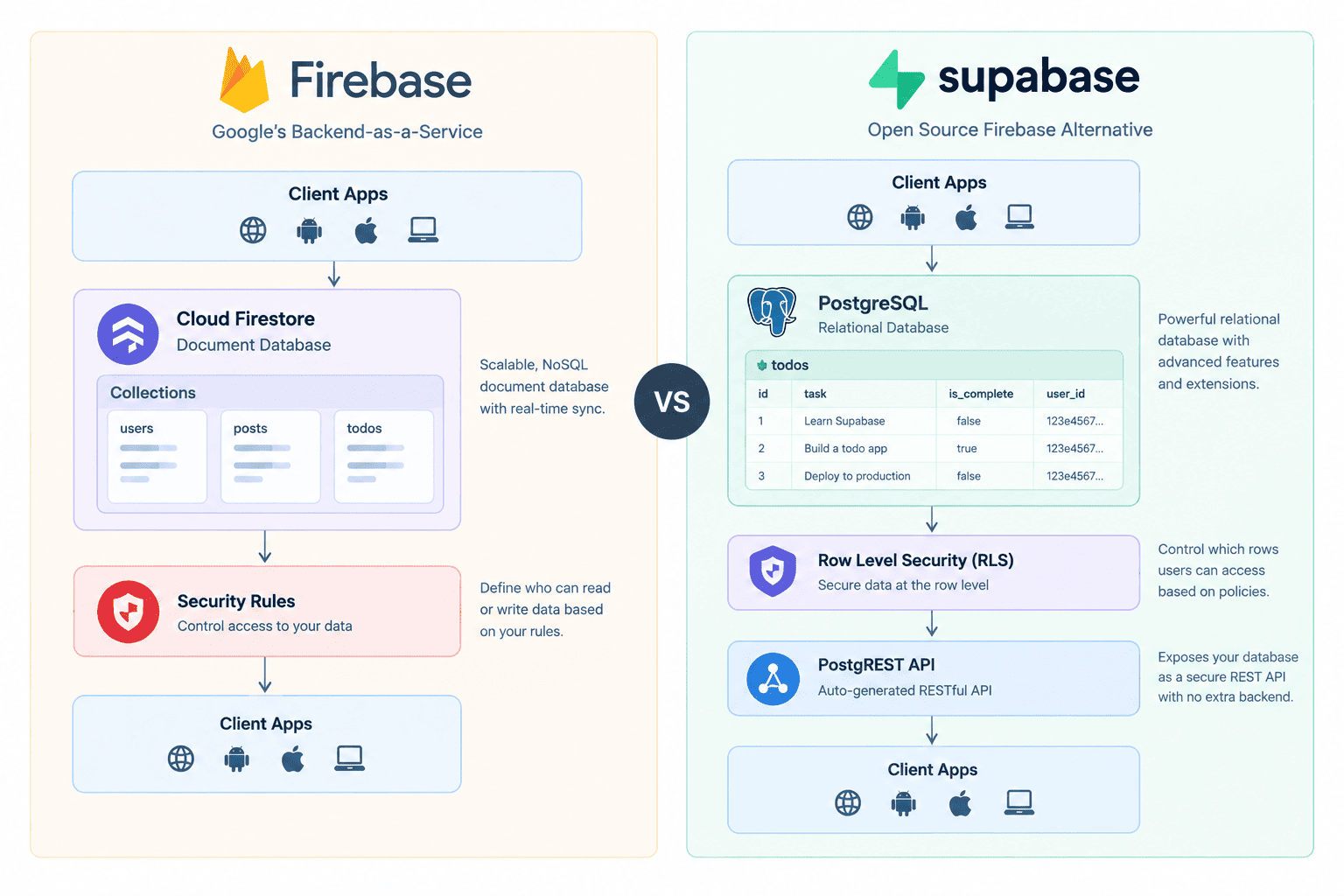
Supabase vs Firebase vs Plain PostgreSQL
Two comparisons matter when you are deciding whether to adopt Supabase. The first is against Firebase, the incumbent backend-as-a-service. The second is against just running Postgres yourself, which is what many teams do by default.
| Firebase | Supabase | |
|---|---|---|
| Data model | Firestore document store, denormalised, no joins | PostgreSQL, relational, joins and foreign keys |
| Query language | Proprietary SDK query builder, limited compound queries | Full SQL, plus a JS query builder that maps onto it |
| Authorisation | Firestore Security Rules, a separate rules language | Postgres Row Level Security, written in SQL alongside the schema |
| Licensing | Proprietary, Google-hosted only | Apache 2.0 / MIT core, self-hostable with Docker |
| Realtime | First-class, the product was built around it | Available per table, opt-in, built on Postgres logical replication |
| Cold-start migration path | Exporting to another platform means reshaping documents | pg_dump restores anywhere Postgres runs |
The honest summary: Firebase is still stronger if your app is mobile-first, offline-first, and mostly reads and writes small documents. Its offline sync is mature in a way Supabase's is not. Supabase wins the moment your data is genuinely relational, which for most CRUD web apps happens by week three.
The second comparison is subtler. If you already run Postgres on RDS or Neon, what does Supabase add? Everything above the database. You are not paying for Postgres, you are paying to not build auth, file uploads, WebSocket infrastructure, and an API layer.
| Layer | Raw PostgreSQL | Supabase |
|---|---|---|
| Database | You provision, patch, and back it up | Managed instance, daily backups on paid plans |
| API | You write every endpoint | REST and GraphQL generated from the schema |
| Auth | Passport, Auth0, or hand-rolled sessions | Built in, users stored in `auth.users` in your own DB |
| Authorisation | Application-layer checks in your handlers | RLS policies enforced by the database itself |
| File storage | S3 plus signing logic you maintain | Storage API with policy-based access control |
| Realtime | Socket server, pub/sub, scaling, reconnection | `postgres_changes` subscriptions over a managed WebSocket |
Because it is ordinary Postgres underneath, everything you know about schema design still applies, and so does everything you know about its quirks. If you are arriving from MySQL, the differences in types, quoting, and indexing are worth reading first: our guide to PostgreSQL for MySQL developers covers the ones that cause real bugs.
Setting Up Your First Supabase Project
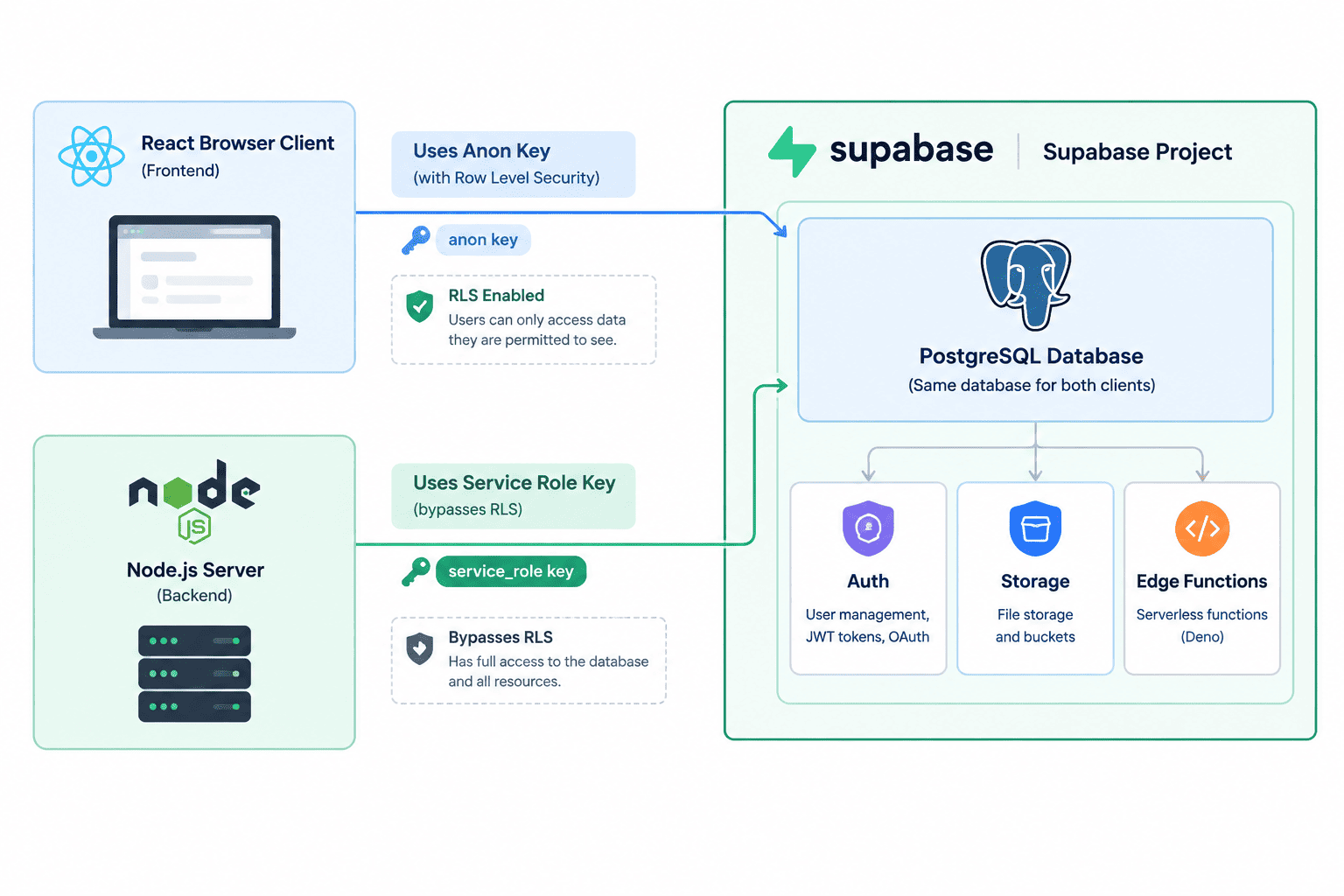
Creating a project takes a few minutes, most of which is the database provisioning while you wait. The important part is not the clicks, it is knowing which two keys you get and which one is safe to ship to a browser.
- 1
Create an Account and a Project
Sign up at supabase.com with GitHub or email. Create an organisation, then a project inside it. You will be asked for a project name, a database password, and a region.
Pick the region closest to your users, not to you. This is the one setting you cannot change later without migrating the project, and it determines the latency of every query your app makes.
- 2
Find Your API Keys
Go to Project Settings, then API. You will see a project URL and two keys. The distinction between them is the single most important security concept in Supabase.
Key Where it belongs What it can do `anon` (publishable) Browser, mobile app, any client bundle Only what your RLS policies allow for anonymous or logged-in users `service_role` (secret) Server only, never in a client bundle Bypasses every RLS policy, full read and write on all tables How you load those variables matters as much as which one you use. Next.js in particular has rules about which prefixes get inlined into the client bundle, and getting them wrong is how secrets leak. Our guide to Next.js environment variables covers the exact boundary.
- 3
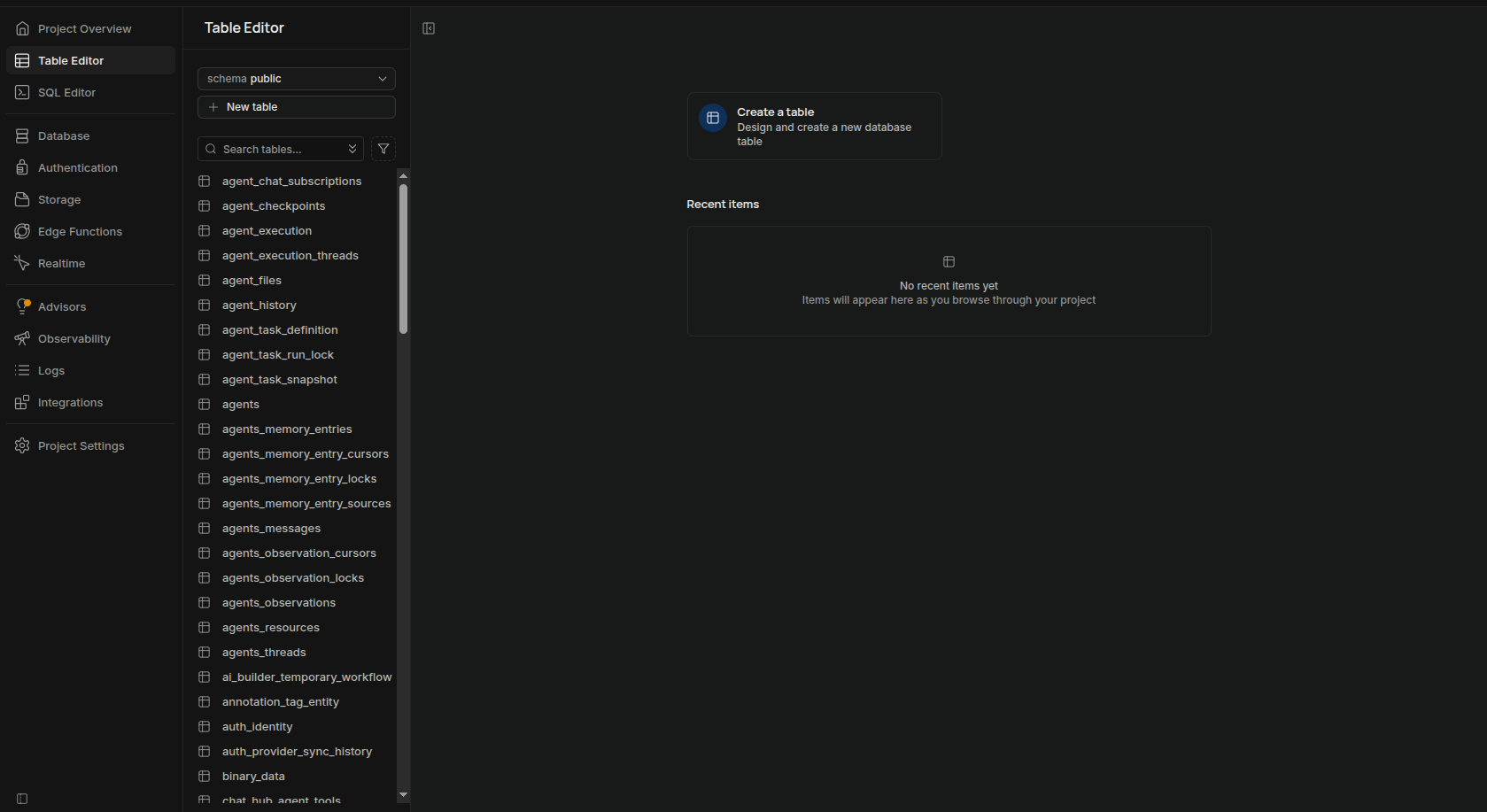
Create Your First Table
You can use the visual table editor, but writing SQL in the SQL Editor is faster and gives you something you can commit to your repository. Here is a
todostable with the ownership column you will need for RLS later:sql — supabase/migrations/0001_todos.sqlcreate table public.todos ( id bigint generated always as identity primary key, user_id uuid not null references auth.users (id) on delete cascade, task text not null check (char_length(task) > 0), is_complete boolean not null default false, created_at timestamptz not null default now() ); -- Every RLS policy below filters on user_id, so index it. create index todos_user_id_idx on public.todos (user_id);Note
references auth.users (id). Supabase stores authenticated users in anauthschema inside the same database, so your application tables can have real foreign keys to them. This is the thing you cannot do with an external auth provider, and it is a genuine advantage: a deleted user cascades to their rows automatically. - 4
Install the CLI for Local Development
bashnpm install -g supabase supabase login supabase init supabase link --project-ref your-project-ref supabase startsupabase startruns the entire stack locally in Docker: Postgres, the API gateway, auth, storage, and a local dashboard on port 54323. Develop against that, then push schema changes up withsupabase db push. Working this way means your schema lives in migration files under version control instead of only in the hosted dashboard, which is the difference between a project two people can work on and one that only you can.
Connecting Supabase to React
The React integration is a single package and a single client instance. There is no provider you have to wrap your app in, and no code generation step.
npm install @supabase/supabase-jsCreate the client once in its own module and import it everywhere. Creating a new client per component leaks WebSocket connections and breaks session persistence, which is the most common beginner mistake with this library.
import { createClient } from "@supabase/supabase-js";

const url = import.meta.env.VITE_SUPABASE_URL;
const anonKey = import.meta.env.VITE_SUPABASE_ANON_KEY;

if (!url || !anonKey) {
  throw new Error("Missing Supabase environment variables");
}

// One client for the whole app: it owns the auth session and the realtime socket.
export const supabase = createClient(url, anonKey);
Now the CRUD operations. The query builder is a thin, chainable wrapper over the REST API, and it reads close enough to SQL that you can usually guess the method you need.
import { useEffect, useState } from "react";
import { supabase } from "../lib/supabase";

type Todo = {
  id: number;
  task: string;
  is_complete: boolean;
};

export function TodoList() {
  const [todos, setTodos] = useState<Todo[]>([]);
  const [error, setError] = useState<string | null>(null);

  useEffect(() => {
    async function load() {
      const { data, error } = await supabase
        .from("todos")
        .select("id, task, is_complete")
        .order("created_at", { ascending: false })
        .limit(50);

      if (error) setError(error.message);
      else setTodos(data);
    }
    load();
  }, []);

  async function addTodo(task: string) {
    const { data, error } = await supabase
      .from("todos")
      .insert({ task })
      .select()
      .single();

    if (!error && data) setTodos((prev) => [data, ...prev]);
  }

  async function toggle(todo: Todo) {
    await supabase
      .from("todos")
      .update({ is_complete: !todo.is_complete })
      .eq("id", todo.id);
  }

  async function remove(id: number) {
    await supabase.from("todos").delete().eq("id", id);
  }

  if (error) return <p role="alert">{error}</p>;

  return (
    <ul>
      {todos.map((todo) => (
        <li key={todo.id}>
          <button onClick={() => toggle(todo)}>
            {todo.is_complete ? "Done" : "Open"}
          </button>
          {todo.task}
          <button onClick={() => remove(todo.id)}>Delete</button>
        </li>
      ))}
    </ul>
  );
}Two details in that insert are worth noticing. There is no user_id in the payload, because a database default of auth.uid() fills it in, and an RLS policy would reject a row claiming another user's id anyway. And .select().single() after the insert returns the created row including its generated id, saving a round trip.
Realtime is the feature people come to Supabase for, and it is about ten lines. Subscribe to a channel, filter it to the table and events you care about, and unsubscribe on unmount:
useEffect(() => {
  const channel = supabase
    .channel("todos-changes")
    .on(
      "postgres_changes",
      { event: "*", schema: "public", table: "todos" },
      (payload) => {
        if (payload.eventType === "INSERT") {
          setTodos((prev) => [payload.new as Todo, ...prev]);
        }
        if (payload.eventType === "DELETE") {
          setTodos((prev) => prev.filter((t) => t.id !== payload.old.id));
        }
      },
    )
    .subscribe();

  // Without this, a remount opens a second socket and events fire twice.
  return () => {
    supabase.removeChannel(channel);
  };
}, []);
Realtime is off by default per table. Enable it in the dashboard under Database, Replication, or by adding the table to the supabase_realtime publication in SQL. If your subscription connects but no events arrive, that is almost always why.
Connecting Supabase to Node.js
On the server you use the same package but a different key and different assumptions. The service_role key bypasses RLS, so the database will not protect you here. Your own code is the only thing standing between a request and every row in the table.
import { createClient } from "@supabase/supabase-js";

// service_role bypasses RLS. This module must never be imported by client code.
export const supabaseAdmin = createClient(
  process.env.SUPABASE_URL!,
  process.env.SUPABASE_SERVICE_ROLE_KEY!,
  {
    auth: {
      // No browser here: nothing to persist and no token to auto-refresh.
      persistSession: false,
      autoRefreshToken: false,
    },
  },
);
With that client, server-side CRUD looks identical to the browser version, except that nothing is filtered for you. Admin jobs, cron tasks, and webhook handlers are the legitimate uses:
// Nightly cleanup: no user context, so service_role is the right key.
const cutoff = new Date(Date.now() - 30 * 24 * 60 * 60 * 1000).toISOString();

const { data, error } = await supabaseAdmin
  .from("todos")
  .delete()
  .eq("is_complete", true)
  .lt("created_at", cutoff)
  .select("id");

if (error) throw new Error(`Cleanup failed: ${error.message}`);
console.log(`Removed ${data.length} completed todos`);
The more interesting server pattern is acting as a user rather than as an admin. When a request arrives with a Supabase access token, you can create a scoped client that runs under that user's identity, which means RLS applies exactly as it would in the browser. This is the safest way to write API routes, because a bug in your handler cannot leak another tenant's data:
import { createClient } from "@supabase/supabase-js";

export function clientForRequest(accessToken: string) {
  return createClient(
    process.env.SUPABASE_URL!,
    // anon key + the user's token: RLS policies still apply.
    process.env.SUPABASE_ANON_KEY!,
    {
      global: { headers: { Authorization: `Bearer ${accessToken}` } },
      auth: { persistSession: false },
    },
  );
}

// In an Express handler:
app.get("/api/todos", async (req, res) => {
  const token = req.headers.authorization?.replace("Bearer ", "");
  if (!token) return res.status(401).json({ error: "Unauthorised" });

  const supabase = clientForRequest(token);
  const { data, error } = await supabase.from("todos").select("*");

  if (error) return res.status(400).json({ error: error.message });
  res.json(data);
});
Verifying a token before you trust it is one call, supabaseAdmin.auth.getUser(token), which validates the JWT against the auth server and returns the user record. Do that on any route where the identity matters for something other than an RLS filter.
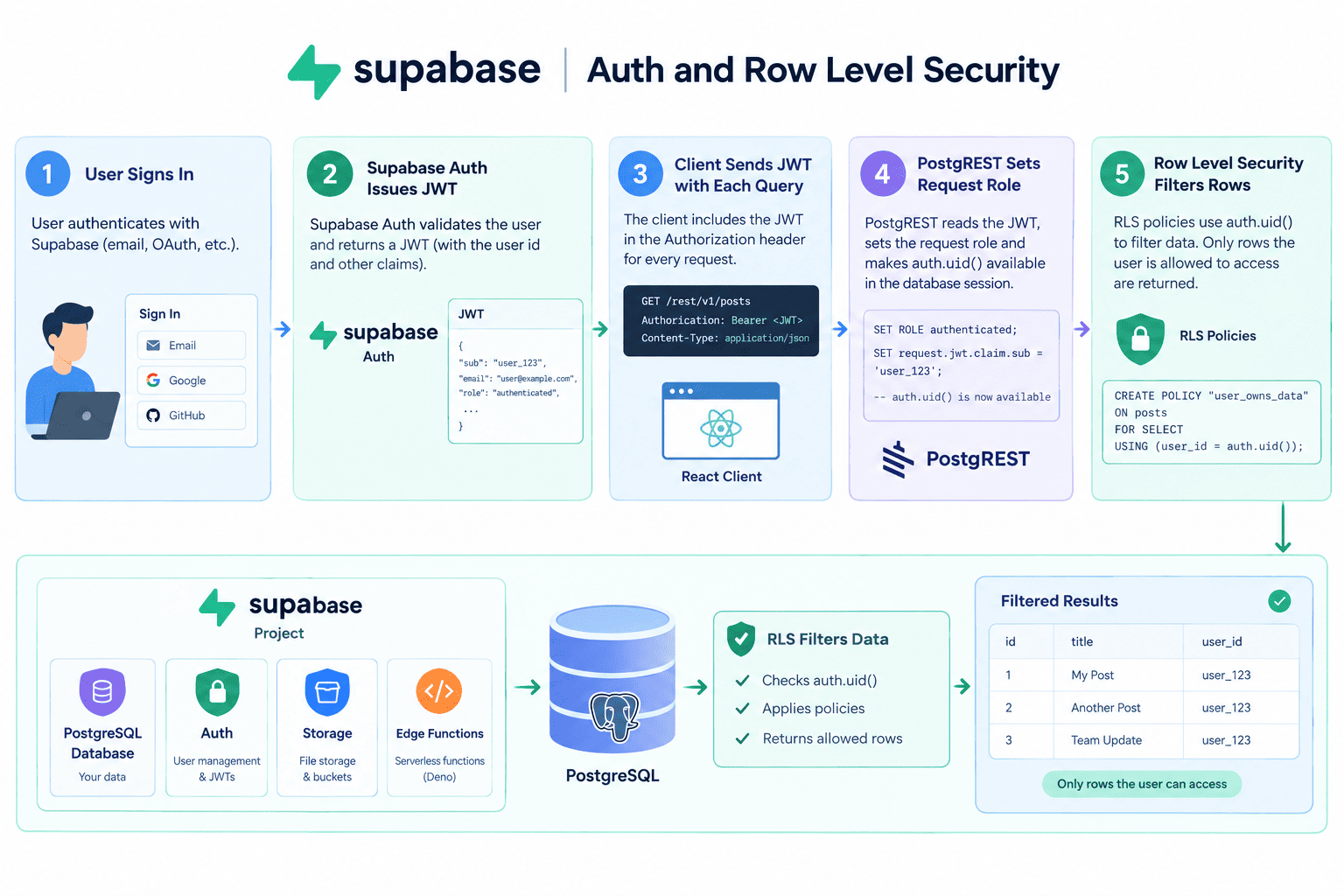
Supabase Auth and Row Level Security
Auth and authorisation are two separate things in Supabase, and conflating them is how projects end up with public data. Auth answers who this is. Row Level Security answers what they are allowed to see. Turning on auth without writing RLS policies leaves your tables wide open to anyone holding the anon key, which is everyone who loads your site.
Signing users in is straightforward. Email and password first:
// Sign up
const { data, error } = await supabase.auth.signUp({
  email: "dev@example.com",
  password: "a-long-random-password",
});

// Sign in
await supabase.auth.signInWithPassword({
  email: "dev@example.com",
  password: "a-long-random-password",
});

// Current session, and a listener for changes
const { data: { user } } = await supabase.auth.getUser();

supabase.auth.onAuthStateChange((event, session) => {
  // SIGNED_IN, SIGNED_OUT, TOKEN_REFRESHED, USER_UPDATED
  setSession(session);
});

await supabase.auth.signOut();
Social login is one method plus some dashboard configuration. Enable the provider under Authentication, Providers, paste in the OAuth client id and secret from GitHub or Google, and add your callback URL to the provider's allowed list:
await supabase.auth.signInWithOAuth({
  provider: "github",
  options: { redirectTo: "https://yourapp.com/auth/callback" },
});
Now the part that actually secures your data. RLS is a Postgres feature, not a Supabase one: you enable it per table, then write policies as SQL expressions that the database evaluates on every row of every query. Supabase exposes the authenticated user's id to those expressions as auth.uid().
alter table public.todos enable row level security;

-- Default the owner column so clients never send user_id themselves.
alter table public.todos
  alter column user_id set default auth.uid();

create policy "Users read their own todos"
  on public.todos for select
  using (auth.uid() = user_id);

create policy "Users create todos for themselves"
  on public.todos for insert
  with check (auth.uid() = user_id);

create policy "Users update their own todos"
  on public.todos for update
  using (auth.uid() = user_id)
  with check (auth.uid() = user_id);

create policy "Users delete their own todos"
  on public.todos for delete
  using (auth.uid() = user_id);
using controls which existing rows a statement can see or touch. with check controls what the resulting rows are allowed to look like. Update needs both: without the with check clause, a user could reassign their row to someone else's user_id and hand over their own data.
Once these policies exist, the same select("*") from the browser returns only that user's rows, enforced by Postgres rather than by your application code. A forgotten WHERE clause in a query stops being a data breach.
Policies are code, and like all code they need tests. A policy that silently returns zero rows and a policy that silently returns everyone's rows both look fine in manual testing against a single account. We covered exactly this in testing PostgreSQL row-level security with Jest, and the approach applies directly to a Supabase project.
Storage: Uploading and Serving Files
Storage is an object store organised into buckets, and its access control uses the same RLS mechanism as your tables. A bucket is either public, meaning anyone with the URL can fetch an object, or private, meaning access goes through policies and signed URLs.
// Upload. upsert: false means a duplicate path errors instead of overwriting.
const { data, error } = await supabase.storage
  .from("avatars")
  .upload(`${user.id}/profile.png`, file, {
    cacheControl: "3600",
    upsert: false,
  });

// Public bucket: a permanent, unauthenticated URL.
const { data: pub } = supabase.storage
  .from("avatars")
  .getPublicUrl(`${user.id}/profile.png`);

// Private bucket: a URL that expires, here after 60 seconds.
const { data: signed } = await supabase.storage
  .from("invoices")
  .createSignedUrl(`${user.id}/march.pdf`, 60);
Prefixing every object path with the user's id is the convention that makes storage policies simple, because a policy can compare the first path segment against auth.uid() and be done. On paid plans, image transformations let you request a resized version by adding a transform option rather than generating and storing thumbnails yourself, which removes a whole background job from most apps.
Edge Functions
Edge Functions are Deno-based serverless functions deployed to Supabase's edge network. They exist for the work that cannot happen in the browser: calling a third-party API with a secret key, handling a Stripe webhook, or running logic that must not be tampered with.
supabase functions new charge-customer
supabase functions deploy charge-customer
supabase secrets set STRIPE_SECRET_KEY=sk_live_xxxDeno.serve(async (req) => {
if (req.method !== "POST") {
return new Response("Method not allowed", { status: 405 });
}
const { amount } = await req.json();
const key = Deno.env.get("STRIPE_SECRET_KEY");
const res = await fetch("https://api.stripe.com/v1/payment_intents", {
method: "POST",
headers: {
Authorization: `Bearer ${key}`,
"Content-Type": "application/x-www-form-urlencoded",
},
body: new URLSearchParams({ amount: String(amount), currency: "usd" }),
});
return new Response(await res.text(), {
headers: { "Content-Type": "application/json" },
});
});Functions can also be triggered by the database itself. A Database Webhook fires an HTTP request to a function on INSERT, UPDATE, or DELETE, which is how you send a welcome email when a row lands in a profiles table without polling for it.
The runtime is Deno with Web APIs rather than Node built-ins, so the constraints match other edge platforms: no fs, no long-running processes, and a CPU budget per request. If you have written for Cloudflare Workers this will feel familiar, and our Hono REST API on Cloudflare Workers guide covers the same class of limitations in depth.
Supabase Pricing: What the Free Tier Actually Covers
Supabase prices per organisation, not per project, and the plans are simple enough to reason about. The figures below reflect the published plans at the time of writing; verify them on the pricing page before you build a budget, because limits do get revised.
| Free | Pro (from $25/mo) | Team / Enterprise | |
|---|---|---|---|
| Database size | 500 MB | 8 GB included, then per GB | Custom, dedicated instances |
| File storage | 1 GB | 100 GB included | Custom |
| Bandwidth | 5 GB | 250 GB included | Custom |
| Monthly active users | 50,000 | 100,000 included | Custom |
| Backups | None | Daily, 7-day retention | Point-in-time recovery |
| Log retention | 1 day | 7 days | 28 days and up |
| Project pausing | Paused after ~1 week idle | Never paused | Never paused |
| Support | Community | SLA, dedicated support |
The practical way to estimate cost: the database size and bandwidth lines are what move first for a content-heavy app, and monthly active users is what moves first for a consumer app. A typical small SaaS with a few thousand users and modest file uploads sits inside the Pro plan's included limits, so $25 per month is the realistic number rather than a starting point that balloons.
The line to watch is bandwidth, because serving images directly from Storage counts against it. Putting a CDN in front of public assets is the cheapest optimisation available, and the general principles in our guide to caching strategies apply directly.
Real-World Use Cases (and When to Skip Supabase)
Supabase is at its best when the backend you would otherwise write is mostly CRUD with authentication attached, which describes a large share of web applications. Here is where it genuinely shortens the build, and what the shape of each app looks like.
| App type | What you use | Why it fits |
|---|---|---|
| SaaS MVP | Auth, Postgres, RLS, Edge Functions | Multi-tenant isolation is a policy on `org_id` rather than a middleware layer you write and test |
| Internal tool or admin panel | Auth with a single OAuth provider, Postgres | Restrict sign-ups to one email domain and let RLS handle roles; no backend service to deploy |
| Collaborative editor or dashboard | Realtime, presence, Postgres | `postgres_changes` plus presence channels replace a socket server you would otherwise operate |
| Mobile app backend | Auth, Storage, REST API | One SDK covers sign-in, uploads, and queries across iOS, Android, and web |
| Marketplace or booking app | Postgres constraints, transactions, RLS | Real foreign keys and unique constraints prevent double bookings at the database level |
| AI or vector search feature | `pgvector` extension, Edge Functions | Embeddings live in the same database as the rows they describe, so one query joins both |
It is worth being equally clear about when Supabase is the wrong tool. Its architecture makes some things harder, and knowing which is what stops you from fighting the platform for a month.
- Heavy offline-first mobile apps. Firebase's offline sync and conflict resolution are years ahead. Supabase can cache, but it does not solve merge conflicts for you.
- Complex server-side business logic. If most of your endpoints do orchestration, calculation, and third-party integration rather than reading and writing rows, you are writing a backend anyway. Supabase is then just a good managed Postgres with auth attached, which is still fine but a smaller win.
- Very high write throughput. Realtime is built on logical replication, and extremely write-heavy tables can push the replication slot harder than you want. Benchmark before you commit.
- Strict data residency or compliance regimes. Achievable, but usually via self-hosting or an enterprise agreement rather than the standard hosted plans.
A useful rule: if you can describe your feature as tables plus permissions, Supabase will save you weeks. If you can only describe it as a set of processes, reach for a conventional backend and use Supabase as the database underneath it. That hybrid is common and works well, and it pairs naturally with a small service layer of the kind described in our Node.js microservices guide.
Pre-Launch Checklist
Most Supabase incidents come from the same handful of omissions. Work through this before you point real users at a project.
- RLS is enabled on every table in the
publicschema, with no table showing as "unrestricted" - The
service_rolekey appears only in server-side environment variables, never behind aNEXT_PUBLIC_orVITE_prefix - Every update policy has a
with checkclause, not justusing - Columns used in policy expressions, such as
user_idororg_id, are indexed - The project is on a paid plan so it cannot be paused for inactivity
- Schema changes live in
supabase/migrationsand are applied with the CLI, not typed into the dashboard - Auth redirect URLs are restricted to your real domains, so a token cannot be sent to an attacker's callback
- Storage buckets that hold user data are private, with signed URLs rather than public links
- Every client call checks
errorrather than assumingdatais populated - Realtime is enabled only on the tables that need it, since every enabled table adds replication load
Frequently Asked Questions
What is Supabase in simple terms?
Supabase is a hosted backend built around a PostgreSQL database. Creating a project gives you a Postgres instance plus an auto-generated REST and GraphQL API over your tables, user authentication, file storage, realtime subscriptions, and serverless Edge Functions, all managed from one dashboard.
It is often called the open source Firebase alternative because it covers the same ground, but it stores your data in a standard relational database you can query with SQL and export with pg_dump at any time.
Is Supabase better than Firebase?
Neither is universally better. They optimise for different data shapes.
| Choose Firebase when | Choose Supabase when | |
|---|---|---|
| Data shape | Documents that are read whole and rarely joined | Relational data with foreign keys and reporting queries |
| Offline support | Offline-first mobile is a hard requirement | Users are mostly online, or brief caching is enough |
| Team background | The team has no SQL experience | The team already writes SQL comfortably |
| Exit strategy | Vendor lock-in is acceptable | You want to be able to self-host or migrate |
For a typical web app with users, ownership, and relationships between records, Supabase usually costs less effort over the project's life, because expressing those relationships in Firestore means denormalising and maintaining the duplicates by hand.
Is Supabase free, and what happens when I outgrow the free tier?
The free tier is genuinely free with no credit card, and it covers a 500 MB database, 1 GB of file storage, 5 GB of bandwidth, and 50,000 monthly active users. Its real constraint is not the limits but the pausing: a free project with no activity for about a week is suspended until you restore it manually.
Moving to Pro is a plan change rather than a migration, so nothing about your code or data changes. Paid plans bill overages per unit instead of cutting your project off, which means a traffic spike raises a bill rather than taking your app down.
How do I make sure my Supabase database is not publicly readable?
Enable Row Level Security on every table and write policies. The anon key is public by design, shipped in your JavaScript bundle, so a table without RLS is readable by anyone who opens devtools. Tables created through the SQL editor do not have RLS turned on automatically.
-- Find every public table that is not protected.
select tablename, rowsecurity
from pg_tables
where schemaname = 'public'
  and rowsecurity = false;
Any row that query returns is exposed. Fix it with alter table <name> enable row level security; followed by policies for each operation you want to allow. Remember that enabling RLS with no policies denies everything, which is the safe direction to fail.
How do I use Supabase with Next.js Server Components?
Use @supabase/ssr rather than creating a plain browser client. Server Components have no localStorage, so the session has to be read from and written to cookies, and that package handles the cookie plumbing on both the server and the client.
import { createServerClient } from "@supabase/ssr";
import { cookies } from "next/headers";

export async function createClient() {
  const cookieStore = await cookies();

  return createServerClient(
    process.env.NEXT_PUBLIC_SUPABASE_URL!,
    process.env.NEXT_PUBLIC_SUPABASE_ANON_KEY!,
    {
      cookies: {
        getAll: () => cookieStore.getAll(),
        setAll: (list) => {
          try {
            list.forEach(({ name, value, options }) =>
              cookieStore.set(name, value, options),
            );
          } catch {
            // Called from a Server Component: middleware refreshes the session instead.
          }
        },
      },
    },
  );
}
Pair it with a middleware that refreshes the session on each request, otherwise tokens expire mid-session and users get logged out unpredictably.
Why is my realtime subscription connecting but not firing events?
Three causes account for nearly all of these, in order of likelihood.
- Realtime is not enabled for the table. It is opt-in per table. Enable it under Database, Replication, or add the table to the publication:
alter publication supabase_realtime add table public.todos; - RLS is blocking the event. Realtime respects your policies. If the subscribed user cannot
selectthe changed row, they never receive the event, which is correct behaviour that looks like a broken socket. - `DELETE` payloads are missing columns. By default
payload.oldcontains only the primary key. Setalter table public.todos replica identity full;if your handler needs other columns from the deleted row.
Can I self-host Supabase, and should I?
Yes. The stack runs with docker compose from the official repository, and it is the same components the hosted platform uses: Postgres, PostgREST, GoTrue for auth, Realtime, Storage, and Kong as the gateway.
Whether you should is a different question. Self-hosting means you now own Postgres backups, upgrades, TLS certificates, monitoring, and the scaling of six services rather than one. That is a reasonable trade when data residency rules require it or when your infrastructure team already runs Postgres in production. For most teams the $25 per month buys back more engineering time than it costs.
The valuable part is that the option exists. Because the platform is open source and your data sits in standard Postgres, migrating off is a database restore rather than a rewrite, and that materially lowers the risk of adopting it in the first place.
Supabase earns its place by removing work you were never going to enjoy: session handling, upload endpoints, socket infrastructure, and a hand-written CRUD API over tables you already designed. What it leaves you with is Postgres, which is a good thing to be left with.
The one habit that separates a project that goes well from one that goes badly is treating Row Level Security as part of the schema rather than as a step for later. Write the policy in the same migration as the table, index the column it filters on, and test it. Everything else in this guide is easier to fix afterwards.
Related Articles
PostgreSQL for MySQL Developers: The Complete Guide (Syntax, Queries, and Key Differences)
Coming from MySQL? Learn PostgreSQL's syntax, data types, and query differences with real examples, so you can start writing Postgres with confidence.
Testing PostgreSQL RLS Policies With Jest (No pgTAP)
Test PostgreSQL row-level security with Jest and node-postgres, no pgTAP required. Catch tenant isolation bugs in CI before a bad grant reaches production.
Hono.js Tutorial: REST API with Zod, JWT & Cloudflare Workers
Step-by-step Hono.js tutorial: routing, middleware, Zod validation, JWT auth, and deployment to Cloudflare Workers and Node.js. Working code throughout.