PostgreSQL for MySQL Developers: The Complete Guide (Syntax, Queries, and Key Differences)
Coming from MySQL? Learn PostgreSQL's syntax, data types, and query differences with real examples, so you can start writing Postgres with confidence.

On this page
Where MySQL Habits Break in PostgreSQL
If you have spent years writing MySQL and just joined a project running PostgreSQL, you already know SQL. You know SELECT, JOIN, GROUP BY, and how to write a decent index. What trips people up is not SQL itself. It is the dozen small Postgres-specific habits that do not match what MySQL taught you, and the fact that some of them fail loudly while others fail quietly and hand you wrong data.
This guide is written for that exact situation: you know the fundamentals, you need the deltas. Every section maps a MySQL construct you already use to its PostgreSQL equivalent, then explains where the two genuinely diverge rather than just look different.
If your SQL fundamentals are rusty before you start, our SQL interview questions reference covers the shared ground both databases build on. Everything below assumes that ground is solid.
The Mental Model Shift
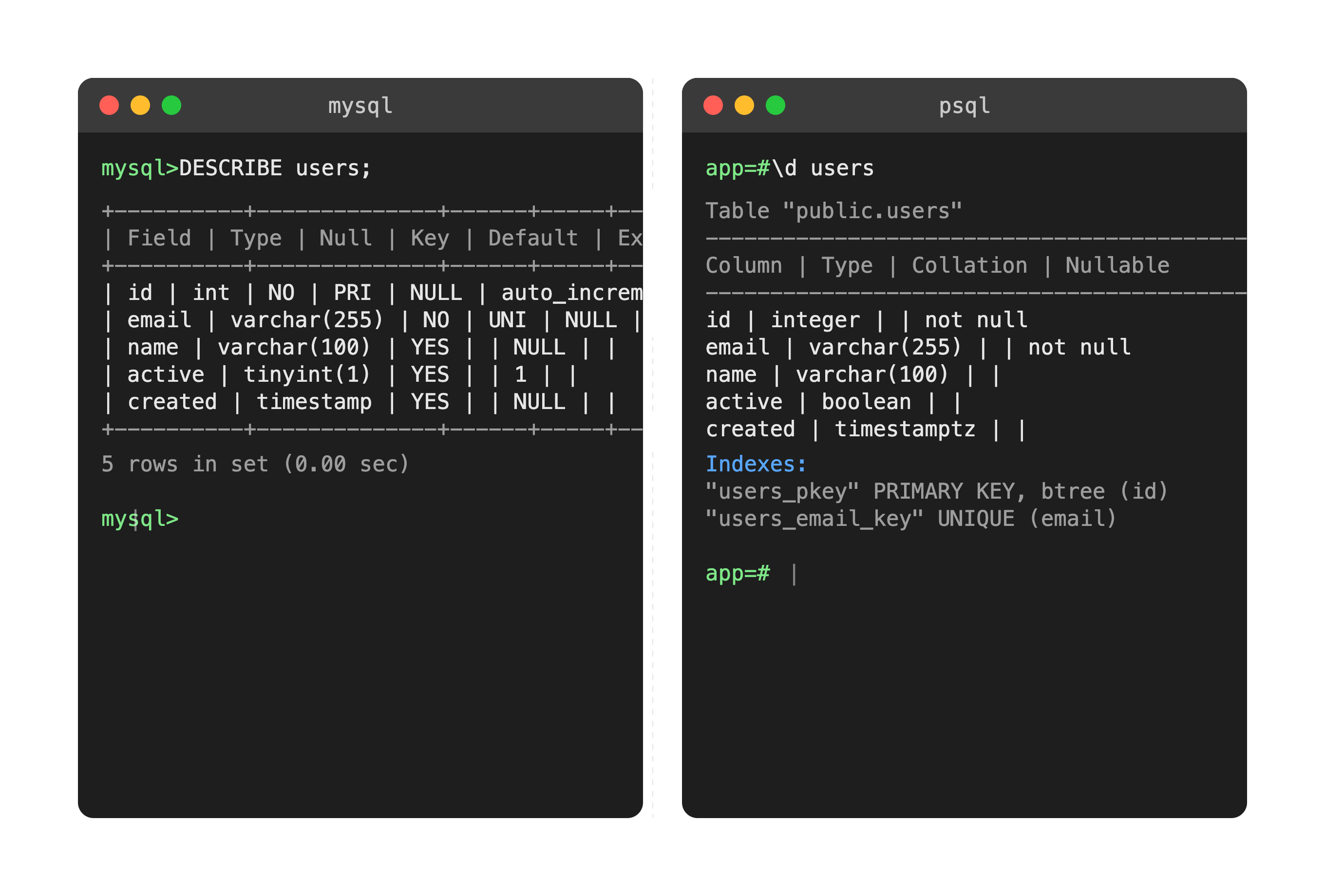
The biggest adjustment is not syntax, it is how strict Postgres is compared to MySQL. MySQL will often let you get away with things: inserting a string into a numeric column, comparing values of mismatched types, running DDL inside a transaction that silently commits parts of it. Postgres rejects most of that outright. Try to insert 'abc' into an integer column and it throws an error immediately instead of coercing or truncating.
This is not Postgres being difficult. It follows the SQL standard more closely. MySQL's permissiveness made sense in the nineties for ease of adoption, but it also means bugs can hide in your data for years without anyone noticing. Postgres would rather break your query today than corrupt your data quietly.
The second core difference is concurrency. Both databases use MVCC (Multi-Version Concurrency Control) so readers and writers do not block each other, but the implementations diverge in ways you will eventually feel in production.
| MySQL (InnoDB) | PostgreSQL | |
|---|---|---|
| Old row versions | Kept in a separate undo log, purged automatically by a background thread | Kept in the table itself as dead tuples until VACUUM reclaims them |
| Failure mode under churn | Undo log growth and history list length on long transactions | Table and index bloat, plus transaction ID wraparound risk if autovacuum falls behind |
| Type handling | Coerces where it can, warns or truncates depending on SQL mode | Rejects mismatched types at parse or execution time |
| DDL in a transaction | Implicitly commits, cannot be rolled back | Fully transactional, rolls back cleanly |
| Connection cost | Thread per connection, cheap to scale into the thousands | OS process per connection, needs a pooler past a few hundred |
That first row is the one to internalise. When a Postgres table "feels" slower over time even though your query volume has not changed, dead tuples and a lagging autovacuum are almost always the reason. It is the single most common surprise for people arriving from InnoDB, and it has no MySQL equivalent to reason from.
MySQL is not free of the problem, it just moves it. Long-running transactions there inflate the undo log and the history list instead. The difference is where you look when things degrade, and what command you reach for.
Syntax, Quoting, and Identifier Case
MySQL uses backticks for identifiers containing spaces or reserved words. Postgres uses double quotes, which is the SQL standard.
-- MySQL
SELECT `user id`, `order status` FROM `orders`;

-- PostgreSQL
SELECT "user id", "order status" FROM "orders";
String literals are always single-quoted in both. MySQL will also accept double quotes for strings unless ANSI_QUOTES mode is on. Postgres never will: a double-quoted token is always an identifier. Get in the habit of single-quoting strings and double-quoting identifiers and an entire class of errors disappears.
Identifier case is the quieter trap. Unquoted identifiers in Postgres are folded to lowercase. If you write CREATE TABLE Users, Postgres creates a table named users. Query "Users" with quotes afterwards and it will not be found, because the quoted form is case-sensitive and does not match.
-- Postgres folds this to `users`
CREATE TABLE Users (id SERIAL PRIMARY KEY);

SELECT * FROM Users;    -- works, folds to users
SELECT * FROM users;    -- works
SELECT * FROM "users";  -- works, quoted lowercase matches
SELECT * FROM "Users";  -- ERROR: relation "Users" does not exist
MySQL's behaviour here depends on the filesystem: table names are case-sensitive on Linux and case-insensitive on macOS and Windows by default, which is its own source of "works on my machine" bugs. Postgres is at least consistent across platforms.
The practical rule for both: use snake_case, all lowercase, never quoted. Then the difference stops mattering entirely.
Data Types: The Translation Table
This is the table you will come back to most often in your first month.
| Concept | MySQL | PostgreSQL |
|---|---|---|
| Auto-incrementing ID | AUTO_INCREMENT | SERIAL / BIGSERIAL, or GENERATED ALWAYS AS IDENTITY |
| Boolean | TINYINT(1), stores 1 or 0 | BOOLEAN, stores true or false natively |
| Variable text | VARCHAR(n), TEXT | VARCHAR(n), TEXT (no storage penalty for TEXT, so it is used freely) |
| Timestamp, no timezone | DATETIME | TIMESTAMP |
| Timestamp with timezone | TIMESTAMP (converts to UTC using session timezone) | TIMESTAMPTZ (the recommended default for most apps) |
| JSON | JSON (validated text, no indexing of paths) | JSON (text) and JSONB (binary, indexable, faster to query) |
| Arrays | Not supported natively | Native, for example INTEGER[] or TEXT[] |
| UUID | CHAR(36) or BINARY(16) | Native UUID type, 16 bytes |
| Enumerations | ENUM('a','b') inline on the column | CREATE TYPE ... AS ENUM, a reusable schema object |
| Fixed precision money | DECIMAL(10,2) | NUMERIC(10,2) (DECIMAL is an alias) |
| Unsigned integers | INT UNSIGNED | No unsigned types, use a CHECK constraint |
| IP addresses | VARCHAR(45) or INT | Native INET and CIDR types |
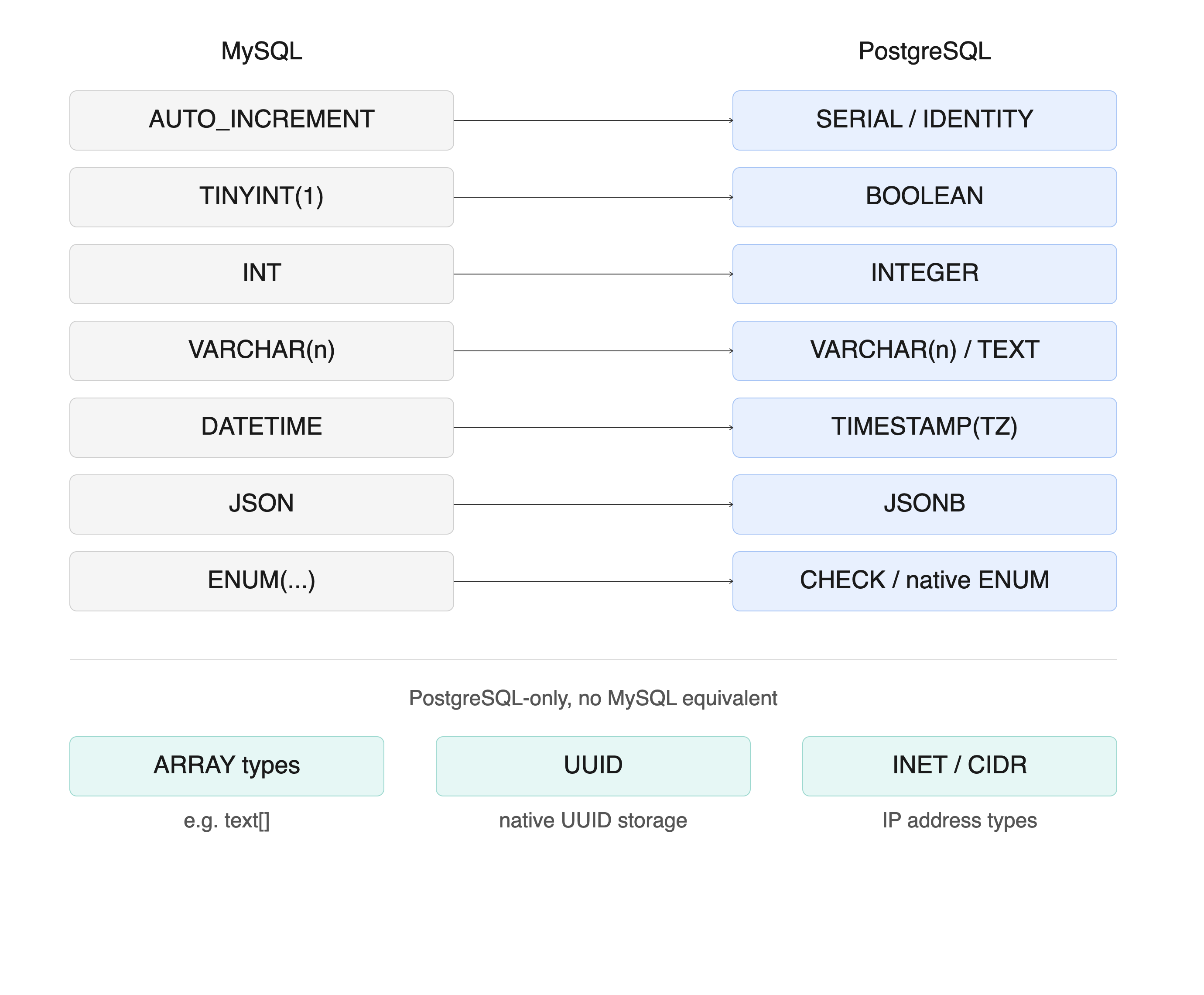
The SERIAL swap trips up almost everyone on their first Postgres table.
-- MySQL
CREATE TABLE users (
  id INT AUTO_INCREMENT PRIMARY KEY,
  email VARCHAR(255) NOT NULL UNIQUE,
  is_active TINYINT(1) DEFAULT 1,
  created_at TIMESTAMP DEFAULT CURRENT_TIMESTAMP
);

-- PostgreSQL
CREATE TABLE users (
  id BIGINT GENERATED ALWAYS AS IDENTITY PRIMARY KEY,
  email TEXT NOT NULL UNIQUE,
  is_active BOOLEAN NOT NULL DEFAULT true,
  created_at TIMESTAMPTZ NOT NULL DEFAULT now()
);
SERIAL still works and you will see it constantly in existing codebases, so recognise it. It is not a real type: it is shorthand that creates an INTEGER column, a sequence, and a default. New code should prefer GENERATED ALWAYS AS IDENTITY, which is the SQL-standard equivalent, cannot be accidentally overwritten by a manual insert, and does not leave an orphaned sequence behind when you drop the column.
Two more choices in that snippet are deliberate. TEXT instead of VARCHAR(255) costs nothing in Postgres and saves you a migration the first time an email exceeds your guessed limit. TIMESTAMPTZ instead of TIMESTAMP stores an absolute point in time rather than a wall-clock reading with no timezone attached, which is what you almost always actually want.
Query Syntax You Will Write Every Day
String concatenation is the first difference you will hit, usually within an hour.
-- MySQL
SELECT CONCAT(first_name, ' ', last_name) AS full_name FROM users;

-- PostgreSQL, idiomatic
SELECT first_name || ' ' || last_name AS full_name FROM users;
CONCAT() also exists in Postgres, so this one is forgiving, but the two are not interchangeable. CONCAT() treats NULL as an empty string, while || returns NULL if any operand is NULL. A user with no last_name gives you 'Ada ' from CONCAT() and NULL from ||. Pick deliberately, and reach for concat_ws(' ', first_name, last_name) when you want NULL-skipping behaviour with a separator.
Upserts are where the syntax genuinely diverges rather than just looking different.
-- MySQL
INSERT INTO users (id, email) VALUES (1, 'a@example.com')
ON DUPLICATE KEY UPDATE email = VALUES(email);

-- PostgreSQL
INSERT INTO users (id, email) VALUES (1, 'a@example.com')
ON CONFLICT (id) DO UPDATE SET email = EXCLUDED.email;

-- PostgreSQL, insert-or-ignore
INSERT INTO users (id, email) VALUES (1, 'a@example.com')
ON CONFLICT DO NOTHING;
Postgres requires you to name the conflicting column or constraint explicitly. That is more verbose, and also more predictable: you are not relying on the database to decide which unique key triggered the conflict when a row violates two of them at once. EXCLUDED is the pseudo-table holding the row you tried to insert, filling the role VALUES() plays in MySQL. If you are unsure which conflict action you actually want, our ON CONFLICT clause picker walks you to the right one in three questions.
LIMIT and OFFSET behave the same in both, so that is one thing you do not need to relearn. The MySQL shorthand LIMIT 10, 20 is not valid in Postgres though: write LIMIT 20 OFFSET 10.
Several everyday functions are named differently. These are the ones that come up constantly:
| Task | MySQL | PostgreSQL |
|---|---|---|
| Current timestamp | NOW() | now() or CURRENT_TIMESTAMP |
| First non-null value | IFNULL(a, b) | COALESCE(a, b) |
| Conditional value | IF(cond, a, b) | CASE WHEN cond THEN a ELSE b END |
| Cast a value | CAST(x AS SIGNED) | x::integer or CAST(x AS integer) |
| Group into a string | GROUP_CONCAT(name) | string_agg(name, ',') |
| Substring position | LOCATE(sub, str) | position(sub IN str) or strpos(str, sub) |
| Random row order | ORDER BY RAND() | ORDER BY random() |
| Date arithmetic | DATE_ADD(d, INTERVAL 7 DAY) | d + INTERVAL '7 days' |
| Regex match | col REGEXP 'pattern' | col ~ 'pattern' |
| Case-insensitive LIKE | LIKE (collation dependent) | ILIKE |
That last row deserves attention. LIKE in MySQL is case-insensitive by default because the default collation is case-insensitive. In Postgres, LIKE is always case-sensitive, and ILIKE is the explicit case-insensitive form. A search feature ported straight across will silently return fewer results rather than error, which is exactly the kind of quiet failure worth watching for.
Both databases support CTEs and window functions with standard syntax, so WITH ... AS (...) and ROW_NUMBER() OVER (PARTITION BY ...) port across unchanged. Postgres additionally supports data-modifying CTEs, which let you write a delete and an insert as one atomic statement:
WITH archived AS (
  DELETE FROM orders
  WHERE created_at < now() - INTERVAL '1 year'
  RETURNING *
)
INSERT INTO orders_archive SELECT * FROM archived;
RETURNING has no MySQL equivalent and is worth adopting immediately. Every INSERT, UPDATE, and DELETE can return the affected rows, which removes the follow-up SELECT you would otherwise write to get a generated ID back.
JSON and JSONB: Where Postgres Pulls Ahead
Postgres has two JSON types. JSON stores the exact text you gave it, preserving key order and whitespace. JSONB parses it into a binary form, discards insignificant whitespace and duplicate keys, and supports indexing. Use JSONB unless you specifically need to round-trip the original text byte for byte.
-- -> returns JSON, ->> returns text
SELECT data->>'email' AS email
FROM users
WHERE data->>'status' = 'active';

-- Nested access
SELECT data->'address'->>'city' AS city FROM users;

-- Path access, Postgres 14+
SELECT data['address']['city'] FROM users;

-- Containment: does the document contain this fragment?
SELECT * FROM users WHERE data @> '{"role": "admin"}';

-- Key existence
SELECT * FROM users WHERE data ? 'deleted_at';
Mixing up -> and ->> is the most common beginner mistake, and it usually surfaces as a confusing type error rather than an obviously wrong result. The rule: -> keeps you inside JSON so you can keep chaining, ->> exits to text so you can compare, cast, or return it.
The real advantage is indexing. A GIN index over a JSONB column makes containment queries use an index instead of scanning every row and parsing every document.
-- Broad: supports @>, ?, ?& and ?| on any key
CREATE INDEX idx_users_data ON users USING GIN (data);

-- Narrow and much smaller: supports @> only
CREATE INDEX idx_users_data_path ON users USING GIN (data jsonb_path_ops);

-- For equality on one known key, a plain B-tree expression index wins
CREATE INDEX idx_users_status ON users ((data->>'status'));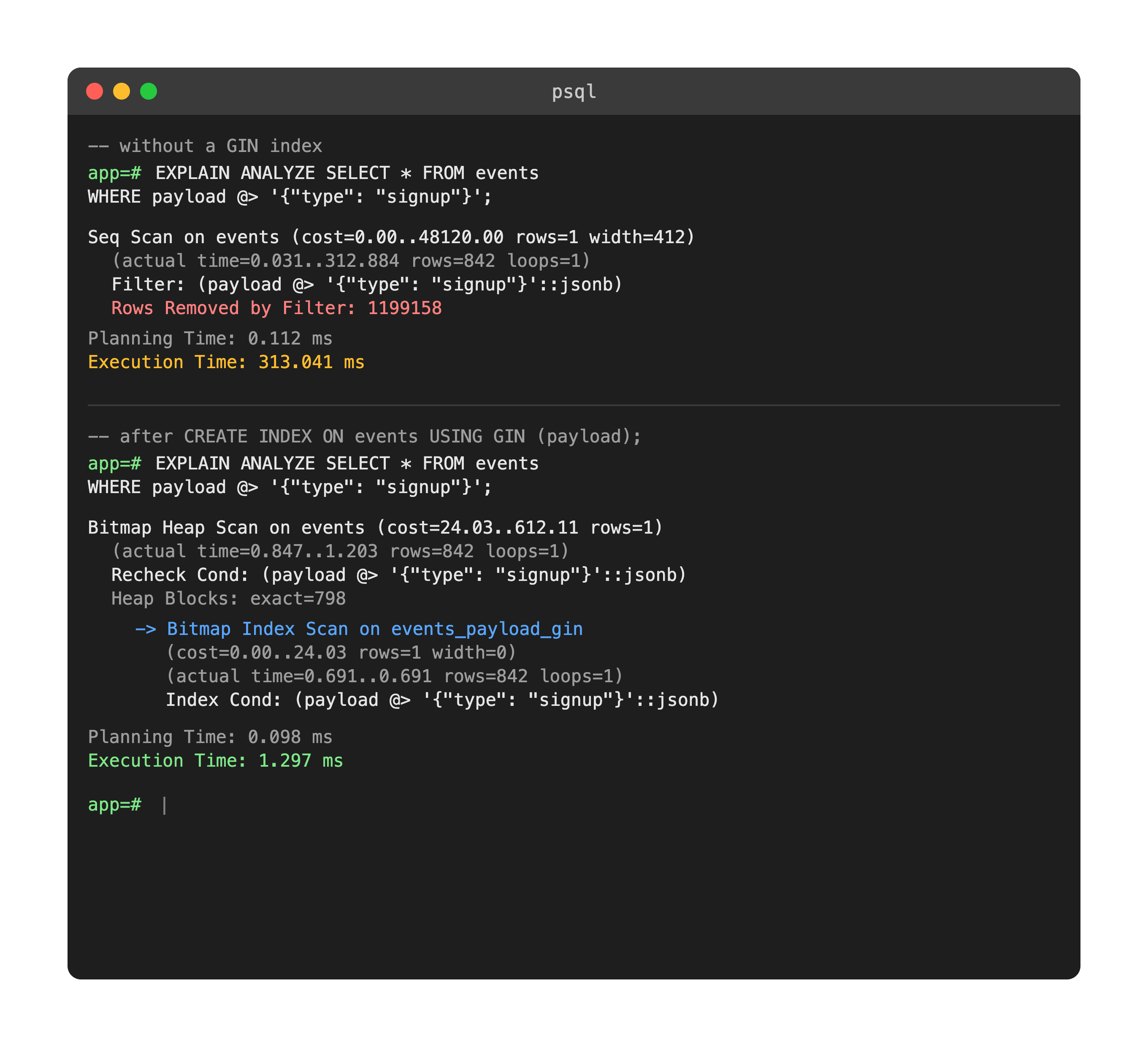
MySQL's JSON type supports similar extraction with JSON_EXTRACT() and the ->> shorthand, but it cannot index a JSON column directly. The workaround is a generated column plus an index on that column, which works for known paths and not for ad-hoc containment queries. If your data model is genuinely semi-structured, this difference alone is often the reason teams pick Postgres.
That said, JSONB is not a substitute for a schema. Columns you filter, join, or aggregate on belong in real columns with real types and real constraints. Reach for JSONB for the genuinely variable tail of your data. If you are weighing a document database instead, our NoSQL reference covers where that trade-off actually lands.
Indexing: GIN, GiST, and Partial Indexes
Both databases default to B-tree indexes and the basic CREATE INDEX syntax is nearly identical. Where Postgres pulls ahead is in index types MySQL has no answer for.
- GIN: built for JSONB, arrays, and full-text search vectors. Slower to write, very fast for containment and membership lookups.
- GiST: geometric data, range types, and nearest-neighbour searches. This is what PostGIS builds on.
- BRIN: tiny indexes for very large tables whose values correlate with physical row order, such as an append-only events table keyed by timestamp.
- Hash: equality only, crash-safe and replicated since Postgres 10. Rarely worth choosing over a B-tree.
- Partial indexes: any index type restricted to rows matching a
WHEREclause. - Expression indexes: index the result of a function call, such as
lower(email), so a case-insensitive lookup can use it.
-- Only index rows you actually query
CREATE INDEX idx_active_users ON users (email) WHERE is_active = true;

-- Case-insensitive uniqueness, enforced by the index
CREATE UNIQUE INDEX idx_users_email_lower ON users (lower(email));

-- Build without locking writes on a live table
CREATE INDEX CONCURRENTLY idx_orders_created ON orders (created_at);
Partial indexes are the underrated one. On a table where ninety percent of rows are archived or soft-deleted and you only ever query the rest, a partial index can be a fraction of the size of the full index, which means fewer pages read per lookup and less write amplification on every insert. MySQL has no direct equivalent.
CREATE INDEX CONCURRENTLY is the other habit to build early. A plain CREATE INDEX takes a lock that blocks writes for the duration, which on a large production table means an outage. The concurrent form takes longer and cannot run inside a transaction block, but it lets writes continue.
Transactions, DDL, and the Concurrency Model
Postgres supports transactional DDL. You can wrap CREATE TABLE, ALTER TABLE, or DROP TABLE inside a BEGIN and COMMIT block and roll the whole thing back if something goes wrong partway through.
BEGIN;

ALTER TABLE users ADD COLUMN phone TEXT;
ALTER TABLE users ADD CONSTRAINT phone_unique UNIQUE (phone);
UPDATE users SET phone = legacy_phone WHERE legacy_phone IS NOT NULL;

-- Something looks wrong. Back out cleanly, schema and data together.
ROLLBACK;
MySQL cannot do this. DDL statements there implicitly commit, so a migration that fails on step three leaves your schema half-changed with no clean way back. If your team runs migrations by hand, or through a tool that does not handle partial failure well, this single difference is a real production safety net. It is also why Postgres migration tooling tends to be simpler: the database does the hard part. Our guide to Drizzle ORM migrations with drizzle-kit shows what that looks like in a typed TypeScript workflow.
Both databases default to READ COMMITTED isolation, but the behaviour under that level differs in a way that matters. In MySQL, a SELECT ... FOR UPDATE blocked by another transaction waits and then reads the newly committed row. Postgres does the same, but its REPEATABLE READ is a true snapshot isolation that will abort your transaction with a serialization failure rather than silently give you a different result. Application code talking to Postgres at REPEATABLE READ or SERIALIZABLE needs retry logic. This is a feature, not a bug, but it is code you did not have to write against MySQL.
Row-level security is another Postgres-only capability with no MySQL counterpart. Policies live in the database rather than the application, which means a missed WHERE tenant_id = ? cannot leak another tenant's rows. It is also easy to get subtly wrong, so it belongs in your test suite: see testing PostgreSQL row-level security policies in Jest for a working setup.
The same transactional guarantees are strong enough that teams increasingly run job queues and workflow state directly in Postgres rather than adding a dedicated engine. We compared that trade-off in detail in Postgres as a durable workflow engine versus Temporal.
Things That Will Bite You
These are the ones that cost real debugging hours, ordered roughly by how often they come up.
- `GROUP BY` is strict. MySQL historically let you select columns not in the
GROUP BYand picked an arbitrary value. Postgres rejects the query. Every selected column must be grouped or aggregated, or wrapped in a window function. - Integer division stays integer.
SELECT 5 / 2returns2in both, but MySQL returns2.5because it promotes to decimal. Cast explicitly:5::numeric / 2. - No implicit type coercion in comparisons.
WHERE id = '42'works, since the literal is untyped and gets resolved, butWHERE some_text_col = 42errors. MySQL would coerce and, worse, would coerce'abc'to0and match rows you did not expect. - Sequences are not rolled back. A failed insert still consumes the sequence value, so identity columns have gaps. This is correct behaviour, not a bug, and code that assumes contiguous IDs will break.
- `NULL` sorts differently. Postgres puts
NULLlast inORDER BY ASCby default, MySQL puts it first. UseNULLS FIRSTorNULLS LASTexplicitly if the order matters. - No `INSERT IGNORE`, no `REPLACE INTO`. Use
ON CONFLICT DO NOTHINGand an explicit upsert respectively. There is no directREPLACEequivalent, because delete-then-insert has different foreign key and trigger consequences. - Connection cost is real. Postgres forks an OS process per connection. A pooler is not optional at any real scale, and the default
max_connectionsof 100 is not a target to raise, it is a hint to pool. - `VACUUM` is not optional either. Autovacuum handles most workloads, but a table with heavy update churn and a default configuration will bloat. Watch
n_dead_tupinpg_stat_user_tables.
When to Actually Pick PostgreSQL vs MySQL
Both databases are mature and both will handle the vast majority of real applications without breaking a sweat. Anyone telling you one is simply better is selling something. The honest decision factors are narrower than the comparison posts suggest.
Reach for PostgreSQL when your data is semi-structured and you want it indexed, when your queries involve complex joins, CTEs, or analytical aggregation, when you need geospatial support, or when you are anywhere near vector search and embeddings. The extension ecosystem, PostGIS, pgvector, TimescaleDB, does things MySQL has no answer for. Transactional DDL and row-level security are also genuine operational advantages on teams that ship schema changes often.
Stay on MySQL when your team already runs it well, when your workload is high-volume simple lookups on a primary key, when you are deep in a WordPress or LAMP-adjacent ecosystem, or when you need very high connection counts without a pooling layer. MySQL's replication story is also older and more widely operationally understood, which matters more than benchmark numbers when something breaks at 3am.
The factor that decides it in practice is usually not technical at all: it is which one your team can operate confidently. A well-tuned MySQL beats a badly maintained Postgres every single time, and the reverse is equally true.
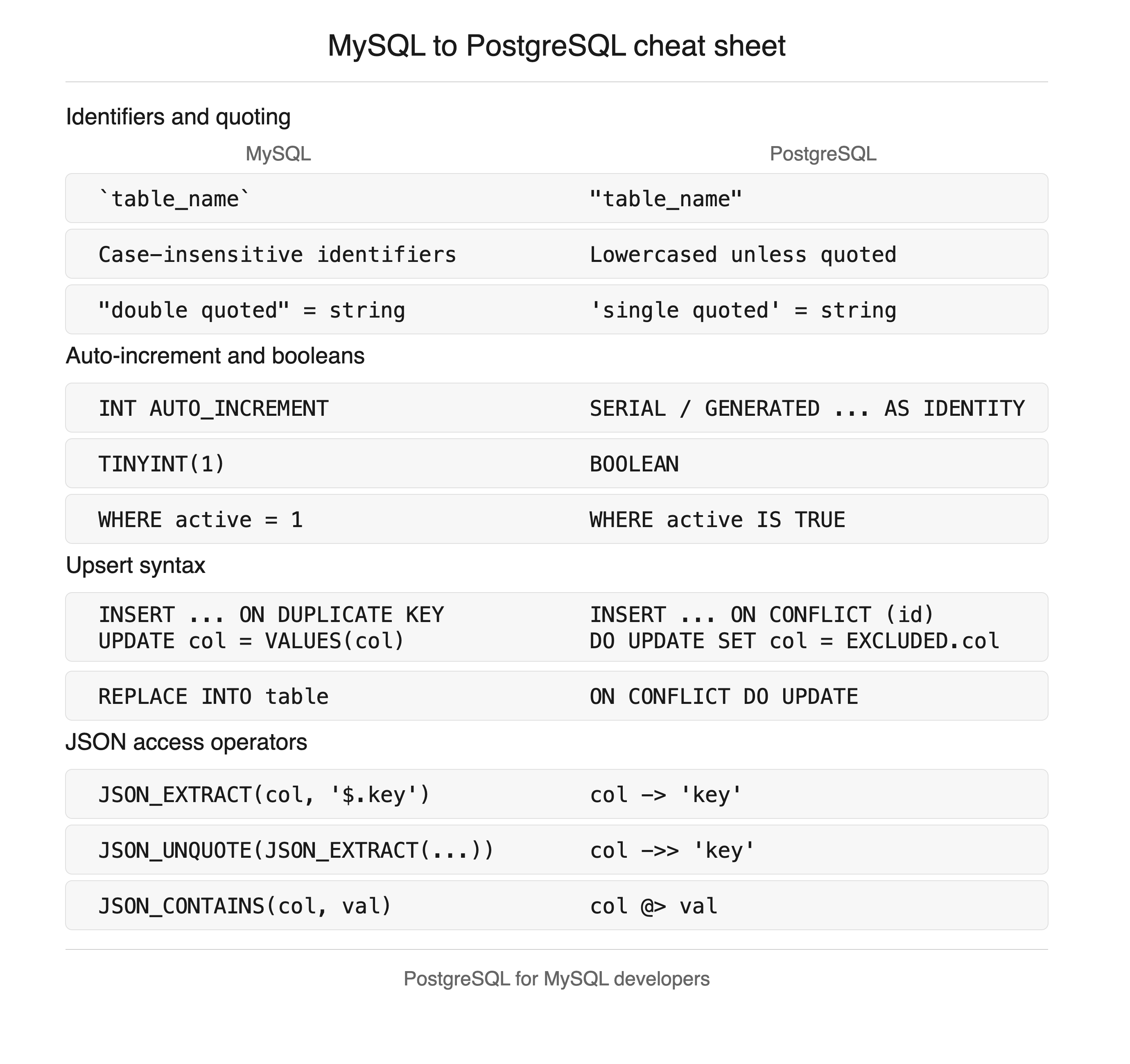
Quick Reference Cheat Sheet
Bookmark this section. It is the part you will reopen six months from now when you forget which operator does what.
| Task | MySQL | PostgreSQL |
|---|---|---|
| Auto-increment | id INT AUTO_INCREMENT | id BIGINT GENERATED ALWAYS AS IDENTITY |
| Boolean column | TINYINT(1) DEFAULT 1 | BOOLEAN DEFAULT true |
| Quote an identifier | `order status` | "order status" |
| Concatenate strings | CONCAT(a, b) | a || b |
| Upsert | ON DUPLICATE KEY UPDATE | ON CONFLICT (col) DO UPDATE |
| Insert or ignore | INSERT IGNORE | ON CONFLICT DO NOTHING |
| Read a JSON field | JSON_EXTRACT(d, '$.email') | d->>'email' |
| Case-insensitive search | LIKE | ILIKE |
| Return the inserted row | SELECT LAST_INSERT_ID() | INSERT ... RETURNING * |
| List tables | SHOW TABLES | \dt in psql |
| Describe a table | DESCRIBE users | \d users in psql |
| Show the query plan | EXPLAIN SELECT ... | EXPLAIN (ANALYZE, BUFFERS) SELECT ... |
| Limit with offset | LIMIT 10, 20 | LIMIT 20 OFFSET 10 |
| Current database | SELECT DATABASE() | SELECT current_database() |
- Identifiers are lowercase snake_case and unquoted everywhere
- Primary keys use GENERATED ALWAYS AS IDENTITY, not SERIAL
- Timestamp columns are TIMESTAMPTZ, defaulting to now()
- Booleans are BOOLEAN, not integers
- Case-insensitive searches use ILIKE or an expression index on lower()
- Indexes on live tables are created with CONCURRENTLY
- A connection pooler is in front of the database before launch
- Autovacuum settings reviewed for any high-churn table
Frequently Asked Questions
Frequently Asked Questions
Is PostgreSQL faster than MySQL?
It depends entirely on the workload, and for most applications the answer will not decide anything.
Postgres tends to win on complex queries: multi-table joins, subqueries, CTEs, and analytical aggregation, because its planner considers more strategies and its parallel query support is stronger. MySQL tends to win on very high volumes of simple primary-key lookups, because its planner has less overhead per query and its connection model is cheaper.
In practice your query design, indexing strategy, and whether you have a caching layer will matter far more than the engine choice. If throughput is the concern, our guide to caching strategies is a better place to spend the first hour than a benchmark comparison.
Can I run my existing MySQL queries directly against PostgreSQL?
Simple SELECT and JOIN statements usually work unchanged. Anything touching MySQL-specific syntax needs rewriting.
- Usually fine: SELECT, JOIN, WHERE, GROUP BY with fully grouped columns, LIMIT and OFFSET in the standard form, CTEs, window functions.
- Needs a rewrite: backtick identifiers,
AUTO_INCREMENT,ON DUPLICATE KEY UPDATE,INSERT IGNORE,REPLACE INTO,IFNULL,GROUP_CONCAT,LIMIT 10, 20. - Needs a full rewrite: stored procedures and triggers. MySQL's procedural syntax and PL/pgSQL are different languages, not dialects.
The queries that worry me most are the ones that run without error and return different results, such as a LIKE search that was case-insensitive in MySQL and is not in Postgres. Those do not show up in a smoke test.
Do I really need a connection pooler for PostgreSQL in production?
Yes, in almost every real deployment. Postgres forks a full OS process per connection, each holding its own memory for sorts, caches, and catalogs. A few hundred idle connections is measurable RAM and context-switching cost before a single query runs.
PgBouncer in transaction pooling mode is the standard choice and most managed providers offer one. Be aware of what it changes: session-level state does not survive between pooled transactions, so SET search_path, session advisory locks, and some prepared statement patterns behave differently. Serverless and edge runtimes make this worse, because each function instance opens its own connection, which is exactly the case pooling was built for.
Why does my Postgres table look empty when I query it with quotes?
You almost certainly created it with a mixed-case name without quotes. Postgres folds unquoted identifiers to lowercase, so CREATE TABLE Users creates users. Querying "Users" with quotes asks for a different, case-sensitive identifier that does not exist.
-- Confirm what the table is actually called
SELECT tablename FROM pg_tables WHERE schemaname = 'public';

-- Rename it to the unquoted-friendly form if an ORM created it quoted
ALTER TABLE "Users" RENAME TO users;
ORMs that quote every identifier are the usual source of genuinely mixed-case tables. If yours does, configure it to snake_case rather than fighting the quoting in every hand-written query.
How hard is migrating an existing app from MySQL to PostgreSQL?
It scales with how much MySQL-specific behaviour your code depends on, not with data volume.
If you are on a solid ORM with little raw SQL, the migration is mostly mechanical: convert the schema, map the types, move the data with a tool like pgloader, then fix the handful of raw queries. A week or two of work for a mid-sized app.
If you have hand-written SQL throughout, stored procedures, triggers, or code relying on MySQL's permissive type coercion, expect real engineering time. The hidden cost is usually data quality: rows that MySQL accepted through coercion, such as '0000-00-00' dates or strings in numeric columns, will be rejected on import and need cleaning first.
Should I use SERIAL or GENERATED ALWAYS AS IDENTITY?
Use GENERATED ALWAYS AS IDENTITY for new tables. It is the SQL-standard form, it is what Postgres itself recommends, and it fixes two real problems with SERIAL.
- Ownership: a
SERIALcolumn's sequence is a separate object that can be left orphaned, or have its permissions drift out of sync with the table. - Accidental overwrite:
SERIALlets an application insert an explicit ID, which silently desynchronises the sequence and causes duplicate key errors later.GENERATED ALWAYSrejects that unless you writeOVERRIDING SYSTEM VALUE.
You will still meet SERIAL in every older codebase, so recognise it and leave it alone. Converting an existing column is possible but not worth the migration risk on its own.
Why does my PostgreSQL database get slower over time when the data barely grows?
This is table bloat, and it is the single most common Postgres surprise for people arriving from InnoDB.
Every UPDATE in Postgres writes a new row version and marks the old one dead. Autovacuum reclaims that space in the background, but on a table with heavy update churn it can fall behind, and the table plus its indexes keep growing with tuples nobody can see. Scans read more pages for the same number of live rows, so queries slow down without your data or traffic changing.
SELECT relname,
       n_live_tup,
       n_dead_tup,
       last_autovacuum
FROM pg_stat_user_tables
ORDER BY n_dead_tup DESC
LIMIT 10;
If n_dead_tup is a large fraction of n_live_tup on a hot table, tune autovacuum for that table specifically rather than globally: lower autovacuum_vacuum_scale_factor so it triggers more often on large tables. VACUUM FULL reclaims the space properly but takes an exclusive lock, so it is a maintenance-window operation, not a fix you run during traffic.
None of this makes Postgres harder than MySQL. It makes it different in a small number of specific, learnable ways, and most of those differences exist because Postgres refuses to guess what you meant. Once the strictness stops feeling like friction, it starts feeling like a safety net.
Work through the checklist above on your next table, read one EXPLAIN (ANALYZE, BUFFERS) plan properly, and set up a pooler before you need one. That covers most of the distance between knowing SQL and being productive in Postgres.
Related Articles
Testing PostgreSQL RLS Policies With Jest (No pgTAP)
Test PostgreSQL row-level security with Jest and node-postgres, no pgTAP required. Catch tenant isolation bugs in CI before a bad grant reaches production.
pg_durable: Durable Workflows in PostgreSQL vs Temporal and Cron+Queue
Microsoft's pg_durable brings durable workflow execution inside PostgreSQL. Here is the syntax, what it replaces, and an honest comparison against Temporal and cron+queue patterns.
40 SQL Interview Questions and Answers (2026)
40 SQL and relational database interview questions covering joins, indexes, ACID, window functions, CTEs, MySQL vs PostgreSQL, and query challenges.