40 React Interview Questions and Answers (2026 Edition)
40 React interview questions covering Hooks, Server Components, Actions, the React Compiler, and React 19.2 features like useEffectEvent and Activity. Updated for 2026.

On this page
React interviews in 2026 no longer stop at props, state, and the Virtual DOM. React 19 shipped Actions, useActionState, and ref as a regular prop. React 19.2 followed with useEffectEvent, the Activity component, and cacheSignal. The React Compiler went stable in October 2025, and interviewers now expect you to know what it changes about the code you write, not just what it is.
These 40 questions cover both layers: the fundamentals every candidate is still expected to know cold, and the React 19 / 19.2 specifics that separate someone reciting 2022 answers from someone who actually ships current React. If you are also interviewing for full-stack or Next.js roles, our Next.js interview questions guide pairs directly with the Server Components material here.
Section 1: React Fundamentals (Q1-Q8)
Fundamentals questions test whether you understand the model React is built on, not whether you've memorized API names. Expect these in every interview regardless of seniority.
Q1. What is React and why do companies still choose it in 2026?
React is a JavaScript library for building user interfaces out of reusable components. It is not a full framework: it handles the view layer and leaves routing, data-fetching conventions, and build tooling to the ecosystem or to a framework like Next.js.
Companies still pick it because the hiring pool is enormous, the component model scales from a single form to a full application, and the ecosystem (React Query, Zustand, React Router) covers almost every problem you'll hit. In 2026 the pitch is stronger than ever because the React Compiler removes most manual performance tuning, and Server Components let you keep data-fetching code on the server without a separate API layer.
Q2. What is JSX and does it get shipped to the browser?
JSX is a syntax extension that lets you write HTML-like markup inside JavaScript. It never reaches the browser as-is. A compiler (Babel or the TypeScript compiler) transforms JSX into React.createElement calls, or in newer setups, into calls against the automatic JSX runtime.
The browser only ever sees plain JavaScript function calls that build up a tree of objects describing your UI.
Q3. What is the Virtual DOM and is it still relevant with the React Compiler?
The Virtual DOM is a lightweight JavaScript object tree that mirrors the real DOM. When state changes, React builds a new Virtual DOM tree, diffs it against the previous one, and applies only the minimal set of real DOM operations needed. This is still exactly how React works today.
The React Compiler doesn't replace the Virtual DOM. It reduces how often components re-render and re-diff in the first place by auto-memoizing values and skipping unnecessary render calls. The two systems solve different problems: the Virtual DOM makes each render cheap, the compiler reduces how many renders happen.
Q4. What is the difference between props and state?
Props are read-only data passed down from a parent component to a child. A component can never modify its own props. State is data owned and managed by a component itself, typically through useState or useReducer, and it can change over time in response to user actions or events.
When state changes, the component re-renders. When props change, it's because the parent re-rendered and passed new values down. Props flow down, state lives locally, and this one-directional flow is what makes React apps predictable to debug.
Q5. What are controlled and uncontrolled components?
A controlled component has its value driven entirely by React state: you set the value prop and update it in an onChange handler. An uncontrolled component keeps its own internal DOM state and you read it out only when needed, usually with a ref.
Controlled components give you full control for validation and conditional logic, but require a re-render on every keystroke. Uncontrolled components are faster for very large forms because typing doesn't trigger React renders at all. Since React 19, this decision matters less for simple forms because Actions and the form action prop can read FormData directly without wiring up controlled state at all.
Q6. What is the key prop and why does React complain if you skip it in a list?
The key prop tells React's reconciler which array item is which across renders, so it can correctly match, reorder, insert, or remove DOM nodes instead of tearing everything down and rebuilding it.
Without a stable key, React falls back to matching by index position, which breaks badly the moment you insert or remove an item from the middle of a list: inputs can lose focus, and component state can attach to the wrong row. The fix is always the same: use a stable, unique identifier from your data, like a database id, never the array index unless the list is static and never reordered.
Q7. What is prop drilling and how would you avoid it today?
Prop drilling is passing a prop through several layers of components that don't use it themselves, just so a deeply nested child can access it. It's not wrong, just annoying to maintain.
In 2026 you have three realistic options depending on scope: useContext for values that change rarely (theme, current user, locale), a state management library like Zustand or Jotai for frequently-updating shared state, or component composition, passing already-rendered JSX as children so you skip the layers entirely. Context is not a performance tool by itself; every consumer re-renders when the context value changes, so pair it with memoization or split contexts by concern.
Q8. Explain reconciliation and the diffing algorithm in plain terms.
Reconciliation is the process React uses to figure out what changed between two Virtual DOM trees and what real DOM updates are actually needed. Instead of a full tree comparison, which would be too slow, React uses heuristics: it assumes elements of different types produce different trees and tears them down completely, and it uses the key prop to match items within a list.
This turns an expensive general tree-diff problem into a fast, linear-time comparison that's good enough for real UI trees, where siblings rarely reorder wildly and element types rarely change unpredictably.
Section 2: Hooks (Q9-Q20)
Hooks questions test whether you understand the mental model behind them, not just which hook to reach for. Expect follow-up questions asking why a hook works the way it does, not just what it does.
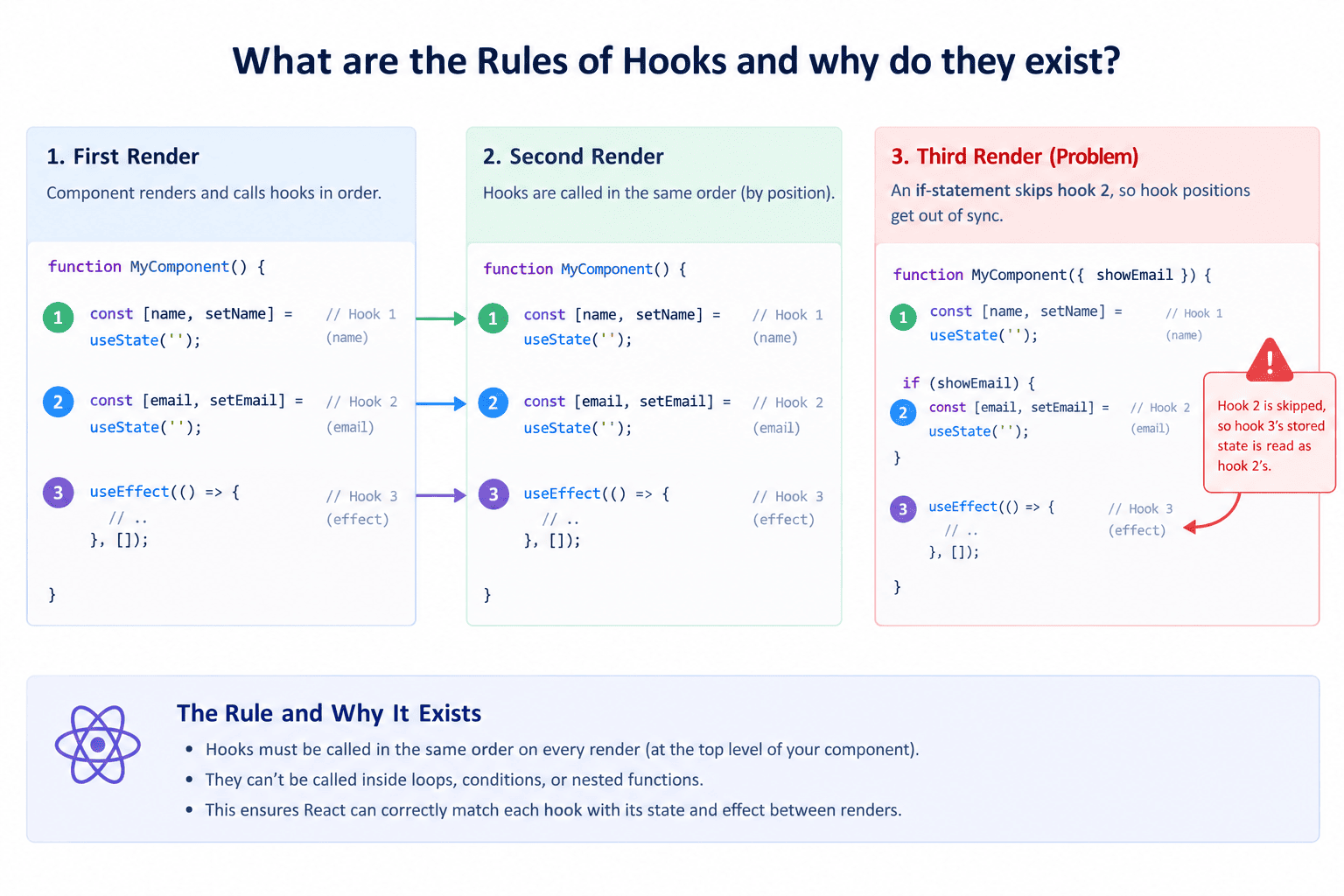
Q9. What are the Rules of Hooks and why do they exist?
Hooks must be called at the top level of a component or custom hook, never inside loops, conditions, or nested functions, and only from React function components or other hooks.
The reason is that React tracks hooks by call order, not by name: it keeps an internal list per component and matches the nth useState call on this render to the nth useState call on the last render. If a hook call is conditional, that order can shift between renders and React ends up reading the wrong stored state for the wrong hook.
The ESLint plugin for hooks catches almost all violations automatically, and it's the same plugin the React Compiler depends on to verify your code is safe to auto-memoize.
Q10. What's the real difference between useEffect and useLayoutEffect?
useEffect runs asynchronously after the browser has painted the screen, so the user sees the UI update first and the effect runs after. useLayoutEffect runs synchronously after DOM mutations but before the browser paints, blocking the paint until it finishes.
You reach for useLayoutEffect only when you need to measure the DOM (like an element's height) and make a visual change before the user has a chance to see a flicker: things like tooltip positioning or scroll restoration. For anything else, including data fetching, subscriptions, and logging, useEffect is the right and more performant default.
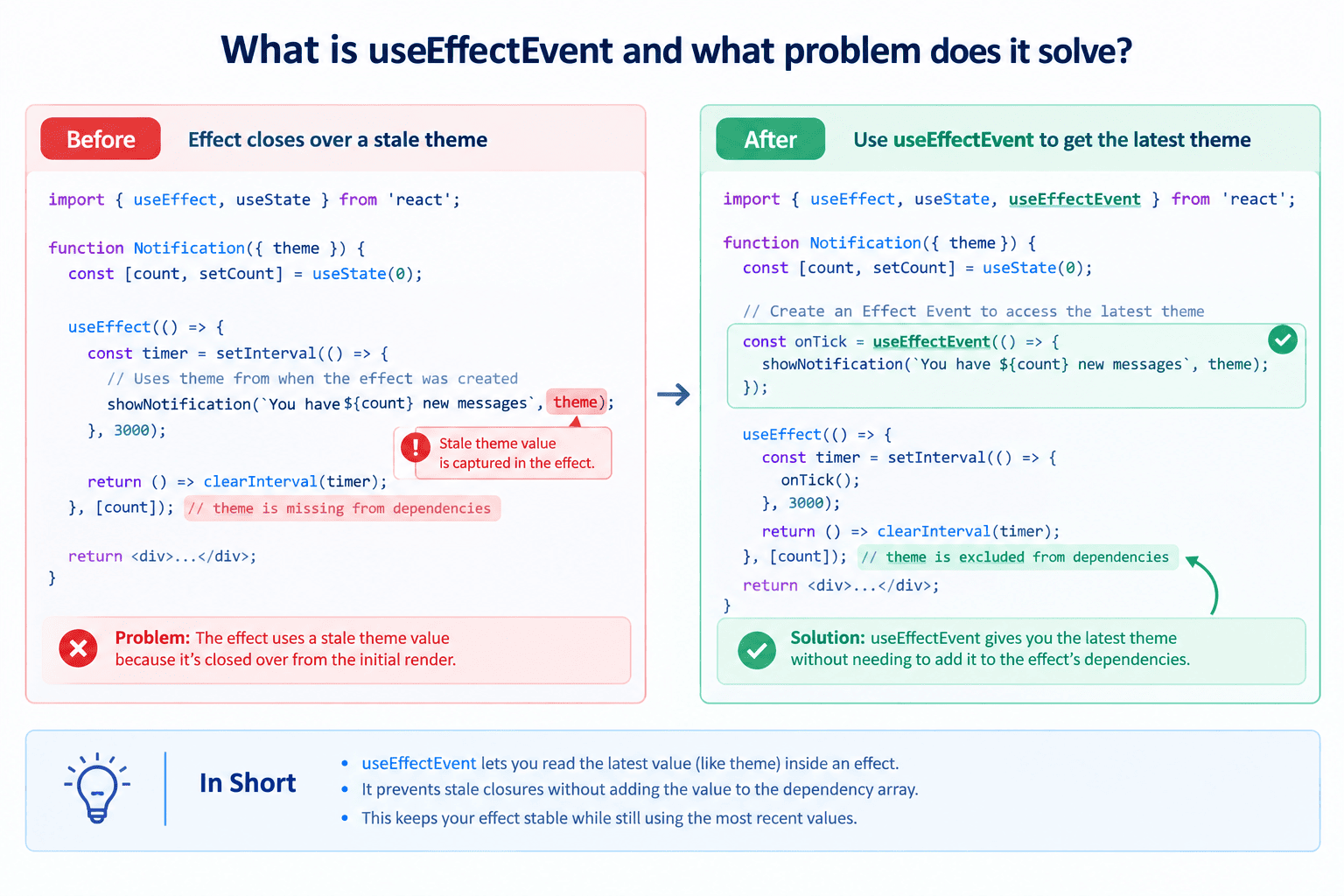
Q11. What is useEffectEvent and what problem does it solve?
useEffectEvent, added in React 19.2, lets you pull a callback out of an effect so it always reads the latest props and state without being a dependency that forces the effect to re-run.
Before this hook, a common problem was a useEffect that connects to a chat room and also needs the current theme to show a notification. Theme has nothing to do with when to reconnect, but leaving it out of the dependency array meant reading a stale value, and including it meant reconnecting every time the theme changed.
// Before: stale closure bug or unwanted reconnects
function ChatRoom({ roomId, theme }: { roomId: string; theme: string }) {
  useEffect(() => {
    const connection = createConnection(roomId);
    connection.on("connected", () => {
      showNotification("Connected!", theme); // reads a STALE theme if omitted from deps
    });
    connection.connect();
    return () => connection.disconnect();
  }, [roomId]); // adding theme here reconnects on every theme change
}

// After: useEffectEvent excludes theme from the dependency array by design
function ChatRoom({ roomId, theme }: { roomId: string; theme: string }) {
  const onConnected = useEffectEvent(() => {
    showNotification("Connected!", theme); // always reads the LATEST theme
  });

  useEffect(() => {
    const connection = createConnection(roomId);
    connection.on("connected", () => onConnected());
    connection.connect();
    return () => connection.disconnect();
  }, [roomId]); // only reconnects when roomId actually changes
}
useEffectEvent solves this cleanly: you wrap the notification logic in useEffectEvent, call it from inside the effect, and it's excluded from the dependency array by design because it's not treated as reactive.
Q12. What is the Activity component in React 19.2 and when would you use it?
Activity is a component that lets you keep part of your UI mounted but hidden, instead of unmounting it. In hidden mode, React unmounts the component's effects and defers its updates until the browser is idle, but keeps its state and DOM structure intact.
This is useful for tab interfaces, multi-step wizards, or side navigation panels where switching back and forth should be instant and preserve exactly what the user had typed or scrolled to, without refetching data or losing input focus. It's a direct upgrade over conditionally rendering with {isVisible && <Component />}, which fully destroys and rebuilds state on every toggle.
Q13. How does useState batching work in React 18 and 19?
React batches multiple state updates that happen within the same event handler or the same tick into a single re-render, rather than re-rendering after each individual setState call.
Since React 18, this batching applies automatically everywhere: inside promises, setTimeout callbacks, native event handlers, and not just inside React's own synthetic event handlers, which was the old React 17 limitation. If you genuinely need to force a synchronous update outside of batching, flushSync from react-dom exists, but you should treat reaching for it as a signal to double check your logic first.
Q14. What is useReducer and when is it a better choice than useState?
useReducer manages state through a reducer function that takes the current state and an action, and returns the next state, similar to Redux's core pattern but scoped to a single component or custom hook.
It's the better choice when state updates depend on multiple related fields, when the next state depends heavily on the previous state in non-trivial ways, or when you have many possible state transitions that are easier to read as named actions than as a pile of individual setState calls scattered across handlers.
Q15. What is useMemo and do you still need it with the React Compiler?
useMemo caches the result of an expensive calculation between renders and only recomputes it when its dependencies change.
With React Compiler 1.0, which went stable in October 2025, the compiler automatically inserts this kind of memoization for you at build time in components that follow the Rules of React, so most new code doesn't need manual useMemo calls at all. You should still reach for it manually when a value's referential identity is a hard correctness requirement, such as an effect dependency, or when you're working with a codebase that isn't running the compiler yet.
Q16. What is useCallback and how is it different from useMemo?
useCallback returns a memoized version of a function itself, so the same function reference is reused across renders as long as its dependencies don't change. useMemo memoizes the return value of a computation.
They're built on the same mechanism: useCallback(fn, deps) is functionally equivalent to useMemo(() => fn, deps), but useCallback exists as a clearer, more readable API specifically for the common case of passing stable callbacks to child components or effect dependencies.
Q17. What is a custom hook and what's the rule for naming one?
A custom hook is a plain JavaScript function that calls other hooks internally and lets you extract and reuse stateful logic across components: things like useDebounce, useLocalStorage, or useFetch.
The naming rule is strict: it must start with use so React's linter and the React Compiler can identify it as a hook and enforce the Rules of Hooks on it. A function that doesn't call any hooks internally shouldn't be named with a use prefix, because that misleads both the linter and other developers reading your code.
Q18. What is useRef used for beyond accessing DOM nodes?
useRef returns a mutable object with a .current property that persists across renders without triggering a re-render when it changes.
Beyond grabbing a reference to a DOM node for focus management or measurements, it's commonly used to store any value you want to persist between renders but don't want to trigger a re-render: a previous prop value for comparison, a timer ID for cleanup, or a flag tracking whether a component has mounted yet.
Q19. What is useTransition and how does it differ from debouncing?
useTransition lets you mark a state update as non-urgent, telling React it can be interrupted by more urgent updates like a keystroke, and can render a pending indicator (isPending) while the transition is in progress.
Debouncing delays firing an update until the user stops interacting for a set amount of time: it changes when the work happens. useTransition doesn't delay anything; it changes how the work is prioritized, letting React keep the input responsive while a lower-priority re-render, like filtering a large list, happens in the background without blocking the UI thread.
Q20. What is useOptimistic and where would you actually use it?
useOptimistic lets you show a temporary, optimistic state immediately in response to a user action, before the actual async operation (usually a server request) has finished. If the action succeeds, React reconciles the optimistic value with the real result. If it fails, you handle rolling it back.
It's built for exactly the kind of UI where a Twitter-style like button, a comment being posted, or an item being added to a cart should feel instant rather than waiting on a network round trip before showing any feedback.
Section 3: React 19 and React 19.2 Specific (Q21-Q30)
This is the section that separates candidates who kept up with React from candidates repeating 2022 answers. Actions, Server Components, and the compiler are the organizing ideas behind everything React shipped in 2025 and 2026.
Q21. What are Actions in React 19 and what problem do they solve?
An Action is an async function passed to a transition, typically through a form's action prop, useActionState, or manually with startTransition. React takes over managing pending state, error handling, optimistic updates, and resetting uncontrolled form fields after a successful submission: all the plumbing developers used to hand-write around every onSubmit handler.
Actions are the organizing idea behind React 19: useActionState, useFormStatus, and useOptimistic are really three different views onto the same underlying mechanism.
Q22. How do you pass a function directly to a form in React 19?
React 19 lets you pass a function directly to a form's action prop, or to a button's formAction prop. React calls that function with a FormData object when the form submits, runs it inside a transition automatically, and resets uncontrolled inputs on success without you writing any manual reset logic.
function SignupForm() {
  const [error, submitAction, isPending] = useActionState(
    async (previousState: string | null, formData: FormData) => {
      const result = await createUser(formData.get("email"));
      if (result.error) return result.error;
      return null;
    },
    null,
  );

  return (
    <form action={submitAction}>
      <input name="email" type="email" required />
      <button disabled={isPending}>Sign up</button>
      {error && <p>{error}</p>}
    </form>
  );
}
Q23. What is useActionState and how does it relate to the old useFormState?
useActionState takes an action function and an initial state, and returns the current state, a wrapped action to pass to your form, and a pending boolean.
It replaces the earlier useFormState API from the canary channel, which only returned state and the wrapped action without a built-in pending flag: you had to combine it with useFormStatus separately for that. useActionState folds both concerns into one hook.
Q24. What is useFormStatus and why can't you call it in the same component as the form?
useFormStatus reads the pending, data, method, and action of the nearest parent form, but only from a component that is rendered inside that form, not from the component that renders the form itself.
This is intentional: it lets you build a reusable SubmitButton component that shows a loading state without threading a pending prop down manually. If you call it in the same component that renders the <form> tag, it won't see that form's status, because it's designed to read from an ancestor, not a sibling.
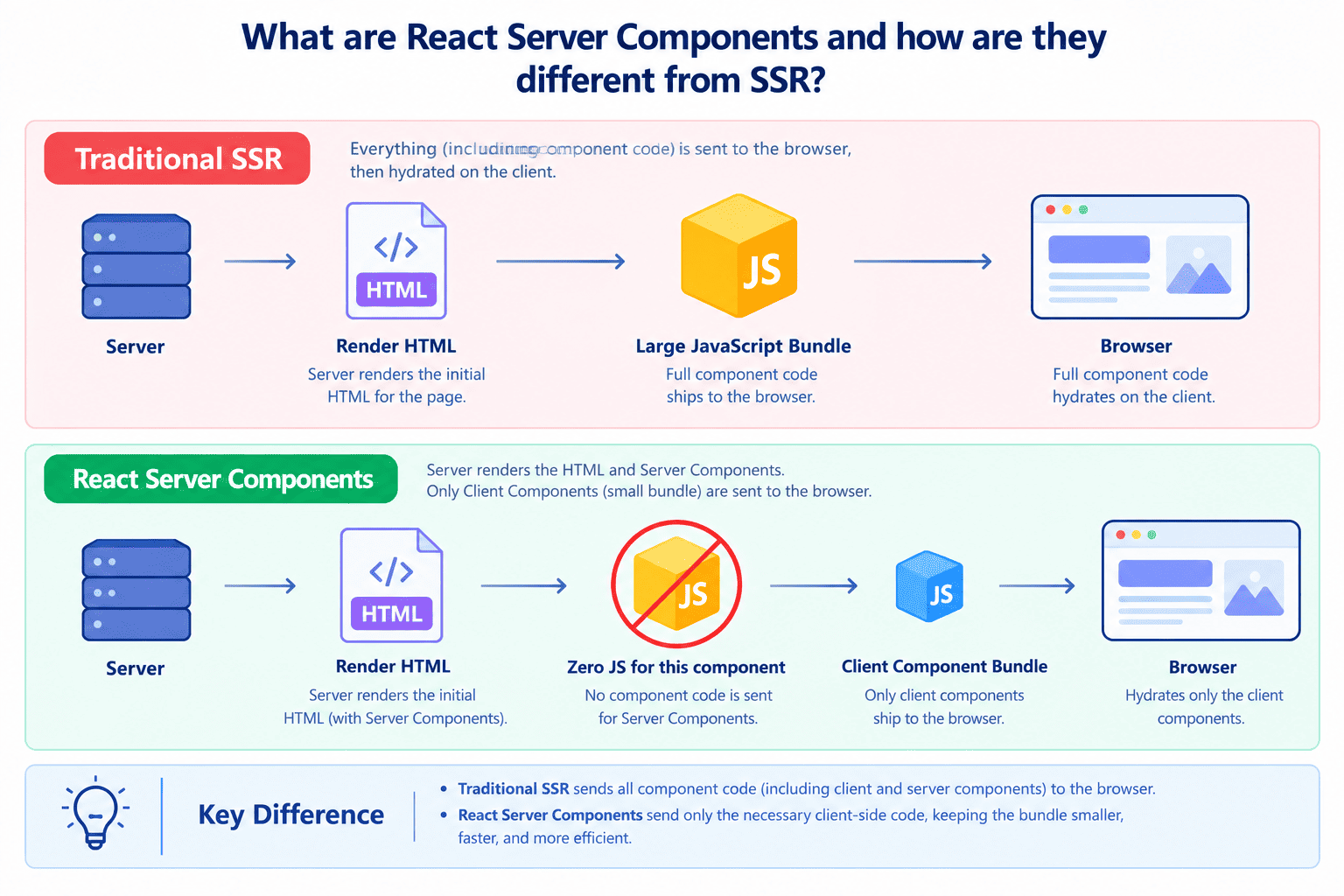
Q25. What are React Server Components and how are they different from SSR?
Server Components are components that run only on the server and never ship their JavaScript to the browser at all: no hydration cost, no bundle size for that component's logic or its dependencies. Traditional server-side rendering (SSR) still sends the full component's JavaScript to the client to hydrate it into an interactive tree; the server-rendered HTML is just a head start on the first paint.
Server Components let you fetch data directly inside a component with a simple await, without exposing that logic or its dependencies to the client bundle, and they compose with Client Components (marked with "use client") for anything that needs interactivity.
Q26. What is the use hook and how is it different from other hooks?
The use hook lets you read the value of a Promise or a Context inside render, and unlike other hooks, it can be called conditionally, inside if statements, after early returns, even inside loops, because it isn't tied to call-order tracking the way useState and useEffect are.
When you pass it a Promise, the component suspends until that Promise resolves, integrating directly with Suspense boundaries. The catch is the Promise itself needs to be created outside of render and cached, typically via a Server Component or a caching layer, because creating a new Promise inside render on every call would cause an infinite suspend loop.
Q27. What is cacheSignal and what problem does it solve in Server Components?
cacheSignal, added in React 19.2, gives you an AbortSignal tied to the lifetime of a server render's cache. It fires when React is done with a particular render pass and its cached data is no longer needed, letting you cancel in-flight requests or clean up resources tied to that cache scope instead of letting them run to completion for no reason after the response has already been sent.
Q28. What are Performance Tracks in React 19.2 and how do you use them?
Performance Tracks are a Chrome DevTools integration that gives React its own dedicated tracks in the Performance panel: a Scheduler track showing what priority level React is working at (blocking updates versus transitions), and a Components track showing render and effect timing per component.
Instead of guessing from a generic flame graph which component caused a slow frame, you can see directly whether a low-priority transition update is blocking a high-priority interaction, which used to require manual console.time calls scattered through your code.
Q29. Is React Compiler mandatory in React 19, and what does it actually change?
The React Compiler is opt-in, not mandatory: it's a separate build-time tool you add via a Babel plugin or bundler integration, and it works with any codebase already running React 19 conventions.
What it changes practically is that you stop manually wrapping values in useMemo, functions in useCallback, and components in React.memo for performance reasons, because the compiler analyzes your component at build time and inserts equivalent memoization automatically wherever it's safe to do so, including cases hand-written hooks structurally can't handle, like memoizing a value defined after an early return.
Q30. Why is ref now a regular prop in React 19, and does forwardRef still work?
Starting in React 19, function components can accept ref as a normal named prop, the same way they accept any other prop, without needing to wrap the component in forwardRef. This removes a common piece of boilerplate that every reusable component library had to add just to support ref passthrough.
forwardRef still works and existing code using it won't break, but the React docs mark it as a legacy pattern headed toward eventual deprecation, so new components should just declare ref as a prop directly.
Section 4: Performance, Patterns and Architecture (Q31-Q36)
These questions test judgment: knowing when to reach for an optimization technique, not just how to use it. Interviewers use these to spot candidates who over-engineer versus candidates who measure first.
Q31. How do you decide what to memoize without the React Compiler?
Profile before optimizing, using the React DevTools Profiler to find components that re-render often and take meaningful render time, since most components don't need memoization at all.
Wrap a component in React.memo only when it receives the same props often but its parent re-renders frequently for unrelated reasons. Use useCallback and useMemo specifically to keep prop references stable so that memo comparison on the child actually succeeds. Guessing and wrapping everything "just in case" adds comparison overhead everywhere and often makes performance worse, not better.
Q32. What is code splitting and how do you implement it with lazy and Suspense?
Code splitting breaks your JavaScript bundle into smaller chunks that load on demand instead of all upfront, which speeds up initial page load. React.lazy takes a function that dynamically imports a component and returns a new component that suspends until that import resolves.
You wrap it in a Suspense boundary with a fallback, typically a loading skeleton, and React shows that fallback while the chunk downloads, then swaps in the real component once it's ready. Route-based splitting, where each page is its own lazy-loaded chunk, is the most common and highest-impact place to start.
Q33. What is the difference between Suspense for data fetching and for lazy loading?
Structurally they're the same mechanism: a component throws a Promise, the nearest Suspense boundary catches it and shows a fallback until it resolves. The difference is just what's inside: React.lazy throws a Promise for a component module import, while a data-fetching library or the use hook throws a Promise for a network request.
Because it's the same underlying primitive, a single Suspense boundary can happily coordinate both a lazy-loaded component and its data fetch at once, showing one unified loading state instead of two separate spinners.
Q34. How would you structure state management in a mid-size app in 2026?
Keep state as local as possible first: most state belongs in the component that uses it, not in a global store. For state shared across a few nearby components, lift it up to their common parent or use composition to avoid prop drilling.
For genuinely global client state like theme or auth session, a lightweight store like Zustand or Jotai avoids Redux's boilerplate while still giving you a single source of truth outside the component tree. For server data, anything fetched from an API, treat it as a separate category entirely and use React Query or SWR, since server state has different concerns (caching, revalidation, staleness) than client state and mixing the two in one store causes more problems than it solves.
Q35. What is hydration and what causes a hydration mismatch error?
Hydration is the process where React takes server-rendered HTML that's already in the DOM and attaches event listeners and internal state to it, turning static markup into an interactive app, without re-rendering everything from scratch.
A hydration mismatch happens when the HTML React generates on the client during hydration doesn't match what the server actually sent. Common causes are using Date.now() or Math.random() directly in render, checking typeof window to conditionally render different content, or relying on browser-only APIs like localStorage during the initial render. The fix is almost always to defer that logic into a useEffect, so the first client render matches the server exactly and the dynamic content applies only after hydration completes.
Q36. What's the difference between Strict Mode double-rendering and an actual bug?
In development, Strict Mode intentionally renders each component twice and calls effect setup and cleanup functions twice, specifically to surface bugs where your component isn't resilient to being mounted, unmounted, and remounted: issues that would otherwise only show up in edge cases like React's concurrent features.
If your app breaks under this double-invocation, it's very often revealing a real bug, like a missing cleanup function in useEffect or state that isn't properly reset, rather than Strict Mode itself causing the problem. Production builds never do this double-render, so it's purely a development-time diagnostic tool.
Section 5: Testing, Tooling and Career-Level Questions (Q37-Q40)
These final questions test how you'd operate on a real team: testing async UI correctly, keeping tooling current, and communicating trade-offs to teammates who haven't caught up yet.
Q37. How do you test a component that uses an Action or useActionState?
Use React Testing Library's userEvent to simulate a real form submission, then use its async utilities (findBy queries or waitFor) to wait for the pending state to resolve and the resulting UI to update, since Actions run asynchronously inside a transition.
You generally want to mock the actual async function the action calls (an API request, for example) rather than mocking React's internals, and assert on the visible outcome, the error message shown, the success state rendered, rather than reaching into implementation details like whether isPending flipped at a particular millisecond.
Q38. What ESLint setup do you need for the React Compiler?
You install eslint-plugin-react-hooks at a recent version, since its recommended and recommended-latest presets now ship the compiler's lint rules directly: this replaced the older, separate eslint-plugin-react-compiler package once the compiler went stable.
These rules are useful even in a codebase that hasn't adopted the compiler at all, because what they're really flagging are violations of the Rules of React itself, which are worth fixing regardless of whether a compiler ever reads your code.
Q39. How would you explain Client vs Server Components to a teammate?
Server Components run once on the server, can talk directly to a database or filesystem, and ship zero JavaScript to the browser for that component, but they can't use state, effects, or any browser-only API, because they never run on the client at all. Client Components (marked with the "use client" directive) run in the browser, can use hooks and respond to events, but their code and dependencies do count against your JavaScript bundle.
The practical rule of thumb: default to Server Components for anything that's just fetching and displaying data, and only mark a component as a Client Component when it genuinely needs interactivity, state, or a browser API.
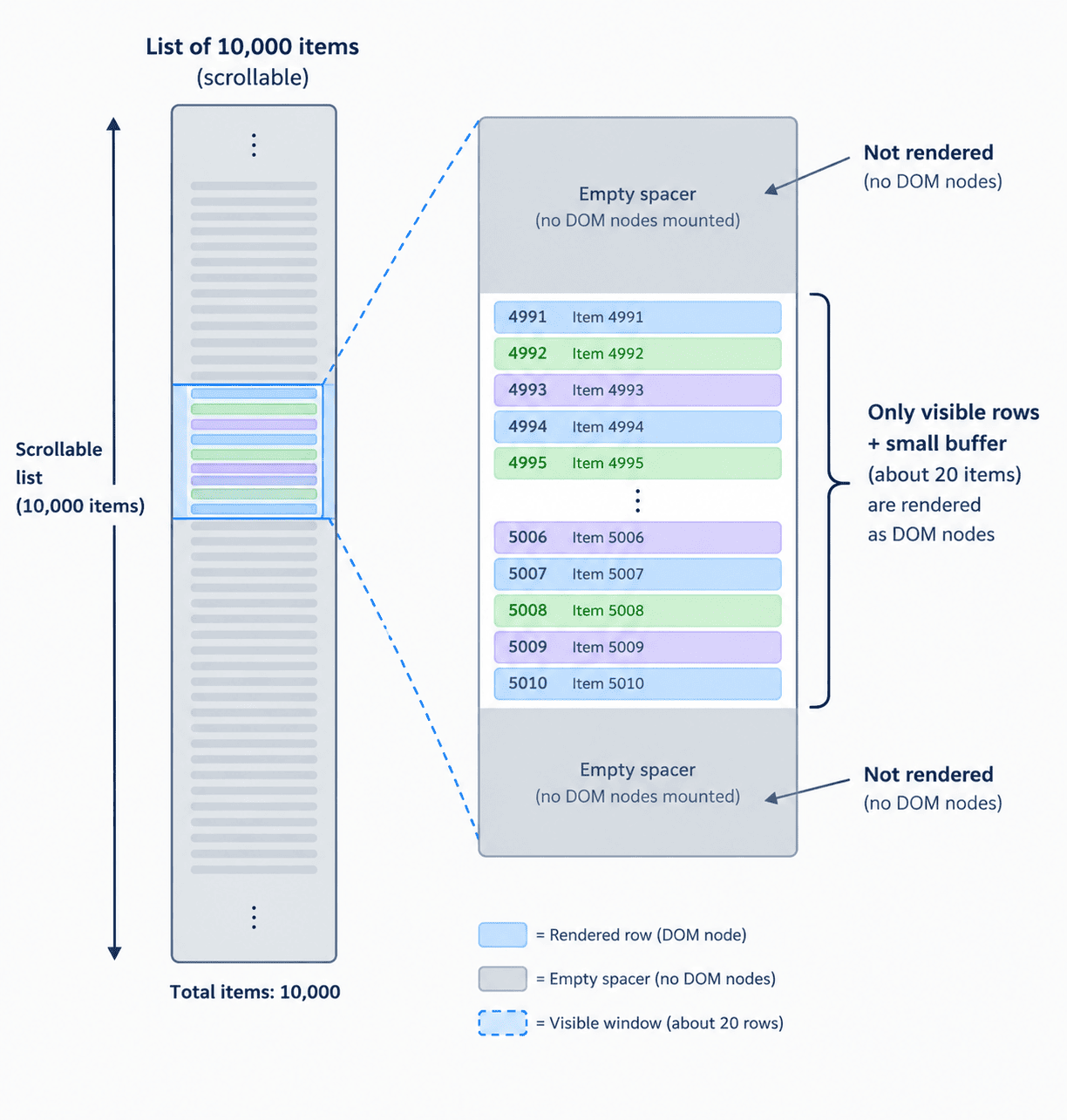
Q40. How would you answer "optimize a slow list of 10,000 items"?
Start with measurement, not a memorized answer: open the React DevTools Profiler and find out whether the bottleneck is render count, render duration, or something outside React entirely like a huge CSS reflow.
If it's genuinely rendering too many DOM nodes at once, the real fix is virtualization: rendering only the visible rows plus a small buffer, using a library like TanStack Virtual, because no amount of memoization fixes the cost of 10,000 real DOM nodes existing at once. Only after windowing is in place does it make sense to talk about memoizing individual row components, since at that point you're rendering a few dozen rows instead of ten thousand, and that's usually the answer interviewers are actually listening for: reach for windowing before you reach for memoization.
Quick Reference: All 40 Questions at a Glance
| Q# | Question | Core Concept |
|---|---|---|
| Q1 | What is React and why still choose it | Component model, huge ecosystem, Compiler + RSC in 2026 |
| Q2 | What is JSX | Compiles to React.createElement, never ships as-is |
| Q3 | Virtual DOM vs React Compiler | VDOM makes renders cheap, Compiler reduces render count |
| Q4 | Props vs state | Props flow down read-only, state is owned locally |
| Q5 | Controlled vs uncontrolled components | React-driven value vs DOM-driven, Actions blur the line |
| Q6 | Why the key prop matters | Stable identity across renders, never use array index |
| Q7 | Prop drilling and how to avoid it | Context, Zustand/Jotai, or composition |
| Q8 | Reconciliation and diffing | Heuristic linear-time diff, type + key based |
| Q9 | Rules of Hooks | Call-order tracking, never call conditionally |
| Q10 | useEffect vs useLayoutEffect | After paint (async) vs before paint (sync, blocking) |
| Q11 | useEffectEvent | Reads latest props/state, excluded from deps by design |
| Q12 | Activity component | Keeps hidden UI mounted, defers effects and updates |
| Q13 | useState batching | Automatic everywhere since React 18, flushSync escape hatch |
| Q14 | useReducer vs useState | Named actions for complex, interrelated state transitions |
| Q15 | useMemo with the Compiler | Compiler auto-memoizes; manual use for hard correctness needs |
| Q16 | useCallback vs useMemo | Memoizes a function reference vs a computed value |
| Q17 | Custom hooks | Must start with use for linter and Compiler to detect it |
| Q18 | useRef beyond DOM | Persists a mutable value across renders, no re-render |
| Q19 | useTransition vs debouncing | Changes priority, not timing; keeps input responsive |
| Q20 | useOptimistic | Instant UI feedback before the async request resolves |
| Q21 | Actions in React 19 | React manages pending/error/reset around an async function |
| Q22 | Function as a form action | action={fn} gets FormData, runs in a transition automatically |
| Q23 | useActionState vs useFormState | Adds a built-in pending flag, folds two concerns into one |
| Q24 | useFormStatus | Reads parent form status from a child, not the form itself |
| Q25 | Server Components vs SSR | RSC ships zero JS for that component; SSR still hydrates full JS |
| Q26 | The use hook | Reads a Promise or Context, callable conditionally |
| Q27 | cacheSignal | AbortSignal tied to a server render's cache lifetime |
| Q28 | Performance Tracks | Chrome DevTools Scheduler + Components tracks |
| Q29 | Is React Compiler mandatory | Opt-in build tool; removes manual useMemo/useCallback/memo |
| Q30 | ref as a regular prop | No more forwardRef needed; forwardRef still works but legacy |
| Q31 | Deciding what to memoize | Profile first, memo only for stable-props + frequently re-rendering parents |
| Q32 | Code splitting with lazy/Suspense | Route-based chunk loading, fallback while chunk downloads |
| Q33 | Suspense: data vs lazy loading | Same throw-a-Promise mechanism, different Promise source |
| Q34 | State management in 2026 | Local first, Zustand/Jotai for global client, React Query for server |
| Q35 | Hydration mismatch causes | Date.now/Math.random/typeof window in render, fix via useEffect |
| Q36 | Strict Mode double-render | Dev-only diagnostic, surfaces missing cleanup bugs |
| Q37 | Testing Actions/useActionState | userEvent + findBy/waitFor, mock the async call not React internals |
| Q38 | ESLint for the Compiler | eslint-plugin-react-hooks recommended-latest ships compiler rules |
| Q39 | Client vs Server Components tradeoff | Zero JS + no state/effects vs interactivity + bundle cost |
| Q40 | Optimizing a 10,000-item list | Measure first, then virtualize, memoization comes last |
Frequently Asked Questions
How many of these 40 questions should I prepare depending on seniority?
For a junior or mid-level role, focus on Sections 1 and 2 (Q1-Q20): fundamentals and hooks. These are asked in nearly every React interview regardless of level.
- Junior/mid-level: Sections 1-2 (Q1-Q20), plus Q21-Q25 for React 19 awareness.
- Senior: all 40, with emphasis on Section 4 (performance/architecture) and Section 5 (testing/tooling), since these test judgment rather than recall.
- Staff/lead: expect deeper follow-ups on Q29, Q34, and Q39, where interviewers probe how you'd guide a team's adoption decisions, not just the correct answer.
How different are these questions from a React 18 interview guide?
| Topic | React 18 era | React 19 / 19.2 era (this guide) |
|---|---|---|
| Forms | Controlled state + manual onSubmit handlers | Actions, useActionState, form action prop |
| Refs on components | Required forwardRef wrapper | ref is a regular prop, forwardRef legacy |
| Manual memoization | useMemo/useCallback/React.memo everywhere | React Compiler auto-memoizes at build time |
| Hidden UI state | Unmount and lose state, or hacky CSS hiding | Activity component keeps state, defers effects |
| Effect dependency bugs | Manual eslint-disable-next-line workarounds | useEffectEvent removes the trade-off entirely |
The underlying fundamentals (Sections 1-2) haven't changed. What changed is the idiomatic way to write forms, refs, and memoization, which is exactly what Section 3 tests.
Do I need hands-on React Compiler experience to pass a 2026 interview?
You don't need production experience with it, but you do need to explain what it does and why it exists (Q15, Q29). Most companies are still mid-migration, so interviewers are usually checking conceptual understanding rather than hands-on Babel config experience.
If you can explain that it auto-memoizes values and functions at build time by analyzing components that follow the Rules of React, and that it's opt-in rather than mandatory, that covers what nearly every interviewer is checking for.
What's the single most commonly asked hooks question in interviews?
The useEffect dependency array, specifically "what happens if you omit a dependency" and "why does my effect re-run too often," comes up more than any other hooks question. It's really testing whether you understand closures in JavaScript, not just the useEffect API itself.
In 2026, a strong answer also mentions useEffectEvent (Q11) as the modern fix for the specific case where a value is used inside an effect but shouldn't trigger a re-run when it changes.
How do I explain Server Components vs SSR succinctly if I get flustered under pressure?
Use one sentence as your anchor: "SSR renders HTML on the server but still sends the component's JavaScript to hydrate it; a Server Component never sends its JavaScript at all." Everything else in Q25 is elaboration on that single distinction.
// Server Component: fetches data, ships zero JS for this component
async function ProductPage({ id }: { id: string }) {
  const product = await getProduct(id); // runs only on the server

  return (
    <article>
      <h1>{product.name}</h1>
      <AddToCartButton productId={id} /> {/* Client Component below */}
    </article>
  );
}
Is class component knowledge still expected in a 2026 React interview?
Rarely as a primary topic, but it can still surface in two contexts: legacy codebase questions ("how would you migrate this class component") and error boundaries, which as of React 19.2 still require a class component since there is no Hook-based error boundary API.
You don't need deep lifecycle-method trivia (componentWillReceiveProps and friends), but you should be able to recognize componentDidCatch and explain why error boundaries remain class-only.
How do I prepare hands-on coding practice, not just memorizing these Q&A pairs?
Pick 3-4 of these questions and actually build the smallest possible reproduction: a chat room effect with a stale closure bug (Q11), a form using useActionState (Q22-Q23), and a virtualized list (Q40) cover most of what live-coding rounds test.
- Build the buggy version first (stale closure, unnecessary re-renders) so you can explain the failure mode out loud.
- Fix it using the current-era API (useEffectEvent, Actions, virtualization) rather than an older workaround.
- Write one test for it with React Testing Library, since Q37 shows up as a live-coding follow-up more often than candidates expect.
What React version should I say I have production experience with if asked directly?
Answer honestly with the version you've actually shipped, then bridge to what you've learned about newer versions conceptually. Interviewers are checking for honesty and continuous learning more than a specific version number.
A strong answer sounds like: "My production experience is mainly React 18 with hooks and Context, but I've been reading through the React 19.2 release notes and worked through examples of Actions and useEffectEvent to stay current." That answer demonstrates exactly the kind of preparation this guide is meant to support.
Related Articles
React Fiber Architecture Explained: How React Renders UI
React Fiber is the engine behind every React render. Learn how it works: render phase, commit phase, Lanes, and double buffering, explained with analogies.
ARIA in React: Stop Using aria-label Wrong
Pages using ARIA average 41% more accessibility errors. Learn the correct ARIA patterns for React: icon buttons, modals, toasts, spinners, and tab panels.
30 Next.js Interview Questions and Answers (2026)
30 Next.js interview questions with full answers: App Router, Server Components, use cache, PPR, Turbopack, and auth. Updated for Next.js 15 and 16.