React Fiber Architecture Explained: How React Renders UI
React Fiber is the engine behind every React render. Learn how it works: render phase, commit phase, Lanes, and double buffering, explained with analogies.

On this page
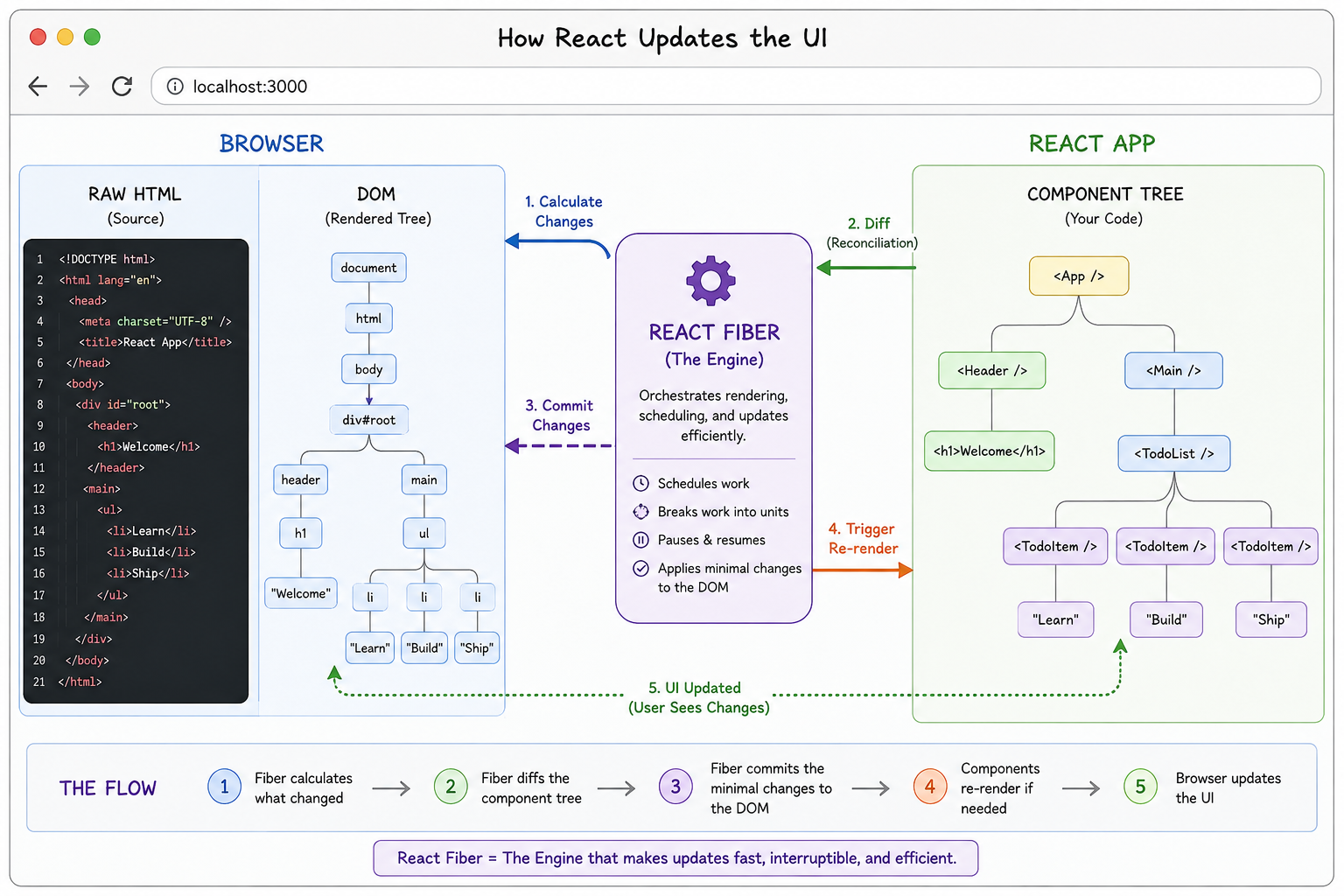
If you have spent any time with React, you have probably bumped into this scenario: you call setState, and somehow React knows to update one part of the screen without touching the rest. You did not tell it which part to update. It figured that out on its own. That is React Fiber doing its job quietly in the background.
Fiber is not a feature you call or a package you install. It is the core engine inside React, the thing that decides what to render, when to render it, and how to get your changes onto the screen without freezing the page. Understanding it will change how you think about performance, hooks, and a handful of React behaviors that otherwise look like arbitrary rules.
This guide walks through Fiber the way you would explain it to a developer who already builds with React but has never looked under the hood: in plain English, with analogies, and with a clear line from each concept to the code you write every day. If you have ever wondered why ARIA attributes or layout updates need to land at exactly the right moment, the timing rules in how React's rendering model affects accessibility trace back to the same render and commit phases covered here.
The Problem Before Fiber
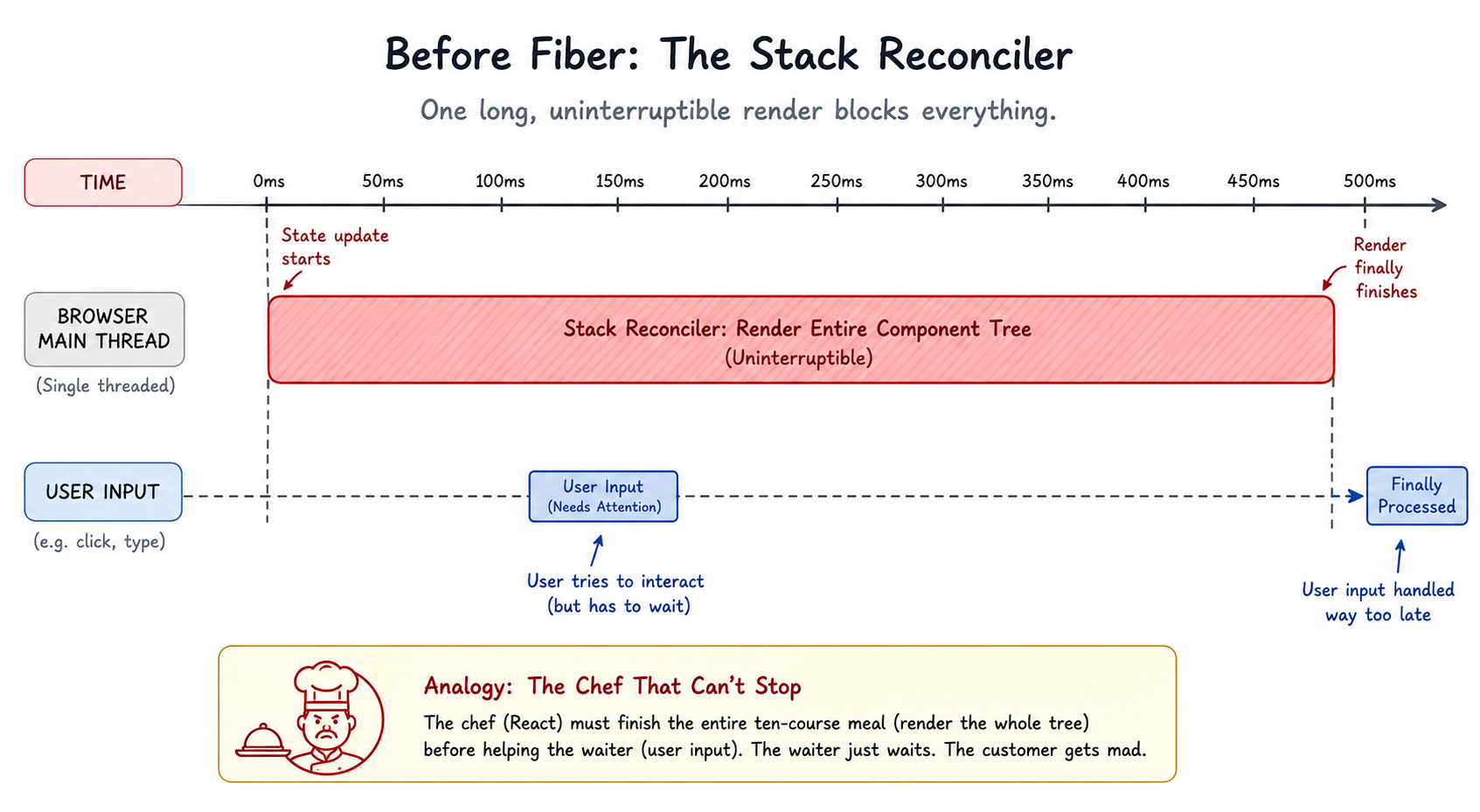
Before React 16, React used something called the Stack Reconciler. When a state update happened, React would walk the entire component tree from the top, compute every change, and write it all to the DOM in one go, with no ability to stop or pause partway through.
Picture a chef in the middle of plating a ten-course meal who cannot stop for anything. A waiter runs in saying "Table 3 needs water urgently," and the chef cannot help until every course is plated. The waiter just stands there. Table 3 gets more frustrated by the second.
That is exactly what happened in a React app built on the Stack Reconciler. A slow component rendering a huge list would block the browser's main thread completely. Typing, clicking, and scrolling all had to wait in line behind it. The result was the kind of janky, unresponsive UI that makes users think your app is broken.
React needed a way to pause mid-render, jump to something more urgent like a keystroke, and come back later to finish the rest. That requirement is the entire reason Fiber exists.
What Is React Fiber?
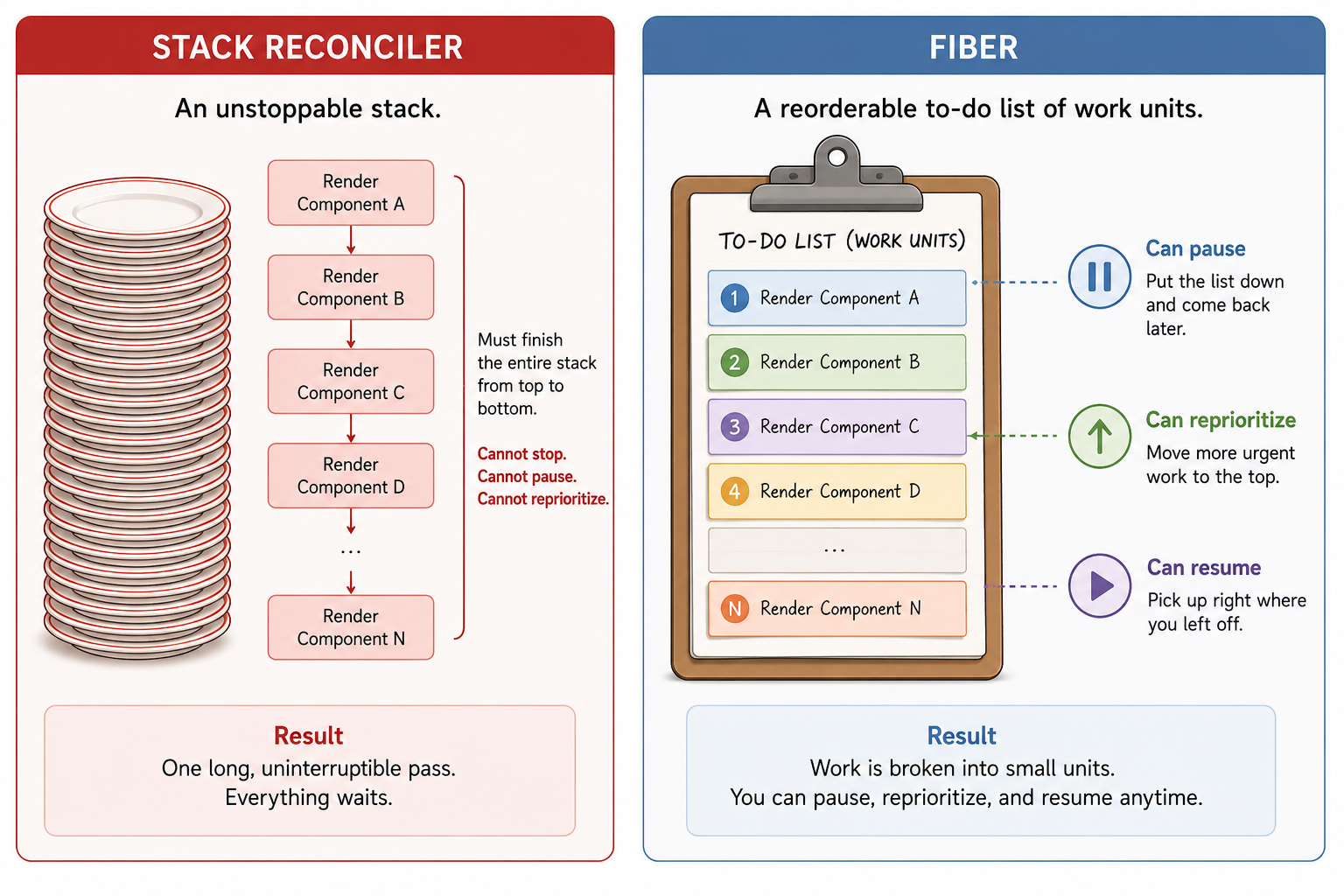
React Fiber is a complete rewrite of React's rendering engine, introduced in React 16. Instead of one uninterruptible pass over the whole tree, Fiber breaks all rendering work into small units of work called, fittingly, fibers.
A fiber is just a JavaScript object that represents one component instance. It stores everything React needs to know about that component: its type, its props, its current state, what work still needs to happen on it, and pointers to its parent, its first child, and its next sibling.
Think of the old system as a single tall stack of plates. Once you start washing from the top, you cannot stop until the stack is empty. Fiber is a to-do list instead: each card is one task, you can put the list down and pick it back up at any time, and you can reorder the cards by priority whenever something more urgent shows up.
The Fiber Tree
React builds a tree of fiber nodes, one fiber per component, that mirrors your component hierarchy. At the root sits the App component, branching down through layouts, pages, and individual elements, the same shape you would draw if you sketched your component tree on a whiteboard.
What makes this tree clever is that it is not a typical parent-with-an-array-of-children structure. Each fiber node carries exactly three pointers:
- child — points to the fiber's first child component
- sibling — points to the next fiber at the same level in the tree
- return — points back up to the parent fiber

This singly-linked-list shape is what lets React walk the tree incrementally. It can process one node, stop, go do something else entirely, and later resume from that exact node using these pointers, something an ordinary recursive function call cannot do once it is mid-stack. Recursion would have to run to completion or unwind; a fiber can simply be set aside and picked back up.
It is a similar idea to how the `:has()` selector lets CSS reach upward through a tree that was traditionally only walkable downward: giving a structure extra pointers unlocks traversal patterns the original shape never allowed.
The Two Phases: Render and Commit
Every React update runs through two distinct phases. This split is one of the most useful mental models you can carry around as a React developer, because it explains a surprising amount of hook behavior.
- Render phase — React walks the fiber tree, runs your component functions, and figures out what changed. Nothing touches the DOM yet, so this phase is invisible to the user. Critically, it can be paused, resumed, restarted from scratch, or thrown away entirely if a more urgent update comes in, like a keystroke.
- Commit phase — React takes everything it figured out during the render phase and writes it to the DOM: inserting, updating, and removing elements.
useLayoutEffectcallbacks fire here too. This phase is synchronous and atomic. It cannot be paused, because the user must never see a half-applied update.
A useful analogy: the render phase is like editing a document in draft mode. You can revise, undo, and rewrite freely, and nobody sees any of it. The commit phase is hitting publish. Once it goes out, it is live, and there is no taking it back mid-stream.
| Render phase | Commit phase | |
|---|---|---|
| What happens | Runs component functions, diffs old vs. new, builds the next tree | Applies DOM changes, runs layout effects |
| Can be paused? | Yes, fully interruptible | No, synchronous and atomic |
| Visible to the user? | No, no DOM writes occur | Yes, this is what the user sees |
| Can run more than once? | Yes, may restart for a higher-priority update | Runs exactly once per committed update |

How Fiber Prioritizes Work (Lanes)
Not every update is equally urgent. If your app is loading data in the background while the user clicks a button, React should handle that click immediately rather than make the user wait for the data fetch to settle first.
React solves this with a system called Lanes. Every update gets assigned a lane, essentially a priority level, represented internally as bits in a 32-bit integer so React can compare and combine priorities cheaply. From highest to lowest priority, the lanes you will encounter most often are:
- SyncLane — the highest priority. Direct user interactions like
onClickandonChange. Cannot be interrupted. - InputContinuousLane — continuous input events such as scrolling and dragging.
- DefaultLane — ordinary state updates that did not request any special priority.
- TransitionLane — updates explicitly wrapped in
useTransition, marked as non-urgent by you, the developer. - IdleLane — the lowest priority. Only runs once nothing else is pending.
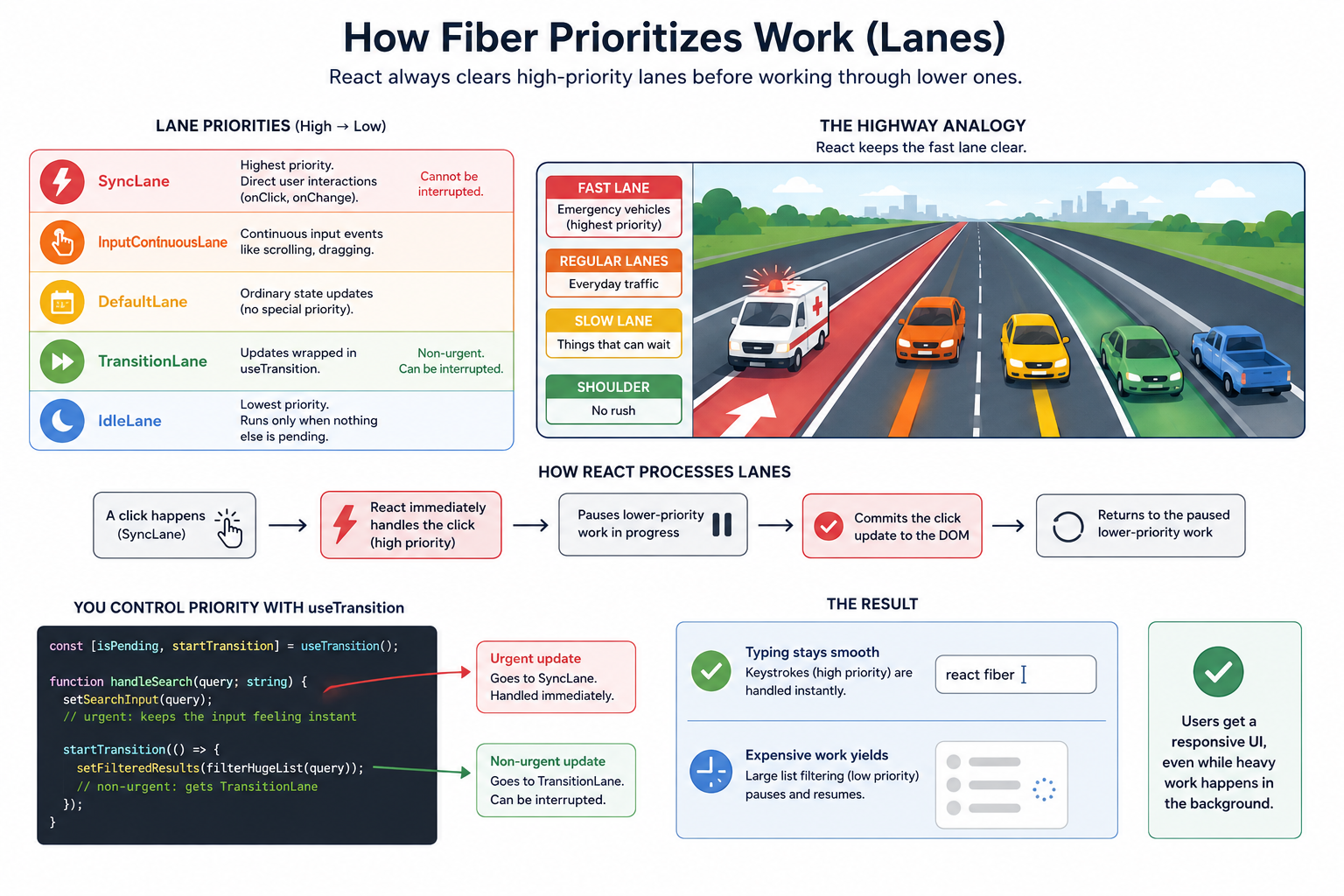
Picture a highway with a fast lane reserved for emergency vehicles, regular lanes for everyday traffic, and a slow shoulder for things that are in no hurry. React always clears the fast lane first. When a click fires, React tags that update as SyncLane, immediately drops whatever low-priority work it was doing, handles the click, and only then returns to the deferred work. That is the actual mechanism behind why typing in a search box stays smooth even while a large list filters in the background.
You get to use this system directly through useTransition, which tells React "this update can wait if something more important shows up":
const [isPending, startTransition] = useTransition();

function handleSearch(query: string) {
  setSearchInput(query);          // urgent: keeps the input feeling instant

  startTransition(() => {
    setFilteredResults(filterHugeList(query)); // non-urgent: gets TransitionLane
  });
}
Without startTransition, both updates land in the same default lane and compete for the same slice of work. With it, React keeps the input itself snappy and lets the expensive list filtering yield whenever something more urgent, like the next keystroke, arrives.
Double Buffering: Two Trees at Once
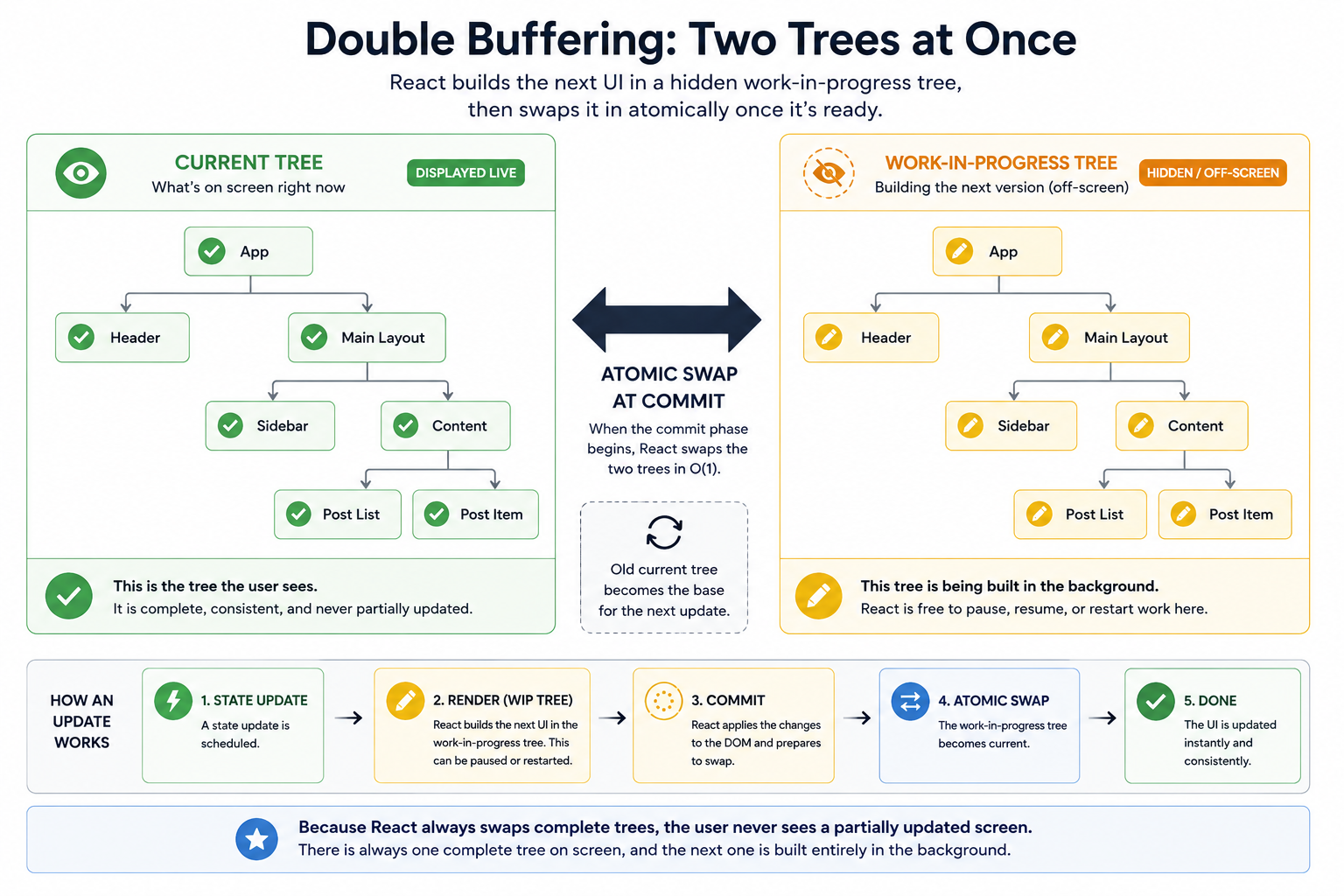
Here is a trick React borrows from game engines: it keeps two copies of the fiber tree in memory at all times.
- The current tree — what is actually on screen right now.
- The work-in-progress tree — where React is assembling the next version of the UI, off-screen and invisible.
When a state update fires, React does not touch the current tree at all. It builds a fresh work-in-progress tree alongside it. Once the render phase finishes and the commit phase begins, React swaps the two: the work-in-progress tree becomes the new current tree, and the old current tree is recycled, often reused as the base for the next update.
This is precisely why you never see a partially updated screen in React. There is always one complete, consistent tree being displayed, and the next one is built entirely in the background before it ever becomes visible.
Concurrent Features Fiber Makes Possible
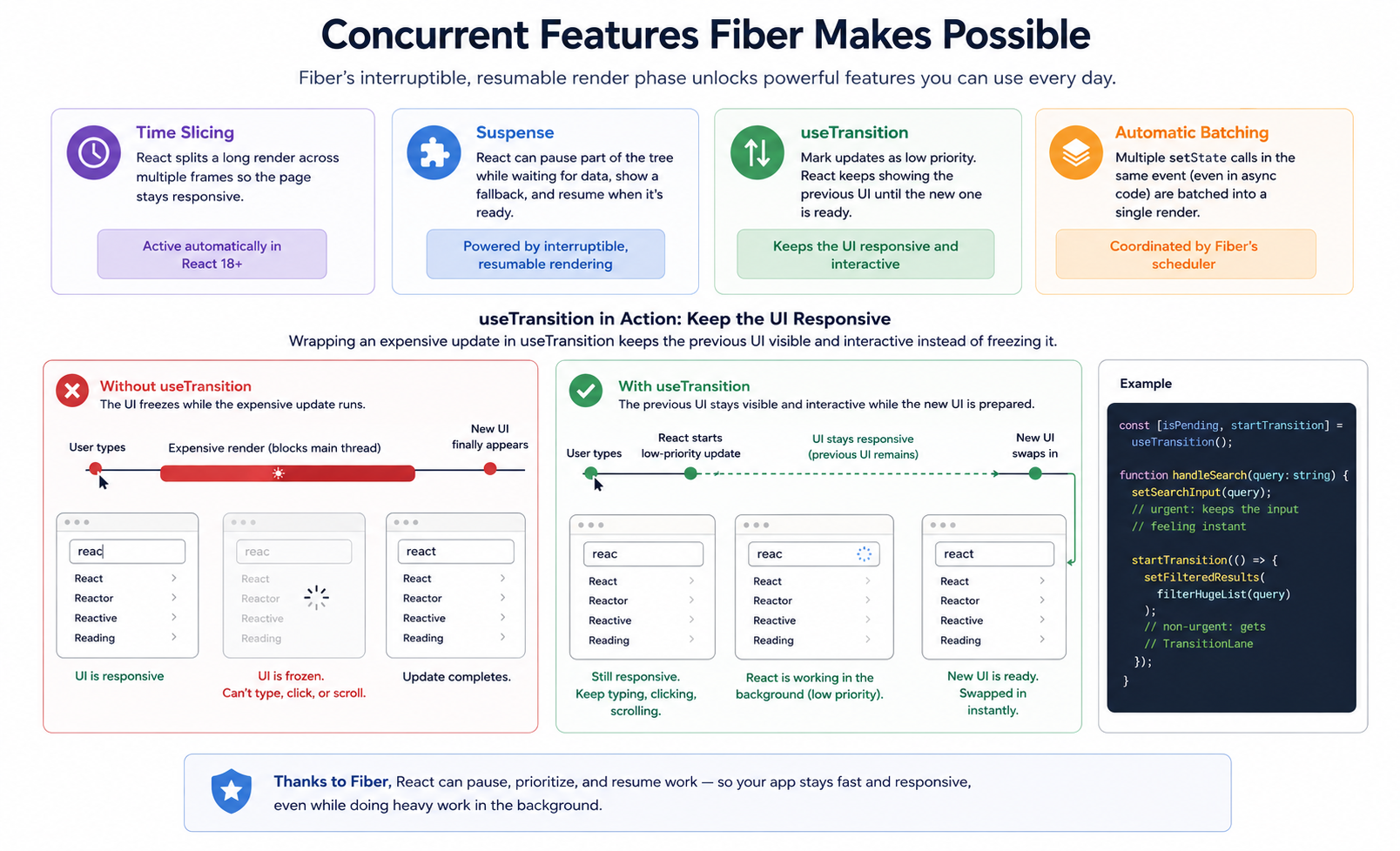
Fiber was not built purely as an internal optimization. It was designed from day one to enable an entire category of features that simply could not exist on top of the old Stack Reconciler. Here are the ones you can reach for directly in your own code today.
- Time slicing — React splits a long render across multiple browser frames so the page stays responsive. Active automatically in React 18 and later; you do not need to opt into it.
- Suspense — React can pause rendering part of the tree while it waits on data, show a fallback in the meantime, and resume once the data arrives. None of this is possible without an interruptible, resumable render phase, which is exactly what Fiber provides.
- `useTransition` — lets you explicitly mark a state update as low priority, so React keeps showing the previous UI until the new one is ready instead of blocking on it.
- Automatic batching — in React 18, multiple
setStatecalls inside the same event handler, including inside async functions and promises, get grouped into a single render pass. Fiber's scheduler is what coordinates that grouping under the hood.
What This Means for You as a Developer
Once you have the render-phase-versus-commit-phase model in your head, several React behaviors stop looking like arbitrary rules and start looking like direct consequences of how Fiber works.
- Why `key` props matter so much — Fiber uses
keyto match fibers across renders. Change the key and React treats the element as an entirely new component instance, discarding the old fiber and its state. If you have ever fixed a stale-state bug by adding akey, this is the mechanism you triggered. - Why `useEffect` runs after paint —
useEffectcallbacks are scheduled to run after the commit phase completes and the browser has painted. That delay is intentional: effects should never block the user from seeing the updated screen. It is also why timing bugs in effects feel a lot like the async/await ordering mistakes that trip up plain JavaScript code: in both cases, code you assumed ran immediately actually runs on a later turn of the event loop. - Why `useLayoutEffect` runs before paint —
useLayoutEffectruns synchronously during the commit phase, before the browser paints anything. Reach for it specifically when you need to measure or adjust the DOM (reading an element's size, repositioning a tooltip) before the user ever sees the new layout. - Why Strict Mode renders components twice in development — React deliberately double-invokes component functions (and some effects) in Strict Mode to catch code that produces side effects during the render phase. Because the render phase can legitimately restart at any time, your components must produce the same output for the same input every time. Strict Mode exists to surface the cases where they don't.
Frequently Asked Questions
Is React Fiber something I need to install separately?
No. Fiber has been React's internal rendering engine since React 16, and you have been using it the entire time you have written React code on a modern version. It is not a library, a package, or an opt-in feature. It is the core of React itself, doing its job invisibly every time a component renders.
What is the difference between the render phase and the commit phase?
| Render phase | Commit phase | |
|---|---|---|
| What happens | Runs component functions, diffs old vs. new, builds the work-in-progress tree | Applies DOM changes and runs layout effects |
| Can be paused? | Yes, fully interruptible | No, synchronous and atomic |
| Visible to the user? | No, no DOM writes happen here | Yes, this is the moment the screen actually changes |
The short version: the render phase is React thinking, and the commit phase is React acting. Thinking can be interrupted and redone; acting happens once, atomically, so the user only ever sees finished results.
How does React decide which updates are urgent?
React assigns every update a lane, a priority level represented as bits in a 32-bit integer so multiple priorities can be compared and combined cheaply. Direct interactions like clicks and key presses get SyncLane, the highest priority, while updates wrapped in useTransition get TransitionLane, a much lower one.
When a high-priority update comes in, React pauses or discards lower-priority work in progress, handles the urgent update first, and resumes the deferred work afterward. That is the entire reason a UI built on Fiber stays responsive even while heavy rendering happens in the background.
What is the work-in-progress tree?
It is the second copy of the fiber tree React keeps in memory whenever an update is in flight. Rather than editing the tree currently on screen, React assembles the entire next version of the UI in this off-screen tree, computes every change there, and only swaps it in for the visible tree once the commit phase begins.
The practical payoff is that the user is never shown a half-updated UI. They either see the old, complete tree or the new, complete tree, never something in between.
Does understanding Fiber actually help me write better React code?
Yes, directly. It is the model that explains why key props affect component identity and state, why useEffect and useLayoutEffect fire at different moments, why stable references and pure components reduce unnecessary work, and when reaching for useTransition actually pays off versus letting React batch updates on its own.
Once "the render phase is invisible and restartable, the commit phase is visible and final" clicks for you, it stops being trivia and starts being the lens you reach for every time you debug a timing issue or reach for a new hook.
How do I see Fiber's work in the React DevTools Profiler?
The Profiler is the closest thing to a window into the fiber tree. Record an interaction and each bar in the top timeline represents one commit: a moment when React finished a work-in-progress tree and applied it to the DOM. A single click producing several commits usually means several state updates landed in different lanes rather than being batched together.
Select a commit and the flamegraph below shows one row per fiber React touched. Bar width is how long that component and its children took to render, and greyed-out bars are fibers React bailed out on and reused from the previous tree. So a screen full of coloured bars after a trivial state change is the signal that your memoization is doing nothing: React rebuilt fibers it could have reused, usually because a prop identity changed on every render.
Is React Fiber the same in React Native as it is on the web?
Yes. The reconciler is shared code, and platform renderers plug into it through a host config: a set of functions describing how to create, update, and remove a node in that specific environment. React DOM's host config talks to document and sets attributes, while React Native's sends the equivalent instructions to the native view layer.
Because the fiber tree, the lane priorities, key-based matching, and double buffering all live above that boundary, they behave identically on both platforms. It is also why alternative renderers such as react-three-fiber for WebGL scenes or Ink for terminal UIs inherit concurrent rendering without reimplementing it. Only the commit-phase side effects differ, so the mental model you build debugging React on the web transfers straight across.
Related Articles
ARIA in React: Stop Using aria-label Wrong
Pages using ARIA average 41% more accessibility errors. Learn the correct ARIA patterns for React: icon buttons, modals, toasts, spinners, and tab panels.
8 CSS :has() Patterns You'll Actually Use (2026)
CSS :has() is production-ready in every browser. Here are 8 real-world patterns: form states, sibling dimming, modal scroll-lock, and more.
5 async/await Mistakes That Slow Your JavaScript Code
Sequential awaits, await in forEach, missing Promise.all: these 5 async/await mistakes silently slow your JavaScript. Here's how to spot and fix each one.