Mongoose 9 Migration Guide: What Actually Breaks in a Real MERN App
Upgrading to Mongoose 9? Here's what actually breaks in real MERN apps: pre-save hooks, plugins, TypeScript types, and how to fix each one.

On this page
If you run npm update on a Mongoose 8 project today, you might end up on Mongoose 9 without meaning to, depending on how your package.json is pinned. That's when the fun starts.
Mongoose 9 shipped in November 2025 as what the maintainers call the "async maturity release." The pitch is good: cleaner stack traces, no more mystery processTicksAndRejections lines, stricter TypeScript. The reality for anyone running a real app is that it quietly breaks a handful of patterns most MERN codebases still use, especially anything written before 2023.
I upgraded three projects to Mongoose 9 over the past few weeks. Here's what actually broke, in the order I hit it.
The pre() Hook Change That Breaks Almost Everyone
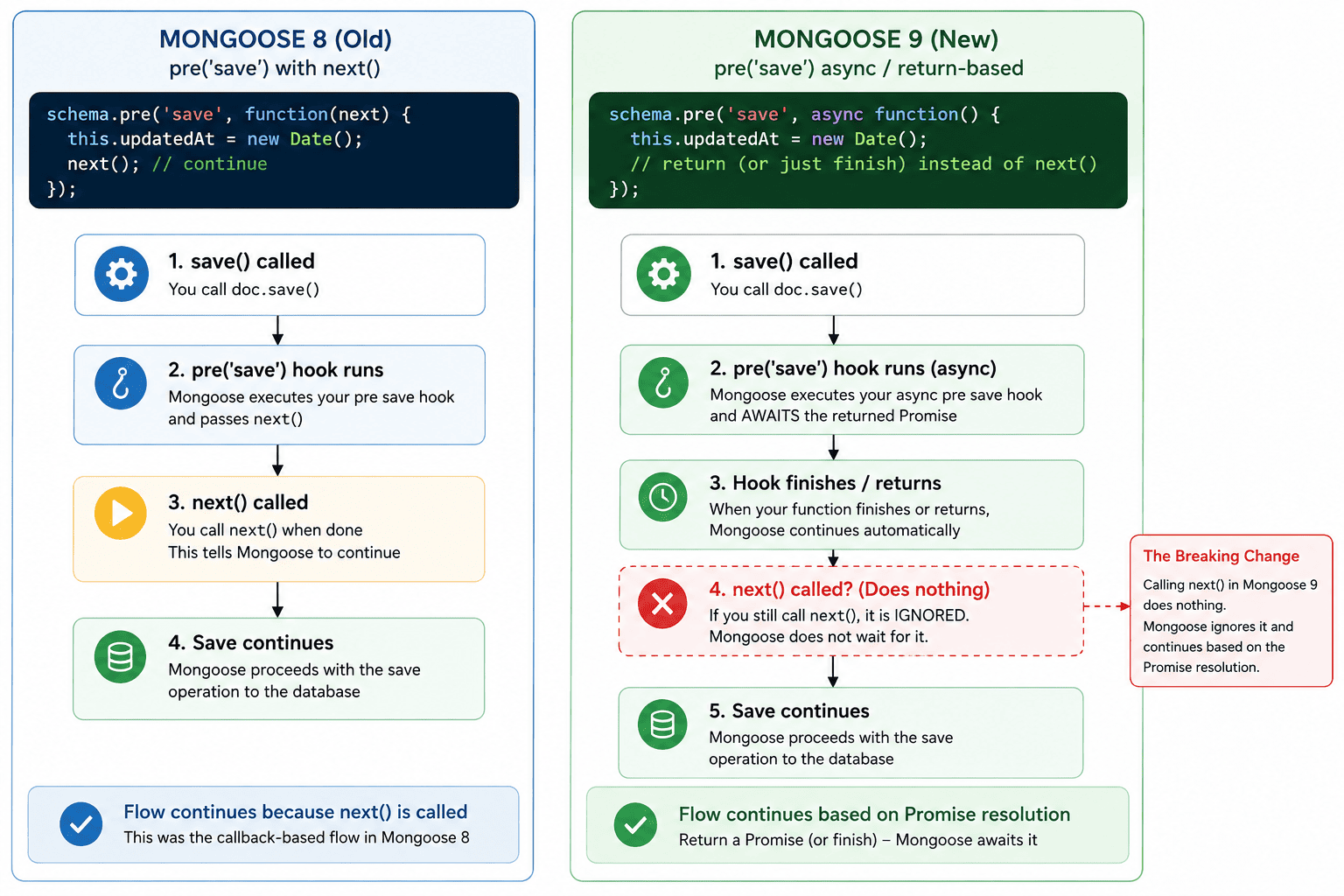
This is the one. If your schema has anything that looks like this, it's gone in Mongoose 9:
schema.pre('save', function(next) {
  this.updatedAt = Date.now();
  next();
});
The next callback parameter is no longer supported on pre() hooks. Calling next() just does nothing now, silently, no error, no console warning. Your hook still fires, but nothing after it runs the way you expect, and any async work you were doing before calling next() may not finish before the save resolves.
The fix is mechanical but you have to touch every hook:
schema.pre('save', async function() {
  this.updatedAt = Date.now();
});
The same applies to done() in other hook types. If it used to take a callback, it doesn't anymore.
Your Auth and Validation Plugins Might Silently Misbehave
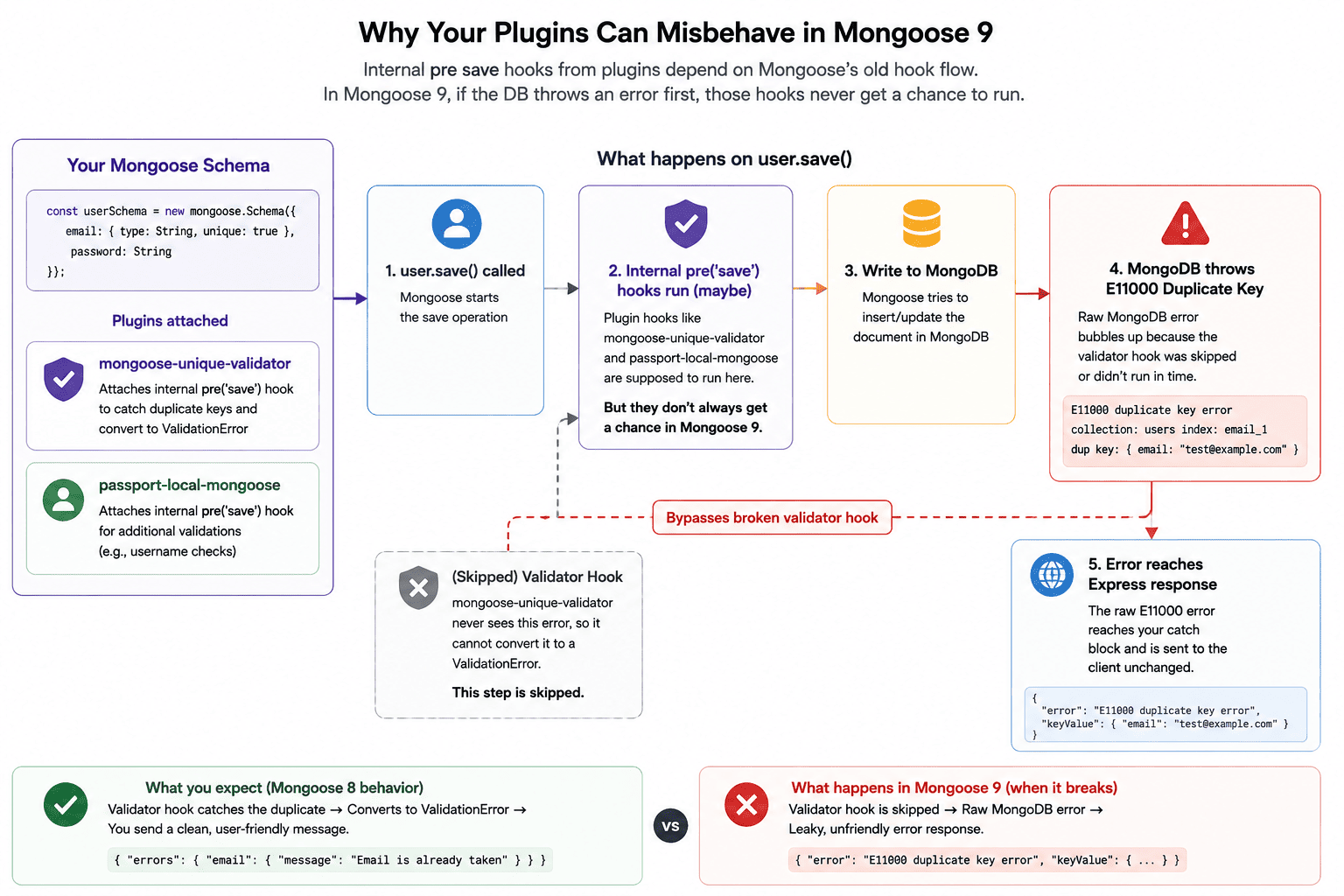
This is the part the official migration guide doesn't spell out clearly enough. A lot of MERN auth setups lean on passport-local-mongoose or mongoose-unique-validator, both of which attach their own pre('save') hooks internally.
mongoose-unique-validator specifically relies on pre-save validation to convert MongoDB's raw E11000 duplicate key error into a normal Mongoose ValidationError. If you're running an old version of the plugin, its internal hook may still use the old callback signature, which means it stops doing its job after the Mongoose 9 upgrade, and your app starts throwing raw MongoDB errors again instead of clean validation errors your frontend expects.
ObjectId Got Strict
This one bit me in a route handler:
new mongoose.Types.ObjectId(6);In Mongoose 8 this quietly created something, wrong, but something. In Mongoose 9 it throws. mongoose.isValidObjectId() changed too, for a handful of edge-case inputs the return value flipped from what it used to be.
If any older code constructs ObjectIds from loosely-typed input, like an ID pulled straight from a query string without validation, run your test suite before assuming this doesn't touch you.
TypeScript Got Noticeably Stricter
If your project uses Mongoose's generated types, expect new red squiggles after the upgrade. Query filters are now checked more strictly against your schema shape:
UserModel.find({ age: 'not a number' }); // now a TS error, wasn't beforeThis is a genuine improvement, it catches real bugs, but a clean tsc run pre-upgrade won't stay clean post-upgrade. Budget time for this specifically if your codebase does any loosely-typed query building. If you're also mid-upgrade on the compiler itself, see our TypeScript 7 migration guide for what changes there.
This is also a good moment to double check your models are typed correctly in the first place, since a stricter query checker won't catch a document type that's already wrong. If you're still hand-writing a duplicate interface next to every schema, see our guide on typing your models correctly, it covers InferSchemaType, HydratedDocument, and the populate() typing trap this stricter checking doesn't touch.
A Practical Upgrade Order
None of this is exotic. It's the kind of upgrade where nothing crashes on npm install, everything looks fine, and then a week later someone notices duplicate accounts started getting created because the unique validator plugin silently stopped catching E11000 errors. Work through these six steps in order and you'll catch it before it ships.
- 1
Upgrade to the latest Mongoose 8.x first
If you're on Mongoose 7 or earlier, land on the latest 8.x release before touching 9. Mongoose 9 assumes you're already on the latest 8.x, and skipping straight there makes every new error harder to attribute.
bashnpm install mongoose@8 - 2
Grep your codebase for every hook signature
Find every
pre()andpost()call and check whether it declares anextordoneparameter. Any that do need to switch to async/Promise style before you upgrade.bashgrep -rn "pre(\|post(" --include="*.js" --include="*.ts" . - 3
Check every third-party plugin's changelog
Look for explicit Mongoose 9 support, not just "should still work." Start with anything attached to auth or validation, since that's where a silent failure does the most damage.
- mongoose-unique-validator: converts
E11000errors intoValidationError; a broken internal hook here means duplicate records slip through silently. - passport-local-mongoose: wires authentication into your user schema via internal hooks; test login and registration explicitly after upgrading.
- Any custom internal plugin written in-house that attaches its own
pre()orpost()hooks.
- mongoose-unique-validator: converts
- 4
Run tsc --noEmit before and after, and diff the error list
Capture your TypeScript baseline before you touch
package.json, then run the same check again after upgrading and compare.bashnpx tsc --noEmit > before.txt npm install mongoose@9 npx tsc --noEmit > after.txt diff before.txt after.txt - 5
Search for loosely-typed ObjectId construction
Find every place an ObjectId gets built from external input and check what's actually being passed in.
bashgrep -rn "new mongoose.Types.ObjectId(\|isValidObjectId(" --include="*.js" --include="*.ts" . - 6
Run your full test suite twice
Run it once for functional correctness, and once specifically watching console output for silent failures in hooks that used to log something. A passing suite doesn't guarantee a hook still fires, only that nothing threw.
How to Test the Upgrade Before It Reaches Production
A green test suite after the upgrade tells you less than it feels like it does. Most existing tests check that a save resolves without throwing, not that a hook actually ran and produced the side effect it's supposed to. A hook that got silently skipped because of the callback change will still let those tests pass.
Write at least one explicit assertion per hook that checks the side effect itself, not just the absence of an error. For the updatedAt example from earlier, that means fetching the document after the save and checking the field actually changed, not just that save() didn't reject.
test('pre-save hook updates the timestamp', async () => {
  const doc = await User.create({ name: 'Ada' });
  const before = doc.updatedAt;

  await new Promise((r) => setTimeout(r, 5));
  doc.name = 'Ada Lovelace';
  await doc.save();

  expect(doc.updatedAt).not.toEqual(before);
});
Beyond unit tests, run the upgraded app against a staging environment with production-shaped data before touching the real deployment. Watch application logs specifically for raw E11000 duplicate key errors reaching the response layer, that's the exact symptom of a validator plugin whose internal hook stopped firing.
Give it more than a single deploy cycle before calling it safe. Duplicate account creation from a broken unique validator often doesn't show up until real signup traffic hits the endpoint, which can be days after the code shipped.
Rolling Back Safely If Something Slips Through
If something breaks after the upgrade ships, the fastest fix is usually a straight revert: commit the previous package.json and package-lock.json together, then redeploy with npm ci so the exact locked versions install instead of whatever satisfies the range.
git revert <upgrade-commit-sha>
npm ci
You don't need to revert the hook syntax you converted in step 2 along with the version number. Mongoose has supported promise-returning, async hooks alongside the callback style for a long time, well before version 9, so the async hooks you wrote for the upgrade keep working if you roll back to 8.x. That means a rollback is one change, not two.
After rolling back, keep watching for the same symptom that told you something was wrong in the first place: duplicate accounts or raw MongoDB errors reaching users. If those stop appearing, the rollback fixed it. If they don't, the bug wasn't the Mongoose upgrade to begin with.
Is It Worth Upgrading Now?
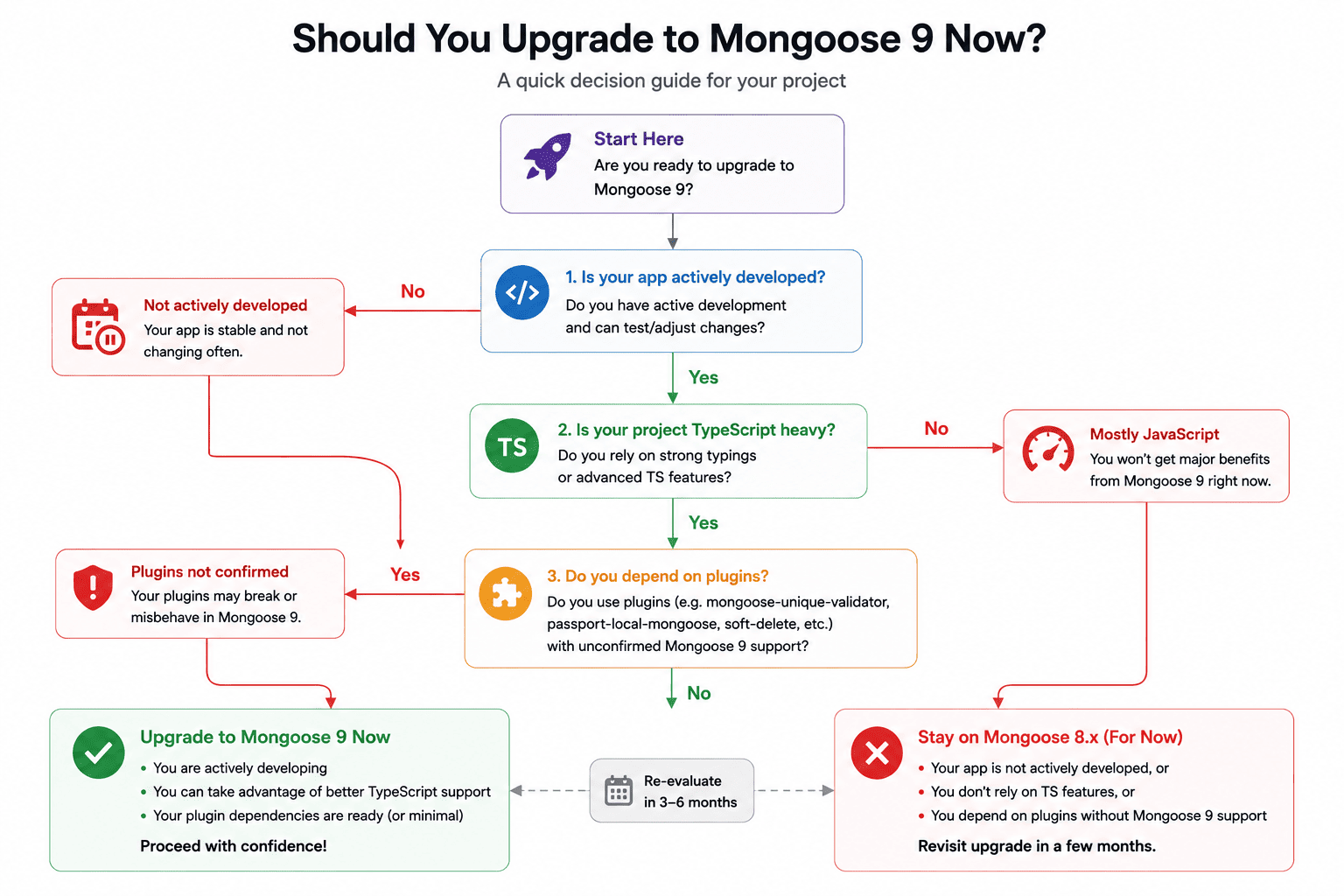
If you're actively maintaining the app and want the async stack traces, genuinely useful for debugging, yes. If the app is in maintenance mode and stable, there's no urgency. Mongoose 8.x keeps getting fixes through at least February 2026. Either way, pin your version deliberately instead of letting a ^8.0.0 range quietly pull in 9.x on your next npm install.
| Feature | Mongoose 8 | Mongoose 9 |
|---|---|---|
| pre() hook callback | next() supported | next() removed, async/Promise only |
| Stack traces | Point to internal Mongoose code | Point to your actual async function |
| new ObjectId(6) | Creates a malformed but valid-looking ObjectId | Throws an error |
| TypeScript query checking | Loosely typed filters allowed | Filters checked against schema types |
Data-modeling questions come up constantly during a migration like this, especially around aggregation pipelines that touch fields your schema validation now checks more strictly. If you're debugging one, our PipelineExplain tool walks through an aggregation pipeline stage by stage. And if you want to brush up on the underlying concepts before diving into schema changes, see our NoSQL interview questions guide.
Frequently Asked Questions
What's the difference between Mongoose 8 and Mongoose 9?
| Feature | Mongoose 8 | Mongoose 9 |
|---|---|---|
| pre() hook callback | next() supported | next() removed, async/Promise only |
| Stack traces | Point to internal Mongoose code | Point to your actual async function |
| new ObjectId(6) | Creates a malformed but valid-looking ObjectId | Throws an error |
| TypeScript query checking | Loosely typed filters allowed | Filters checked against schema types |
The pre() hook change is the one that breaks existing code silently. The others either throw explicitly or only affect TypeScript builds, both of which surface as visible errors instead of quiet behavior changes.
Why did my pre-save hook's next() stop working?
Mongoose 9 dropped callback-based hooks entirely, so next() is now a no-op that does nothing instead of throwing an error you'd notice.
// Broken in Mongoose 9 - next() does nothing
schema.pre('save', function(next) {
  next();
});

// Fixed
schema.pre('save', async function() {
  // your logic here
});Do I need to upgrade to Mongoose 9 right away?
No. Mongoose 8.x continues receiving fixes and improvements until at least February 2026, so there's no forced deadline.
- Stable apps: can safely stay on 8.x for now.
- Active development: benefits most from the async stack trace improvements.
- TypeScript-heavy codebases: should budget extra time for the stricter type checking.
How do I find every pre() hook that needs updating before I upgrade?
Grep your source tree for pre( and post( calls, then check each match for a next or done parameter in the callback signature. Anything without an async/Promise-based body needs converting.
grep -rn "\.pre(\|\.post(" --include="*.js" --include="*.ts" src/Will Mongoose 9 break my TypeScript build even if I don't use pre() hooks?
It can, independently of the hook change. Mongoose 9 checks query filters more strictly against your schema's inferred types, so a query like Model.find({ age: 'twelve' }) that previously compiled will now fail tsc. This affects any project using Mongoose's generated types, whether or not it has custom hooks at all.
Does upgrading to Mongoose 9 require a newer MongoDB server version?
No. Mongoose is an object modeling library that sits on top of the official MongoDB Node.js driver, and the version you install is independent of the MongoDB server version your database runs. The breaking changes in Mongoose 9 are all in the JavaScript/TypeScript API surface, hooks, ObjectId construction, and type checking, not in the wire protocol it uses to talk to MongoDB.
If I roll back to Mongoose 8 after a bad upgrade, do I also need to revert the async hook syntax?
No. Mongoose has supported promise-returning, async-function hooks alongside the older callback style for a long time, well before Mongoose 9 made the callback style stop working entirely. The hooks you rewrote as async function() {} during the upgrade continue to work fine on Mongoose 8.x, so a rollback only means reverting the dependency version and the lockfile, not touching your hook code a second time.
How do I stop Mongoose from upgrading to a new major version by accident?
Pin an exact version instead of a caret range in package.json, and commit package-lock.json to version control so the resolved version is locked for every install, not just your own machine.
{
  "dependencies": {
    "mongoose": "8.9.2"
  }
}
In CI and production, install with npm ci instead of npm install. npm ci installs exactly what's in the lockfile and fails outright if the lockfile is out of sync, instead of silently resolving a newer version to make things work.
Related Articles
42 NoSQL Database Interview Questions and Answers (2026)
42 NoSQL interview questions covering MongoDB, Redis, and DynamoDB: aggregation pipelines, data structures, GSI vs LSI, and CAP theorem. Updated for 2026.
30 Node.js Interview Questions and Answers (2026)
30 Node.js interview questions with full answers: event loop, streams, clustering, worker threads, memory leaks, and security. Updated for 2026.
TypeScript 7 Migration Guide: tsgo, Breaking Changes, Build Times
Migrate to TypeScript 7 (tsgo): install the beta, fix the 4 breaking changes, update tsconfig, and decide if upgrading now is worth it.