Will your TypeScript survive Node’s type stripping?
Paste your code. Find every enum, namespace, and parameter property that throws ERR_UNSUPPORTED_TYPESCRIPT_SYNTAX before Node does, each with the line number and the rewrite.

Background on why the flag was removed and what it means for the Node 24 LTS line is in the companion guide: Node.js removed --experimental-transform-types.
How TypeStripCheck works
The scanner is a tokeniser, not a compiler. Nothing you paste reaches a server, and nothing gets installed.
- 1
You paste a .ts, .mts, or .cts file
A whole file works best, but a single class or module is enough. There is no file size limit and no upload step, because the text never leaves the textarea it is typed into.
- 2
Comments and string contents get masked out first
Before any pattern runs, the scanner replaces the inside of every comment, string, and template literal with spaces while keeping every character offset intact. That is why the word enum inside a comment or a SQL string never shows up as a finding, and why reported line numbers still match your editor exactly.
- 3
Seven patterns run over the masked source
Enums, namespaces with runtime bodies, constructor parameter properties, import-equals declarations, export assignments, decorators, and angle-bracket assertions. Ambient declarations (declare enum, declare namespace) are skipped because they emit nothing and strip cleanly.
- 4
Each finding gets a rewrite built from your actual code
The rewrites are generated, not templated. Your enum member names and values become the as-const object, your constructor parameters become explicit fields and assignments, and your namespace body gets dedented into plain module scope. You copy real code, not a placeholder.
- 5
Behaviour changes get flagged separately from syntax fixes
Most rewrites are safe swaps. A few are not: numeric enums lose reverse mappings, namespace members change how they are imported, and export = changes how consumers import the module. Those carry an explicit behaviour-change note so you do not ship a silent regression.
- 6
You copy the erasableSyntaxOnly tsconfig and make it permanent
The side panel has a ready-to-paste config. Once erasableSyntaxOnly is on, tsc flags this syntax in your editor and in CI, and you never need to run this scan on that codebase again.
What each finding means
Findings come in three severities. Only one of them stops Node from running your file, and knowing which is which is the difference between a real migration and a wasted afternoon.
Node throws ERR_UNSUPPORTED_TYPESCRIPT_SYNTAX and the file does not run at all, not even the lines above the offending syntax. There is no flag, no fallback, and no partial execution. This is the category you have to clear before upgrading.
export enum Direction { Up = 'UP', Down = 'DOWN' }
namespace Config { export const timeout = 5000; }
class Svc { constructor(private db: Database) {} }
import fs = require('node:fs');
export = Svc;Decorators. Whether these break depends on a tsconfig flag the scanner cannot see from your source. With experimentalDecorators: true they are the legacy TypeScript transform and Node rejects them. Standard Stage 3 decorators are a different feature and are not a stripping problem. Open your tsconfig to settle it.
@Injectable()
export class AppService {
  @Inject(TOKEN) private repo: Repository;
}
// Breaks only if experimentalDecorators is trueAngle-bracket type assertions. These are fully erasable and run fine in a .ts file today, so they will not block your upgrade. They are a parse error in .tsx, and the same syntax is how a generic arrow function is written, which makes them ambiguous to read. Worth converting to as, not worth blocking on.
const v = <string>someValue;   // fine in .ts, error in .tsx
const w = someValue as string; // unambiguous everywhere
The behaviour-change flag
Separate from severity, some findings carry an amber behaviour-change note. That means the rewrite compiles and strips fine but does not behave identically to the original at runtime. Three cases trigger it:
- Numeric enums generate reverse mappings, so
Status[0]returns'Active'. Anas constobject has no reverse mapping. Grep for numeric lookups before you migrate. - Namespaces change call sites from
Config.timeoutto a plain import oftimeout. Members that were not exported inside the namespace stay module-private, which is the same visibility they had before. - Decorated parameter properties usually mean a dependency-injection container is reading constructor metadata. Expanding the fields is safe, but confirm the container still resolves the arguments once the modifiers are gone.
Erasable vs non-erasable syntax reference
The whole rule is one sentence: if deleting the syntax leaves valid JavaScript behind, it strips. If new JavaScript has to be generated in its place, it does not. Everything below follows from that.
function greet(name: string): string        // annotations erase to whitespace
interface User { id: string }               // no runtime representation at all
type Id = User['id'];                       // same
class Repo<T> implements Store<T> {}        // generics and implements clauses
declare enum Ambient { A, B }               // ambient: emits nothing
declare namespace Legacy { const x: number } // ambient: emits nothing
abstract class Base { abstract run(): void } // abstract members erase
import type { User } from './types';        // type-only import, removed wholesale
const x = value satisfies Config; // satisfies is compile-time onlyenum Direction { Up, Down } // becomes an object with forward + reverse maps
const enum Flag { On, Off } // same failure, plus isolatedModules problems
namespace Config { const t = 1 } // becomes an IIFE assigning onto a namespace object
class S { constructor(private d: D) {} } // generates this.d = d in the body
import fs = require('node:fs'); // TypeScript-only CommonJS import form
export = Service; // TypeScript-only CommonJS export form$ node app.ts
SyntaxError [ERR_UNSUPPORTED_TYPESCRIPT_SYNTAX]:
x TypeScript enum is not supported in strip-only mode
,-[1:1]
1 | export enum Direction {
: ^^^^^^^^^^^^^^^^^^^^^^^
2 | Up, Down
3 | }
`----// A namespace holding ONLY types is erasable. This one is fine:
namespace Api { export interface User { id: string } }
// Add one runtime value and the same namespace stops running:
namespace Api { export const VERSION = 2; }
// verbatimModuleSyntax matters as much as erasableSyntaxOnly.
// Without it, a type-only import missing the 'type' keyword survives
// stripping as a real import and fails to resolve at runtime:
import { User } from './types'; // runtime error if User is a type
import type { User } from './types'; // correctWhen to use TypeStripCheck
Each row maps a real situation to what to paste and what to look for in the results.
| Situation | What to paste | What to look for |
|---|---|---|
| CI went red after a Node minor bump and you have not touched a major version | The file named in the ERR_UNSUPPORTED_TYPESCRIPT_SYNTAX stack trace | The first Breaks finding, which is almost always the enum or parameter property Node stopped on |
| Scoping a Node 26 upgrade before committing sprint time to it | Your three or four largest entrypoint and service files | The Breaks count per file, as a rough proxy for how big the refactor really is |
| NestJS or Angular-style codebase built on constructor injection | One representative service or controller class | Parameter-property findings and their behaviour-change note about DI metadata |
| Deciding whether to turn on erasableSyntaxOnly project-wide | A file you suspect is the worst offender | Whether the findings are a mechanical rewrite or a real redesign, before you change tsconfig for everyone |
| Reviewing a PR that adds a new enum to a no-build-step service | The diff's new file or class | Any Breaks finding at all, since it means the file cannot run on a current Node |
| Auditing a shared internal library other teams run directly with node | The library's public entrypoint | export = and import-equals findings, which break consumers as well as the library itself |
Which Node versions removed the flag
| Release line | Flag removed in | Why it catches people |
|---|---|---|
| 24.x LTS | 24.12.0 | A patch release of an LTS line. Pinning 24.x or ^24.0.0 pulls it in with no major version bump anywhere. |
| 25.x Current | 25.2.0 | Same removal, one line up, also a minor release. |
| 26.x | 26.0.0 | Shipped without the flag from day one. Enters LTS in October 2026, which is when most fleets will hit this in bulk. |
Frequently Asked Questions
What does TypeStripCheck do?
TypeStripCheck scans a TypeScript file for syntax that Node's built-in type stripping refuses to run. Node 26, Node 25.2.0, and Node 24.12.0 all removed --experimental-transform-types, leaving strip-only mode as the only option. Strip-only mode deletes type annotations and replaces them with whitespace, so any construct that needs new JavaScript generated in its place fails with ERR_UNSUPPORTED_TYPESCRIPT_SYNTAX.
For each finding you get the line number, a plain-English reason stripping cannot handle it, and the erasable rewrite. Where a rewrite is not a pure syntax swap (numeric enums lose their reverse mappings, for example) the finding is flagged as a behaviour change, not just a syntax fix.
How is this different from the TypeScript Playground or tsc?
| TypeStripCheck | Playground / tsc --noEmit | |
|---|---|---|
| Setup | Paste and read | TypeScript 5.8+ installed, or a tab and a config toggle |
| Changes your project | Nothing to install or edit | Editing tsconfig changes type-checking project-wide |
| Output | Line, reason, and the rewrite | A raw compiler error code and message |
| Behaviour-change warnings | Called out explicitly per finding | Not covered, it is a type checker not a migration guide |
| Full-file scan | Every finding at once | Yes with erasableSyntaxOnly, one crash at a time with node |
tsc with erasableSyntaxOnly is the authoritative check and you should turn it on permanently. TypeStripCheck is the fast answer before you have decided to change anything: no install, no config edit, no switching Node versions to see what crashes.
Does my code get uploaded anywhere?
No. The scanner is plain JavaScript running in your browser tab. Your source is tokenised locally with pattern matching, never sent to a server, never logged, and never stored. There is no backend and no API call involved, so once the page has loaded you can disconnect from the network and it still works.
That matters here because the fastest way to answer "will this upgrade break us" is to paste a real internal file, not a sanitised one.
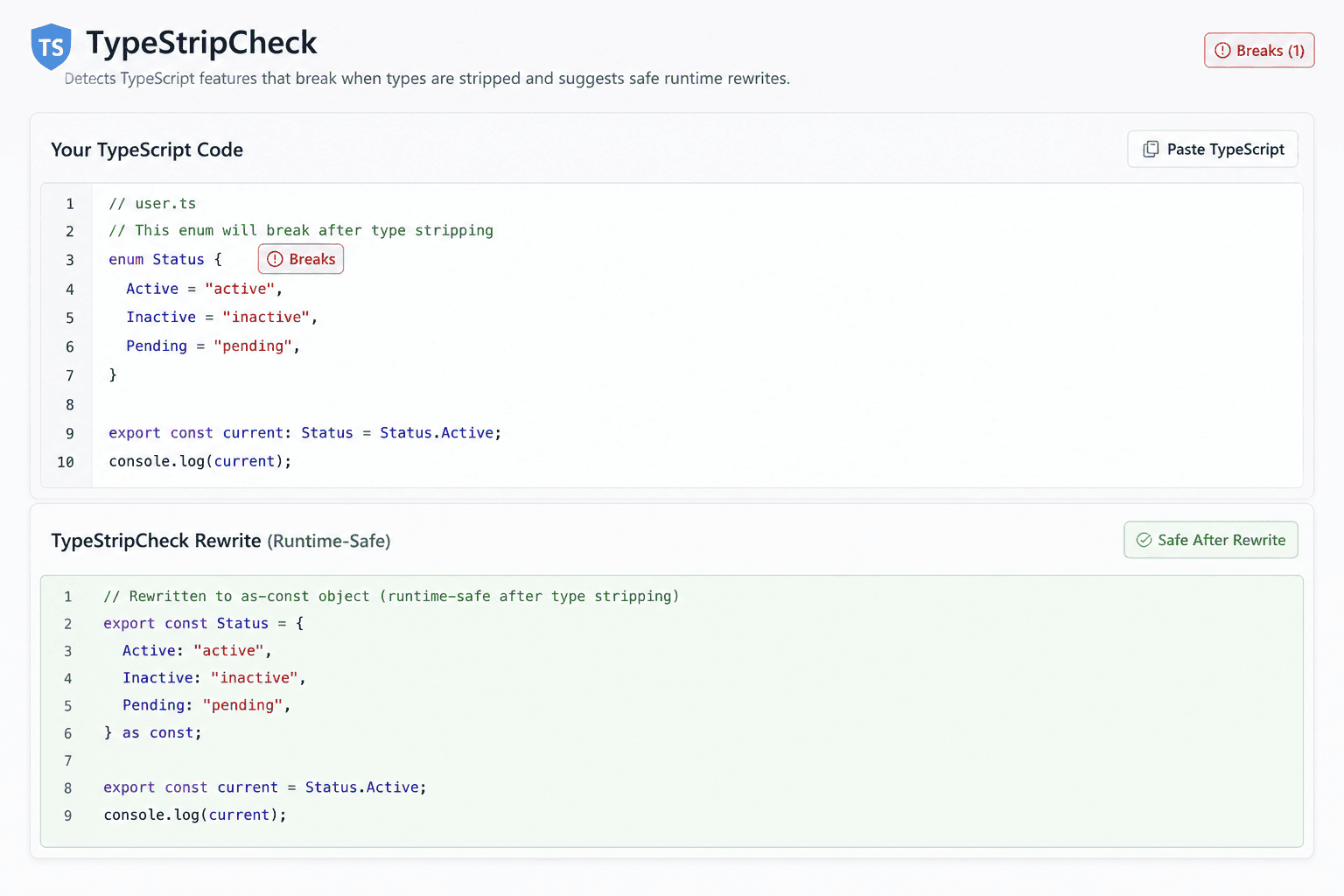
How do I fix "TypeScript enum is not supported in strip-only mode"?
Replace the enum with a const object marked as const, then derive a type of the same name from it. Because TypeScript keeps types and values in separate namespaces, the name works as both, so existing call sites like Direction.Up and annotations like let d: Direction keep compiling unchanged.
// Before: needs a runtime transform, so Node refuses the file
export enum Direction {
  Up = 'UP',
  Down = 'DOWN',
}

// After: fully erasable, same call sites
export const Direction = {
  Up: 'UP',
  Down: 'DOWN',
} as const;

export type Direction = (typeof Direction)[keyof typeof Direction];Why did it not flag my namespace?
A namespace that contains only interfaces and type aliases compiles to nothing at all, so it strips cleanly and Node runs it without complaint. TypeStripCheck deliberately leaves those alone rather than sending you to refactor code that already works.
The scanner flags a namespace only when its body contains runtime content: a const, let, var, function, class, or a nested enum. declare namespace and declare enum are ambient declarations that emit nothing, so those are skipped too.
// Not flagged: erases to nothing, runs fine under strip-only mode
namespace Api {
  export interface User { id: string }
  export type Id = User['id'];
}

// Flagged: compiles into an IIFE that builds a Config object at runtime
namespace Config {
  export const timeout = 5000;
}
Is every finding definitely broken?
The Breaks findings are: enums, namespaces holding runtime code, constructor parameter properties, import X = require(...), and export = are rejected by Node's stripper with no ambiguity.
The other two severities are judgement calls on purpose. Check covers decorators, because the scanner cannot tell a legacy experimentalDecorators decorator (rejected) from a standard Stage 3 decorator (fine) by syntax alone, so it points you at your tsconfig instead of guessing. Note covers angle-bracket assertions like <Type>value, which strip fine in a .ts file and only fail in .tsx.
TypeStripCheck is a pattern scanner, not a full TypeScript parser, which is the tradeoff that keeps it a fast paste-and-read tool instead of a multi-megabyte compiler download. Once it tells you where to look, tsc with erasableSyntaxOnly is the check to wire into CI permanently.
What if I cannot do this refactor right now?
Pin an exact Node version below 24.12.0, 25.2.0, or 26.0.0 depending on the line you are on, and note that pinning 24.x or ^24.0.0 is not enough, because the removal shipped in a patch release of the 24 LTS line.
{
  "engines": { "node": "24.11.1" },
  "volta": { "node": "24.11.1" }
}
The other option is to put a real compiler back in the loop. tsx and ts-node both still transform enums, namespaces, and parameter properties, and compiling to plain JavaScript with tsc or esbuild before deploying sidesteps the whole question. None of this affects you if you already build before shipping.