How to Fix 000 IMEI Number on Google Pixel 6, 7, 8 and 9 Series (Step-by-Step)
Google Pixel showing 000000000000000 IMEI after an update? Fix it in 15 minutes using the GSM Pixel IMEI Fix Toolkit. Works on Pixel 6, 7, 8, and 9 series.

On this page
Introduction
After a software update, some Google Pixel devices start showing 000000000000000 when you dial *#06#. The SIM stops working, mobile data disappears, and the phone loses its cellular connection entirely. This happens because the update corrupts the EFS (Encrypted File System) partition, which is a protected area of internal storage that holds your IMEI, modem calibration data, and carrier configuration.
The IMEI (International Mobile Equipment Identity) is a unique 15-digit number assigned to every cellular device. Without a valid IMEI, your phone cannot register on any mobile network. Carriers use this number to identify your device, so when it reads as all zeros, the network treats your Pixel as an unregistered device and refuses the connection.
This issue is most common on the Pixel 6 series due to its first-generation Tensor chip and modem firmware, but it also affects Pixel 7, 8, and 9 series devices. This guide walks you through restoring your IMEI using the GSM Pixel IMEI Fix Toolkit on Windows. The process takes about 10 to 15 minutes, preserves all your data, and requires no technical experience.
What You Need
Step-by-Step Guide
Check Your IMEI Status
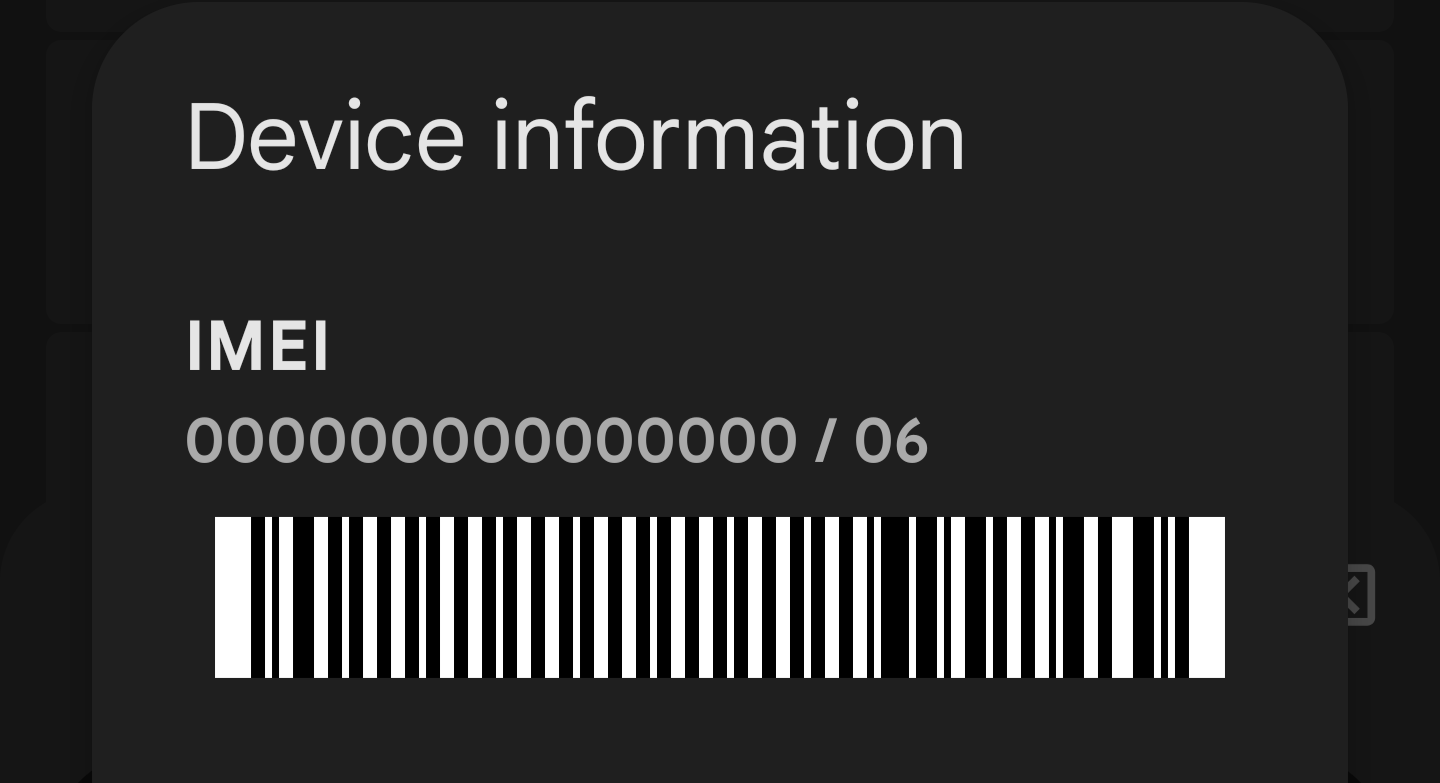
Open your phone dialer and type *#06#. If the screen shows 000000000000000, a blank IMEI field, or just the number 83, your IMEI is corrupted and this guide applies to you. You can also check in Settings > About phone > IMEI. If it shows Unknown or all zeros there as well, the corruption is confirmed.
- All zeros (
000000000000000) means the EFS partition lost the IMEI data completely - Showing just
83or a partial number means the data is partially corrupted - A blank or
UnknownIMEI in Settings confirms the issue - If your IMEI shows a valid 15-digit number but SIM still does not work, the issue is different (check APN settings or SIM card instead)
Identify Your Pixel Model and Codename
The toolkit needs you to select your exact Pixel model, so verify which device you have before downloading. Go to Settings > About phone and note the Model name. Each Pixel has an internal codename that the toolkit uses to apply the correct EFS partition fix.
- Pixel 6 (codename: Oriole), Pixel 6 Pro (codename: Raven), Pixel 6a (codename: Bluejay)
- Pixel 7 (codename: Panther), Pixel 7 Pro (codename: Cheetah), Pixel 7a (codename: Lynx)
- Pixel 8 (codename: Shiba), Pixel 8 Pro (codename: Husky), Pixel 8a (codename: Akita)
- Pixel 9 (codename: Tokay), Pixel 9 Pro (codename: Caiman), Pixel 9 Pro XL (codename: Komodo), Pixel 9 Pro Fold (codename: Comet)
Download the IMEI Fix Tool
On your Windows PC, download the GSM Pixel 0000 IMEI Fix Tool using the button below. Save the ZIP file to your Desktop or Downloads folder. The file is approximately 50 MB and contains the toolkit executable along with the necessary ADB and Fastboot drivers.
Download IMEI Fix Tool— GSM Pixel 0000 IMEI Fix Tool.zipExtract the ZIP File and Install Drivers
Right-click the downloaded ZIP file and choose Extract All. Keep all extracted files in the same folder because the executable depends on companion files in that directory. The main file you need is GSM Pixel 6 series IMEI Fix Toolkit.exe. If Windows Defender or your antivirus flags the file, add an exception for the extracted folder. The tool uses low-level ADB commands, which some antivirus programs misidentify as suspicious.
- Do not move the .exe file out of the extracted folder, it needs the other files alongside it
- If you have never connected a Pixel to your PC before, install the Google USB Driver from the Android developer website
- On Windows 11, you may need to right-click the .exe and select Properties > Unblock before running it
Prepare Your Phone for the Fix
Make sure your Pixel has at least 50% battery. Power off the device completely by holding the Power button and tapping Power off. Wait 10 seconds after the screen goes dark before proceeding. Then connect the powered-off Pixel to your PC with a USB-C data cable.
Enter Fastboot Mode
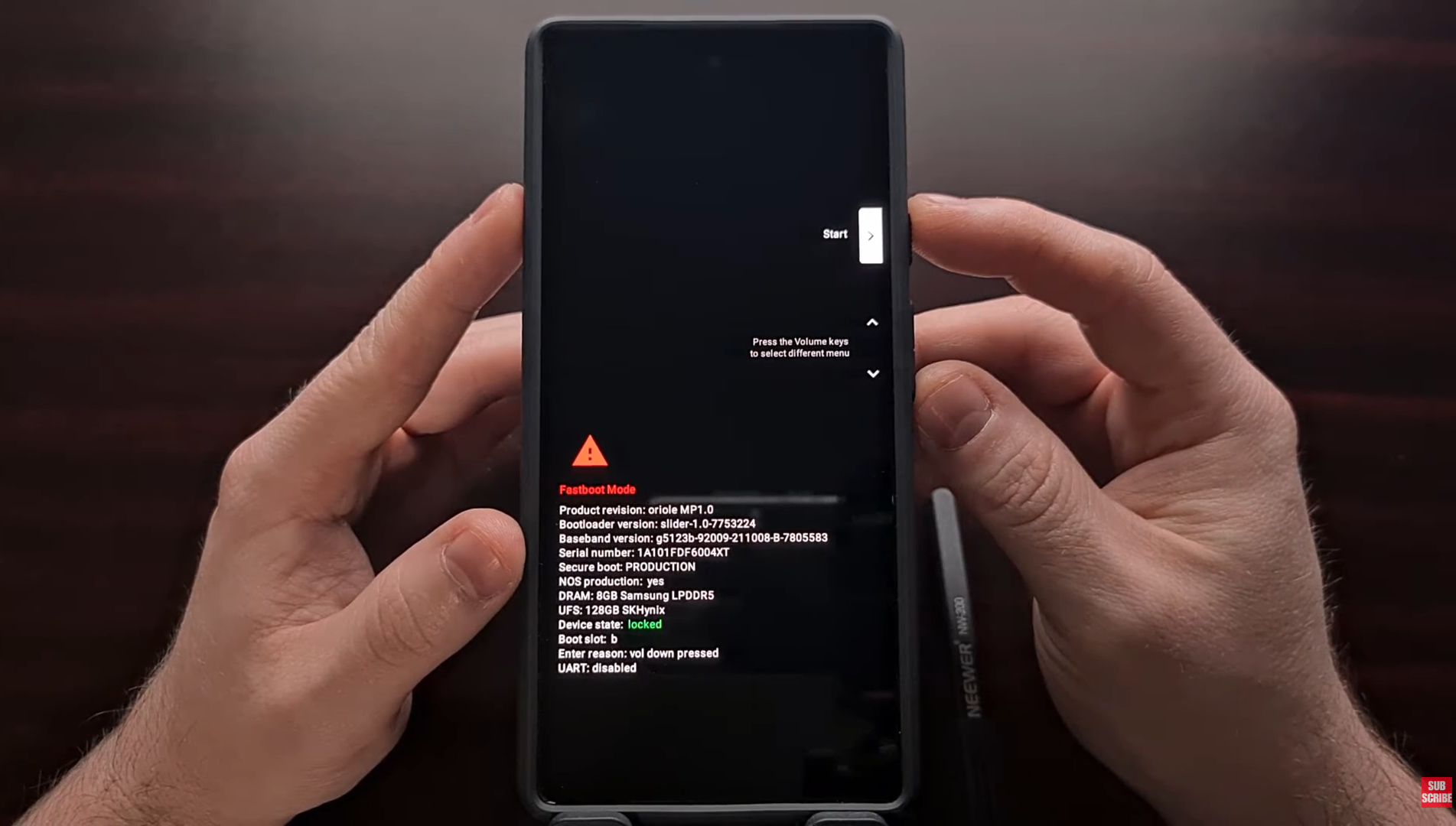
With your phone powered off and connected to the PC, hold Volume Down and Power simultaneously for 5 to 7 seconds. The screen will show Fastboot Mode with a small Android robot. If it does not appear on the first attempt, disconnect the cable, power off the phone completely (hold Power for 15 seconds to force shutdown), reconnect the cable, and try the button combination again.
- On Pixel 6 series: the Fastboot screen shows a green Android with 'Fastboot Mode' text
- On Pixel 7 and 8 series: the layout is similar but may show additional device info
- On Pixel 9 series: the Fastboot screen includes the device codename in smaller text
- If you see 'No Command' with a dead Android, you held the wrong buttons. Power off and try again with Volume Down + Power
Run the Toolkit and Select Your Model
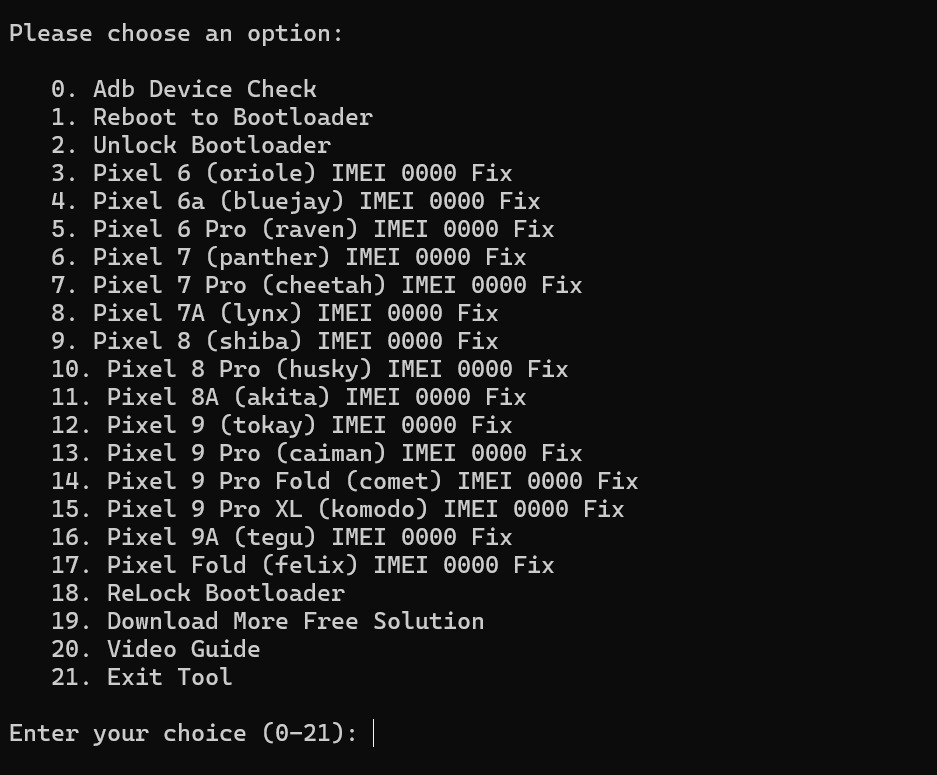
Double-click GSM Pixel 6 series IMEI Fix Toolkit.exe on your PC. If Windows SmartScreen shows a security warning, click More info then Run anyway. The toolkit window will display numbered options for each supported Pixel model. Select the number that matches your exact device. The tool will detect your phone in Fastboot mode, flash the corrected EFS partition data, and restore your IMEI.
Restart and Verify the IMEI
Your phone will restart automatically after the toolkit finishes. If it does not restart on its own, use the volume buttons on the Fastboot screen to navigate to Start and press the Power button to select it. Once the phone boots up (this may take 2 to 3 minutes on the first boot after the fix), open the dialer and type *#06# again.
- A valid 15-digit IMEI on the screen confirms the fix worked
- Check that the IMEI matches the one printed on your phone's original box
- Go to Settings > About phone > IMEI to double-check the value there as well
Restore Mobile Connectivity
After confirming your IMEI is restored, your cellular connection should come back on its own. If it does not, try these steps in order: toggle Airplane Mode on, wait 10 seconds, then toggle it off. If that does not work, restart the phone. As a last resort, remove the SIM card, wait 30 seconds, reinsert it, and restart the phone. Your APN settings should auto-configure, but if mobile data still does not work, contact your carrier for the correct APN values.
Frequently Asked Questions
- Why does my Google Pixel show 000000000000000 as the IMEI?
- The most common cause is a software update (particularly Android monthly security patches or major version updates) that corrupts the EFS partition. This partition stores your IMEI, modem calibration data, and carrier configuration. When the write operation to the EFS partition gets interrupted or goes wrong during the update, the IMEI data is overwritten with zeros. The Pixel 6 series is especially prone to this because of early firmware issues with the first-generation Tensor processor and Samsung Exynos modem.
- Will this IMEI fix delete my photos, apps, or personal data?
- No. The toolkit only writes to the EFS partition, which is a separate area of internal storage from your user data. Your photos, contacts, messages, apps, and settings remain completely untouched. The process is similar to updating your modem firmware. It does not perform a factory reset or wipe any user-accessible storage.
- Which Google Pixel models does this IMEI fix support?
- Pixel 6, Pixel 6a, and Pixel 6 Pro (Tensor G1 devices, most commonly affected)
- Pixel 7, Pixel 7a, and Pixel 7 Pro (Tensor G2 devices)
- Pixel 8, Pixel 8a, and Pixel 8 Pro (Tensor G3 devices)
- Pixel 9, Pixel 9a, Pixel 9 Pro, Pixel 9 Pro XL, and Pixel 9 Pro Fold (Tensor G4 devices)
- Pixel Fold (first generation, uses Tensor G2)
- What if the toolkit cannot detect my phone in Fastboot mode?
- Make sure you are using a data cable, not a charge-only cable. They look identical, but charge-only cables do not carry data signals. Test by connecting your powered-on phone: if File Explorer sees it, the cable works.
- Try a different USB port on your PC. Avoid USB hubs and use a port directly on the motherboard (usually the rear ports on a desktop).
- Install the Google USB Driver for Windows from the official Android developer site, then restart your PC.
- Open Device Manager on Windows and check for any devices with a yellow warning icon under 'Other devices' or 'Android Device'. Right-click and update the driver.
- On some PCs, USB 3.0 ports cause detection issues. Try a USB 2.0 port if available.
- Is the GSM Pixel IMEI Fix Toolkit safe to use?
- Yes. The toolkit modifies only the EFS partition to restore your original IMEI. It does not unlock your bootloader, root your phone, or install any additional software on the device. Windows SmartScreen may flag it because the executable is not code-signed by a major publisher, but this is a false positive. Click 'More info' then 'Run anyway' to proceed. The tool uses standard ADB and Fastboot commands under the hood.
- My IMEI is restored but the SIM still shows no signal. What should I do?
- Toggle Airplane Mode on, wait 10 seconds, then toggle it off. This forces the modem to re-scan for available networks.
- Restart your phone completely and wait 2 to 3 minutes for the network to register.
- Remove the SIM card, clean the contacts gently with a dry cloth, reinsert it, and restart the phone.
- Go to Settings > Network & internet > SIMs and verify your SIM is enabled and the correct carrier is selected.
- Reset network settings: Settings > System > Reset options > Reset Wi-Fi, mobile & Bluetooth. This clears saved Wi-Fi passwords but fixes most connectivity issues.
- If none of the above works, contact your carrier. Some networks flag devices that appear with an all-zero IMEI and may need to manually re-register your device.
- Why is this issue more common on the Pixel 6 series?
- The Pixel 6, 6 Pro, and 6a were the first devices to use Google's custom Tensor chip paired with a Samsung Exynos 5123 modem. Early firmware versions for this modem had stability issues, and the EFS partition write process during OTA updates was more fragile compared to Qualcomm-based modems in older Pixels. Google addressed some of these issues in later security patches, but devices that were affected before those patches still need a manual EFS repair. The Pixel 7 and later models use improved Tensor chips with more stable modem firmware, making this issue less frequent (though not impossible).
- How can I prevent the IMEI from getting corrupted again?
- Keep your Pixel on the latest Android security patch. Google has fixed several EFS-related bugs in recent updates.
- Never force-reboot your phone during a system update. Let the update complete fully, even if it takes longer than expected.
- Avoid flashing custom ROMs or kernels unless you know how to back up and restore the EFS partition separately.
- If you have experienced this issue before and want extra protection, back up your EFS partition using ADB after restoring your IMEI. This gives you a local copy you can restore if the problem recurs.
- When should I take my Pixel to a professional repair shop instead of using this tool?
- If the toolkit runs but the IMEI still shows as all zeros after multiple attempts, the EFS corruption may be too severe for a software-only fix.
- If your phone does not enter Fastboot mode at all (no response to the button combination), there may be a hardware issue with the power or volume buttons, or the motherboard.
- If your phone was water-damaged or physically dropped before the IMEI issue appeared, the modem chip itself may be damaged. Software tools cannot fix hardware failures.
- If you see error messages in the toolkit mentioning 'partition not found' or 'flash failed', stop and consult a professional. Continuing to flash can cause additional damage.
- Authorized Google repair centers and uBreakiFix locations can perform component-level repairs that software tools cannot.
- Does using this toolkit void my Google warranty?
- No. The toolkit does not unlock your bootloader or modify the system partition. It only restores the EFS partition to its correct state. Since the EFS corruption was caused by a software update (a Google-side issue), restoring it does not constitute unauthorized modification. Your warranty status, if still active, should remain unchanged. That said, if your Pixel is still under warranty, you can also contact Google Support directly and request a replacement or repair at no cost.
- Can I use this fix on macOS or Linux instead of Windows?
- The GSM Pixel IMEI Fix Toolkit is a Windows-only executable. If you do not have access to a Windows PC, you can use a Windows virtual machine (such as VirtualBox with USB passthrough enabled) or borrow a friend's Windows computer. The process only takes 10 to 15 minutes. There are ADB-based methods for macOS and Linux, but they require manually extracting and flashing EFS partition images, which is significantly more complex and risky for users without command-line experience.
The 000 IMEI issue on Google Pixel devices looks alarming, but the fix is straightforward. The GSM Pixel IMEI Fix Toolkit handles the EFS partition repair automatically, restoring your original IMEI without touching your personal data. The entire process takes about 10 to 15 minutes.
If the software fix does not resolve the issue after two attempts, or if your phone shows signs of physical damage, take it to a Google-authorized repair center. For devices still under warranty, Google Support may replace the phone at no cost since this is a known software-side issue.
To prevent recurrence, always keep your Pixel updated to the latest security patch and never interrupt a system update in progress. If this guide helped you restore your Pixel, share it with others who are dealing with the same problem.